ADAPTIVE CRUISE CONTROL
3
260 - Driving
If you try to activate the function above
105 mph (170 km/h) or below 19 mph
(30km/h),the"InvalidSpeed"mes
sage is displayed and the function will
remain inactive.
Once a cruising speed is memorised
andthecruisecontrolfunctionisac
tive,youmayliftyourfootofftheaccel
erator pedal.
Safe distance control activation
As soon as cruise control is activated,
the default safe distance
9
isdis
playedingreenontheinstrumentpan
el.Thedefaultsafedistancecorre
sponds to approximately two seconds
(see relevant section).
If the system detects a vehicle in your
lane, an outline of a vehicle
8
appears
above the distance gauge
9
onthein
strument panel.
Your vehicle adapts its speed to that of
the vehicle in front and applies the
brakes if necessary (the brake lights
comeon)inordertomaintainthedis
tancedisplayedontheinstrumentpan
el.
Note: the size of the
8
outline varies
according to the distance separating
youfromthevehicleinfront.Thelarg
er the outline, the closer the vehicle in
front.
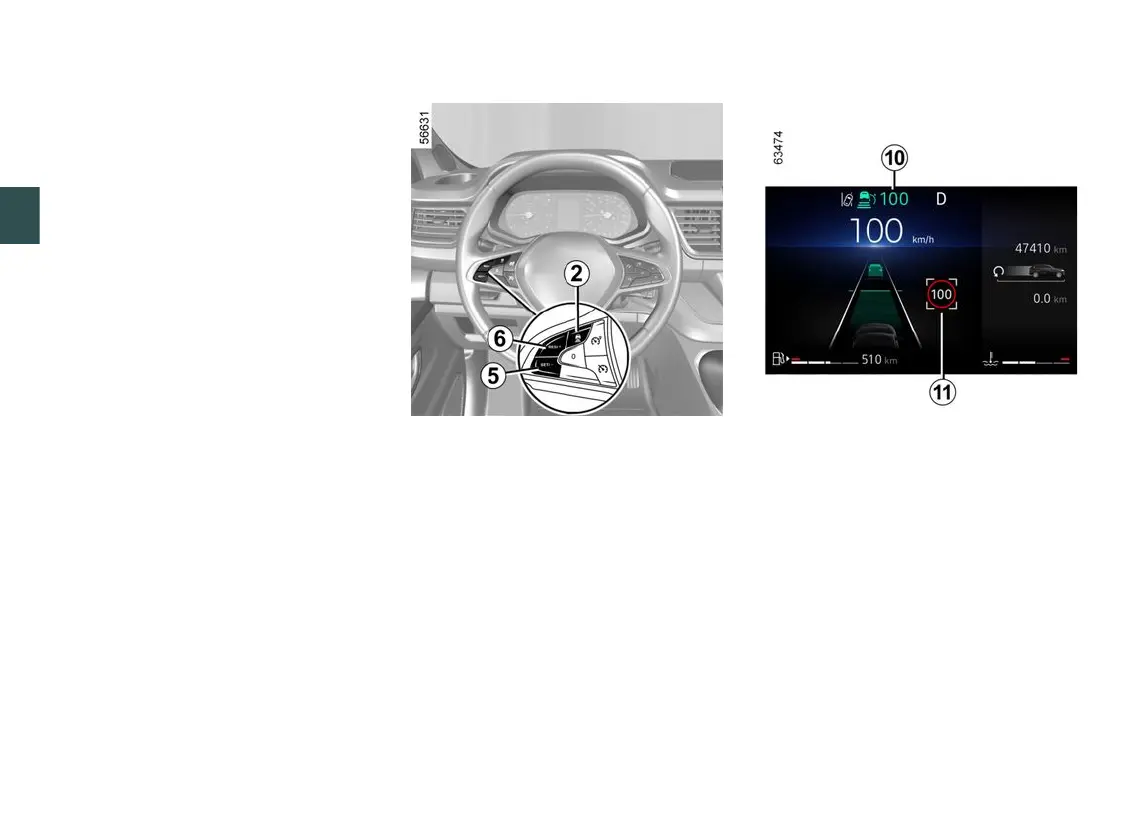
Setting the cruising speed
You can vary the speed by repeatedly
pressing(smallincrements)orpress
ing and holding (large increments)
switch
5
or
6
:
– switch (SET/-)
5
to reduce the
speed;
– switch (RES/+)
6
to increase the
speed.
Activating cruise control with
speed limit sign recognition
(depending on the vehicle)
If the vehicle is equipped with the
"Road sign detection" function 🡺242,
press switch SET/-
5
or RES/+
6
to
adapt the vehicle speed to the speed
limits
11
detected by the camera.
When passing the sign, the cruising
speed
10
adoptsthevalueofthede
tected speed
11
.











 To Next Page