ADAPTIVE CRUISE CONTROL
3
Driving - 261
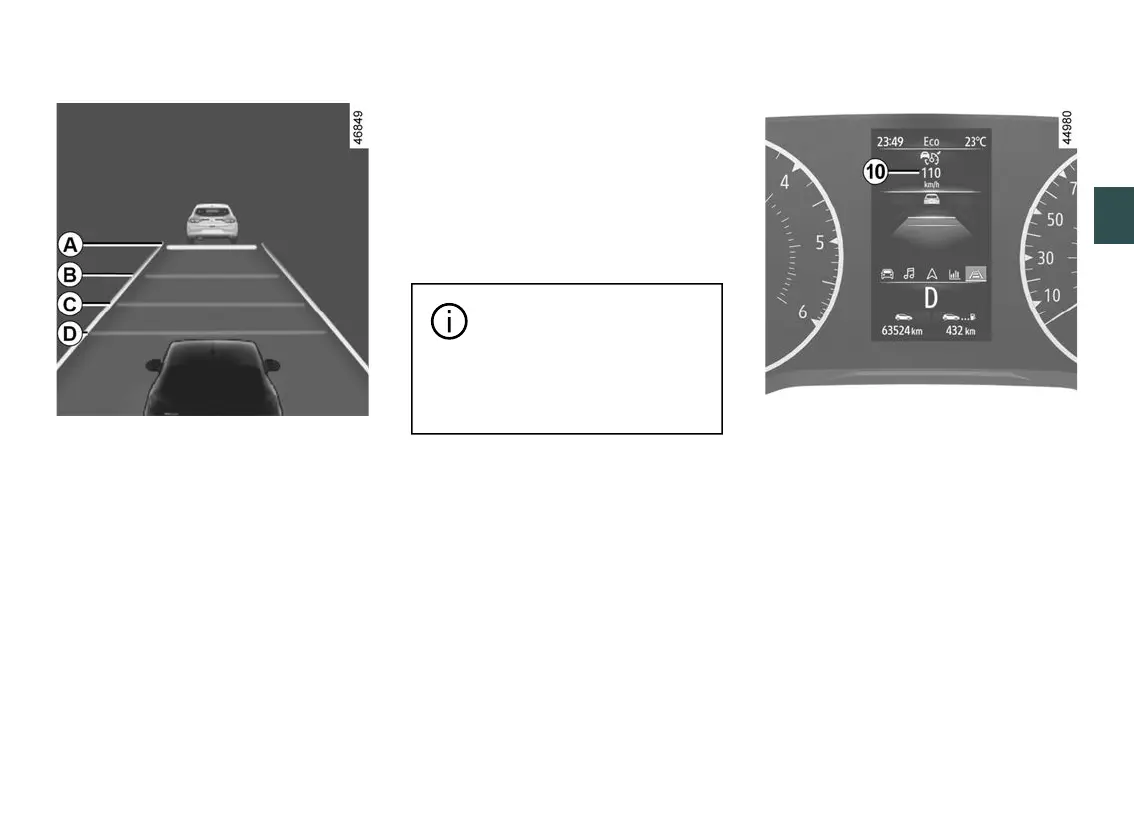
Adjusting the following distance
You can vary the safe distance from
the vehicle in front at any time by
pressing switch
2
repeatedly.
The horizontal distance gauge on the
instrument panel indicates the various
available safe distances:
– distance gauge
A
: long distance
(corresponding to approximately 2.4
seconds);
– distance gauge
B
:intermediatedis
tance2(correspondingtoapproxi
mately two seconds);
– distance gauge
C
:intermediatedis
tance1(correspondingtoapproxi
mately 1.6 seconds);
– distance gauge
D
: short distance
(corresponding to approximately 1.2
seconds).
The selected distance gauge appears
in green on the instrument panel. The
other gauges remain in grey.
Note:thedistancemustbesetaccord
ing to the traffic level, local regulation
and weather conditions.
Thefollowingdistanceset
ting is stored by the system
between each activation of
Adaptive Cruise Control and for
the next vehicle start cycle.
Exceeding the cruising speed
The cruising speed may be exceeded
at any time by applying the accelerator
pedal.
If it is exceeded, the cruising speed
10
appears in red.
Then, release the accelerator pedal:
the cruise control and safe distance
control will automatically resume the
speed and distance instructions that
you had previously selected.
Thedistancegaugeflashesifthedis
tance between your vehicle and the
vehicle in front is less than the safe
distance selected: the "Safe Distance
Control" function is no longer active.











 To Next Page