CARD
2
28 - Getting to know your vehicle
doors in secure mode or all of the
opening elements in access mode;
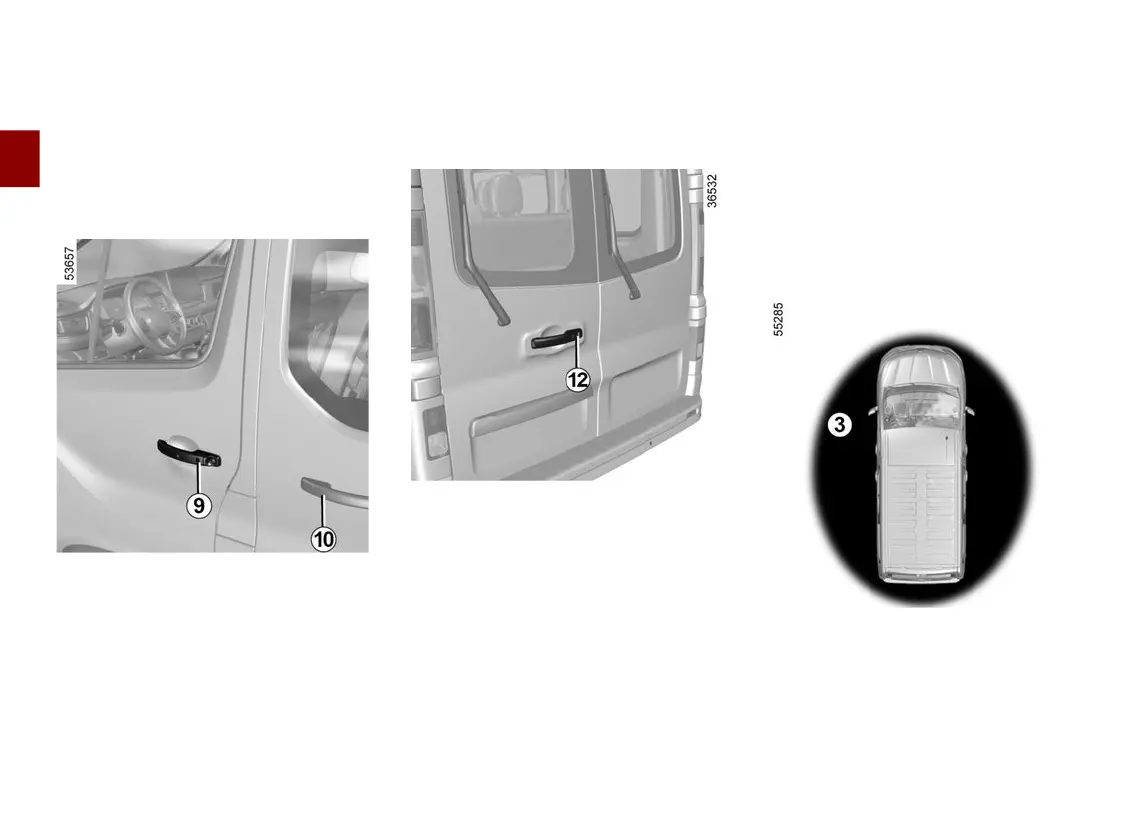
– press button
10
on the handle of
oneoftheslidingsidedoorsoronbut
ton
12
oftherearhingeddoortoun
lock the rear area in secure mode or
all the opening elements in access
mode.
The hazard lights and side repeaters
flash once to indicate that the doors
have unlocked and, on some vehicles,
the door mirrors fold out automatically.
"Hands-free" locking
With the vehicle unlocked and all of
the opening elements closed, press
button
9
,
10
or
12
to lock all of the
opening elements.
Secure mode
If one of the front doors is open, press
button
9
,
10
or
12
to lock the rear
area.
If one of the rear opening elements is
open, press button
9
,
10
or
12
to lock
the front doors.
Access mode
If an opening element is open or not
properly shut, button
9
,
10
or
12
can
not be used to lock.
The hazard warning lights flash twice
to indicate that the vehicle is locked
and, depending on the vehicle, the
door mirrors automatically fold in.
Special features relating to "hands-
free" locking
After locking in "hands-free" mode, you
havetowaitapproximatelythreesec
onds before being able to unlock the
vehicle again.
Note: "hands-free" unlocking/locking
will not work if the card is not present
within the detection zone for the button
being pressed.
"Hands-free" locking when moving
away from the vehicle
With the card on you and the doors
and luggage compartment door
closed, move away from the vehicle: it
will be locked automatically as soon as
you leave the access zone
3
.











 To Next Page