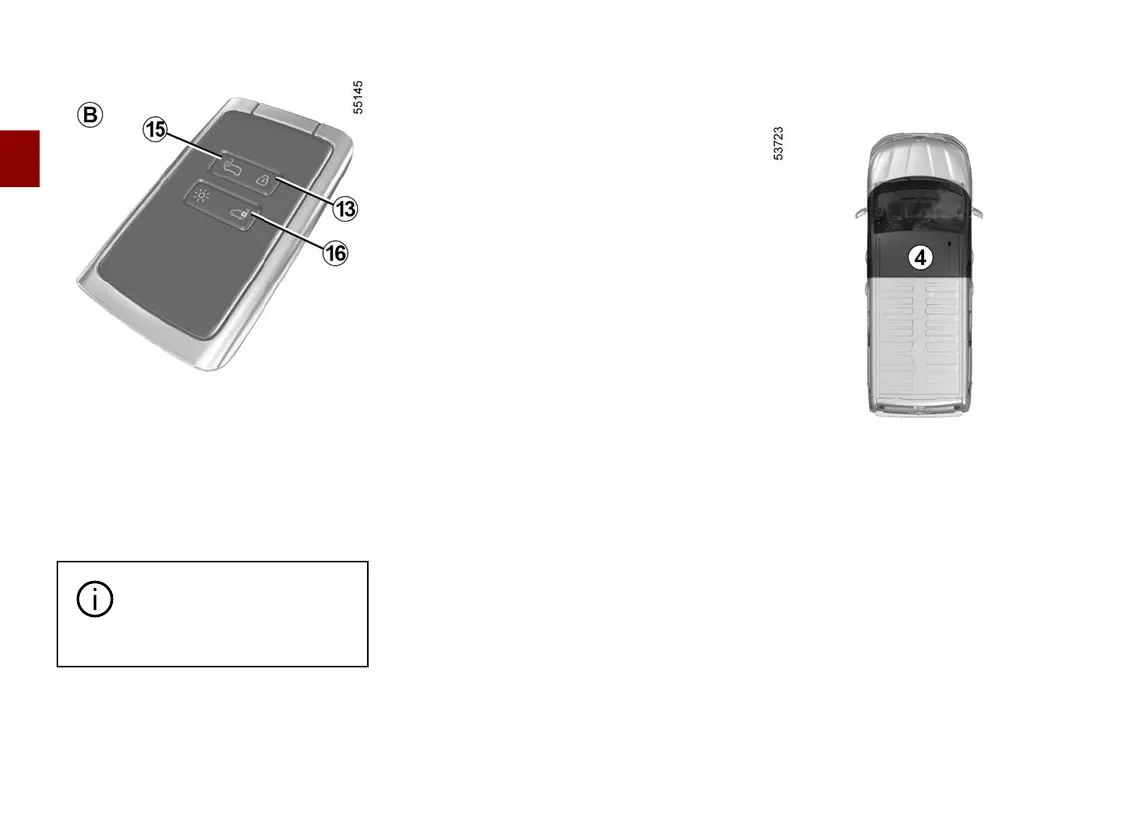
CARD
2
30 - Getting to know your vehicle
There are two modes of use: secure
mode and access mode.
Tochangethecardmodeofuse,ac
cess the "ACCESS" menu from the trip
computer or the multimedia screen,
depending on the vehicle.
The default mode is Secure mode.
Thecardbuttonsaredeac
tivated when the engine is
running.
Unlocking with the card
Press button
16
to unlock the rear,
hingedortailgatedoorsand,depend
ing on the vehicle, the sliding side
doors.
Secure mode
Press the button
15
to unlock the front
doors and, depending on the vehicle,
the sliding side door.
Access mode
Press button
15
tounlockalltheopen
ing elements.
The hazard lights and side repeaters
flash once to indicate that the doors
have unlocked and, on some vehicles,
the door mirrors fold out automatically.
Locking using the card
Withthedoorsandluggagecompart
ment door closed, press button
13
: the
vehicle will be locked.
The hazard warning lights flash twice
to indicate that the vehicle is locked
and, depending on the vehicle, the
door mirrors automatically fold in.
Note:
– the maximum distance at which the
vehiclelocksdependsonthesur
roundings;
– if a door or the boot is open or not
properly shut, locking is not carried
out. A beep sounds and the hazard
warning lights and side repeaters do
not flash.
With the engine running, if a door is
opened and closed and the card is no
longer in zone
4
,the"KeycardNotDe
tected" message indicates that the
card is not inside the vehicle. This will,
for example, prevent you from driving
away after dropping off a passenger
who has kept the card on them.
The warning disappears when the card
is detected again.











 To Next Page