KEY, REMOTE CONTROL
2
Getting to know your vehicle - 35
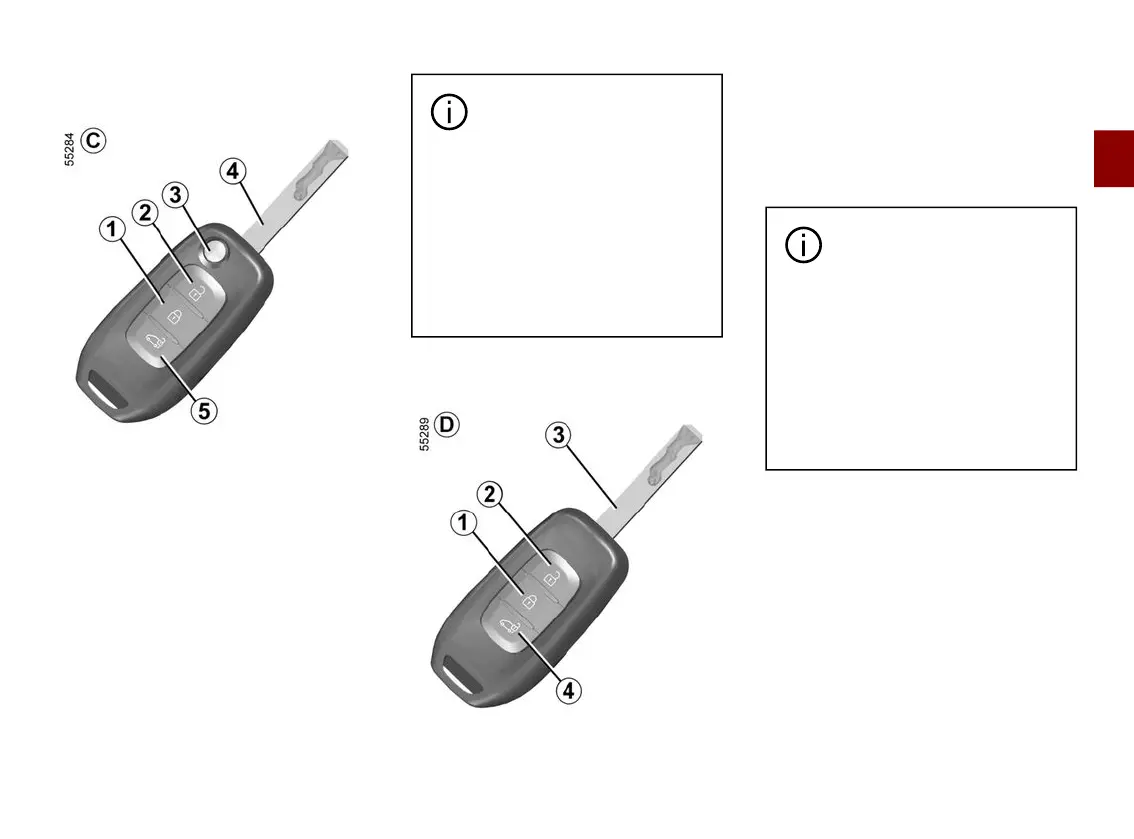
Key,radiofrequencyremotecon
trol
C
(van version)
1.
Locks all the opening elements.
2.
Unlocking the doors and luggage
compartment.
3.
Locking/unlockingusingtheswitch
blade key. To release the insert from its
housing, press the button
3
and it will
come out. Press the button
3
and
guide the insert back into its housing.
4.
Driver’sdoorandignitionkey.
5.
Unlocking the luggage compartment
only.
There are two ways to use
the remote control: access
mode and secure mode.
To switch between the remote
control modes of use, access the
"ACCESS" menu from the trip
computer or the multimedia
screen, depending on the vehicle.
The default mode is Access
mode.
Key,radiofrequencyremotecon
trol
D
(van version)
1.
Locks all the opening elements.
2.
Unlocking the doors and luggage
compartment.
3.
Driver’sdoorandignitionkey.
4.
Unlocking the luggage compartment
only.
There are two ways to use
the remote control: access
mode and secure mode.
To switch between the remote
control modes of use, access the
"ACCESS" menu from the trip
computer or the multimedia
screen, depending on the vehicle.
The default mode is Access
mode.
Interference
Interferencebyfactorsintheimmedi
ate vicinity (external installations or the
use of equipment operating on the
same frequency as the remote control)
may affect the operation of the remote
control.











 To Next Page