13
3. PRESENTATION
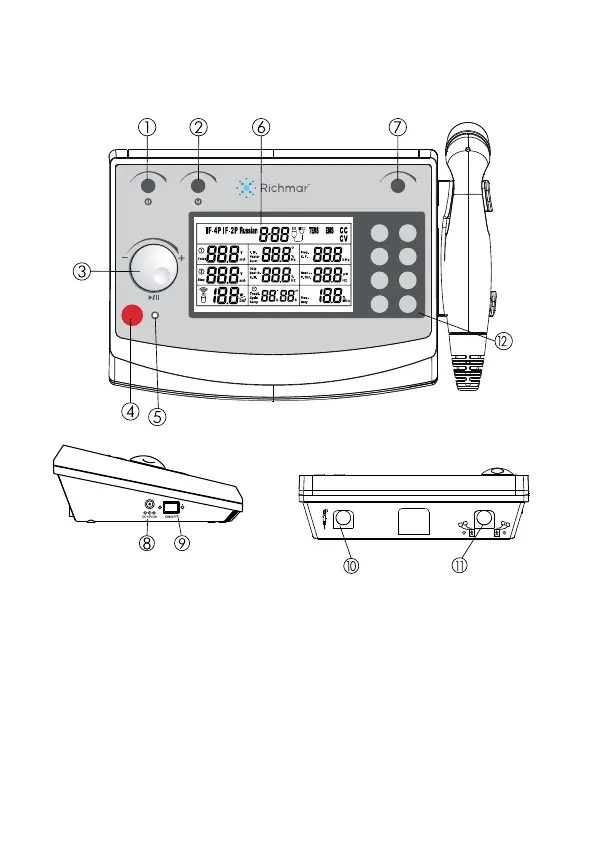
3.1 Panel for Front View
1. Select Channel 1 or adjust the output intensity of channel 1.
2. Select Channel 2 or adjust the output intensity of channel 2.
3. Central Controller Dial and Pause button.
4. Stop treatment button.
5. Power indicator.
6. LCD display: Shows the current information of the device.
7. Ultrasound output intensity control knob
8. Adapter receptacle
9. ON / OFF switch
10. Output connector: connect with ultrasound applicator
11. Output connector: connect with electrical stimulation cable
12. Eight parameters selection buttons, see next page for details:
Waveform
Mode
F.M.
Vector
Burst
Duty
Beat H.
A.M.
Time
Treat.
Cycle
Ramp
Program
CC/CV
Freq.
C.F.
Beat L.
P. Dur.
Freq.
Duty
ComboCare
™
STOP
ULTRASOUND



 To Next Page