39
5.5.3 TENS and EMS Stimulation Set-up Procedure
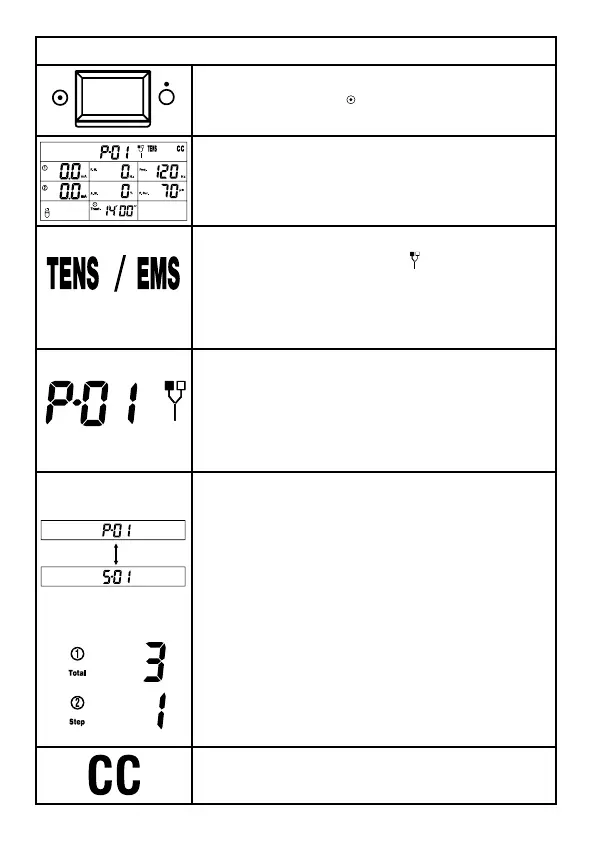
1. In order to turn on the device, please press
ON/OFF switch to [
] icon which is located on
the side of the device.
2. When you turn the ComboCare™ on, the
device will self-check for about 10 seconds,
and then the default parameters will display
the last treatment mode.
3. Press [Waveform/Mode] button to choose
electrical stimulation mode [
], then rotate
the Central controller dial to select TENS or
EMS mode. In TENS mode, the symbol “TENS”
will display on LCD; in EMS mode, the symbol
“EMS” will display on LCD.
4. Each waveform has 10 programs. Press the
[Program/CC/CV”] button to choose between
P1-P10 by rotating the central controller dial
until the desired program is displayed on the
screen.
5. There are two programs on this device
:
• Common program
• Specialty program.
Common program has only one treatment
phase and the program displays “P-”. In
specialty program, there are three treatment
phases display and the program displays “S-”
like figure. You can press and hold [Program/
CC/CV] button to switch them.
If you selected specialty program, please press
the Central controller dial to select treatment
phase from 1 to 3. The parameters of each
treatment phase can be set according to
following methods.
6. Press the [Program/CC/CV] button to
choose CC for constant current.



 To Next Page