45
16. For safety purposes, the load detection
function was designed so when the output
intensity surpasses10.0mA/10.0V, and there
are no electrodes placed on the patient’s
skin or the device has not been connected to
electrodes, an alarm buzzer will sound and
the intensity value will flash and reset to zero.
17. To pause a channel, press the
corresponding channel knob on the top
of the device and then press the central
controller dial to pause that channel. Each
channel must be paused individually.
18. Press the [STOP] button to stop treatment
of the current channel(s). If you want to
stop the other channel(s) treatment, press
corresponding channel button first, and then
press the [STOP] button.
CAUTION: This will only stop the selected
flashing channels, not both channels.
CAUTION:
When only one sound head is connected, the device will automatically
detect which one is connect and the sound head that is not plugged in
will show as not selectable on the treatment screen.
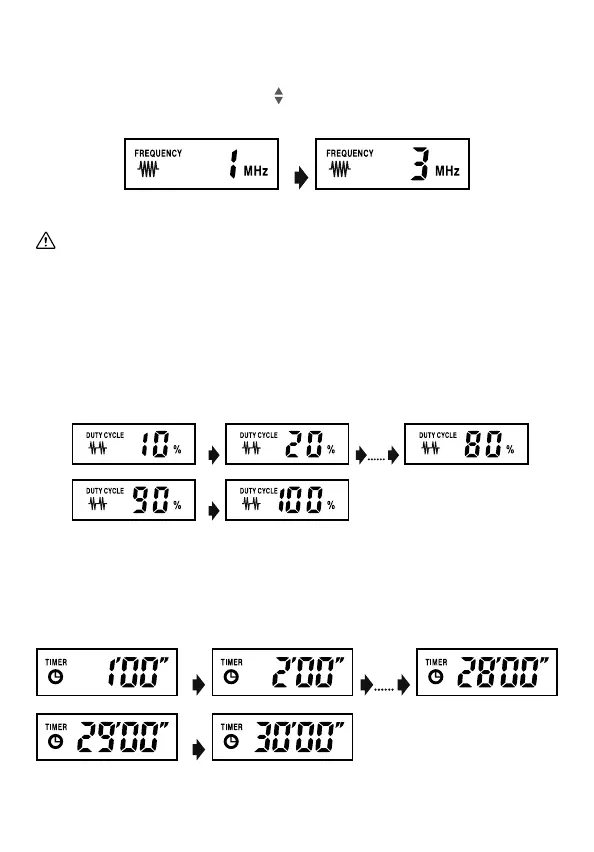
Select Duty Cycle
Duty Cycle Selection: Press or button next to DUTY CYCLE to
increase or decrease the duty cycle for desired treatment. 100% duty
cycle is continuous. 99% or less is pulsed.
Select the Ultrasound Frequency: 1MHz or 3MHz
Freq Up/Down Selection: Press
button next to FREQUENCY to
choose the desired frequency for treatment.
Select Treatment Time
Treatment Time Selection: Press or button next to TIME to
decrease or increase treatment time for desired treatment time.
5.5.5 Ultrasound Set-Up Procedure



 To Next Page