b. Optional: To include the raster data of the processed file in the report, select Rasters.
•
Normally when creating the Job Error Report without selecting the Raster option,
regardless of whether the selected job on the Command WorkStation is RIPped data
or not, the data will be automatically archived without the Raster data.
• The raster data can be useful to include if the file is not processed correctly. However,
it may exceed the allowed size of the report. In this case, it may be useful to provide
the Raster file separately.
To provide the Raster data separately:
1. In Command WorkStation, look for the file that caused the problem.
If it is already RIPped, it will be in the held job list and will have an icon with an
arrow.
If the job is not yet RIPped (no arrow in the icon), select the job and right-click,
and from the short-cut menu, select "Process and Hold". The job is RIPped and an
arrow is added to the icon.
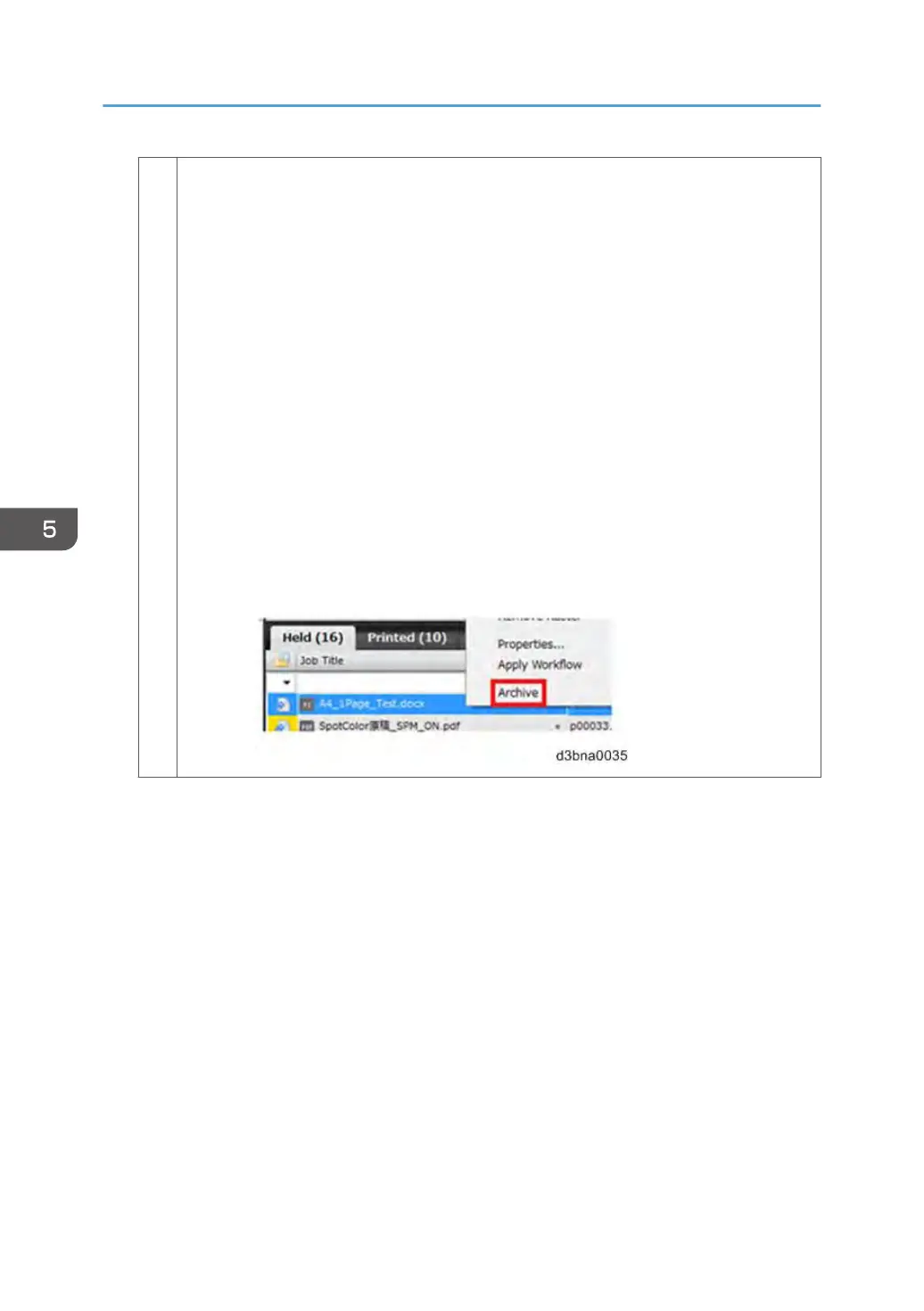
2. Right-click on the job, and from the short-cut menu, select Archive (do not select
‘Server Internal’).
5. Troubleshooting
190


 To Next Page