37
20151763
Calibration and operation
6.7.1 Entering the password
The OEM password should be composed of 5 characters, the
technical one 4 characters.
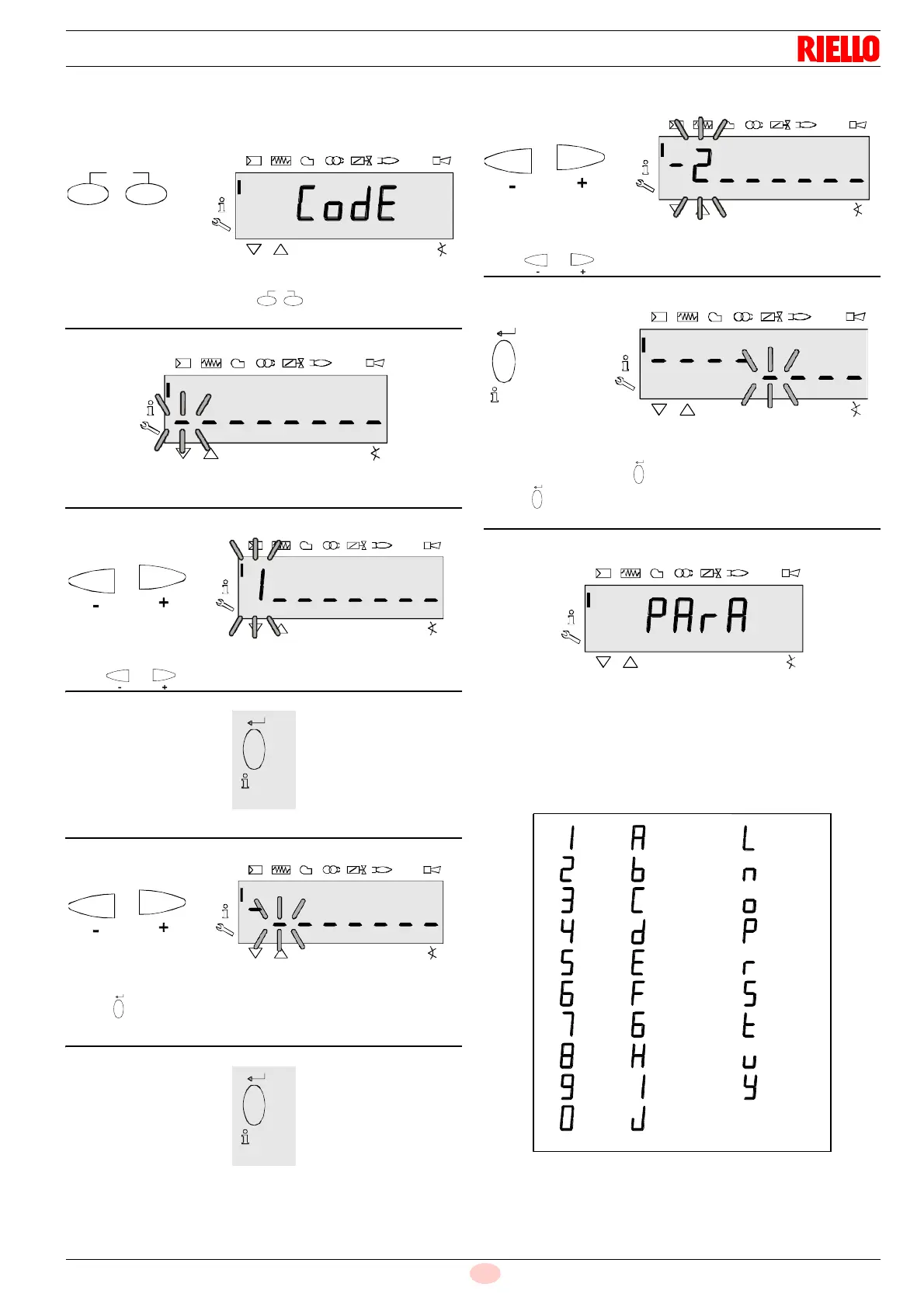
Press the combination of keys to display CodE.
Releasing the keys, 6 bars appear, the first of which is blinking.
Press or to select a number or a letter.
Press “i/reset” to confirm. The value entered is replaced by
the minus sign (-). The next bar starts blinking.
Press or to select a number or a letter.
After entering the last character the password needs to be con-
firmed by pressing the “i/reset” key.
Press “i/reset” again to finish entering the password.
Example: The password is composed of 4 characters.
To confirm it has been entered correctly, PArA is displayed for a
maximum of 2 seconds.
Note:
To enter the password or the burner ID, the following numbers
and letters can be used:
V
=1 =A =L
=2 =b =n
=3 =C =o
=4 =d =P
=5 =E =r
=6 =F =S
=7 =G =t
=8 =H =u
=9 =I =Y
=0 =J



 To Next Page