47
20151763
Start-up, calibration and operation of the burner
7.5 Burner start-up
The burner can operate in two different modes:
1 Manual operation (to be used for the initial start-up): in this
mode the indicators of the display are blinking;
2 Automatic operation (for normal work operation): in this
mode the indicators of the display are fixed.
7.5.1 First burner start-up (manual operation)
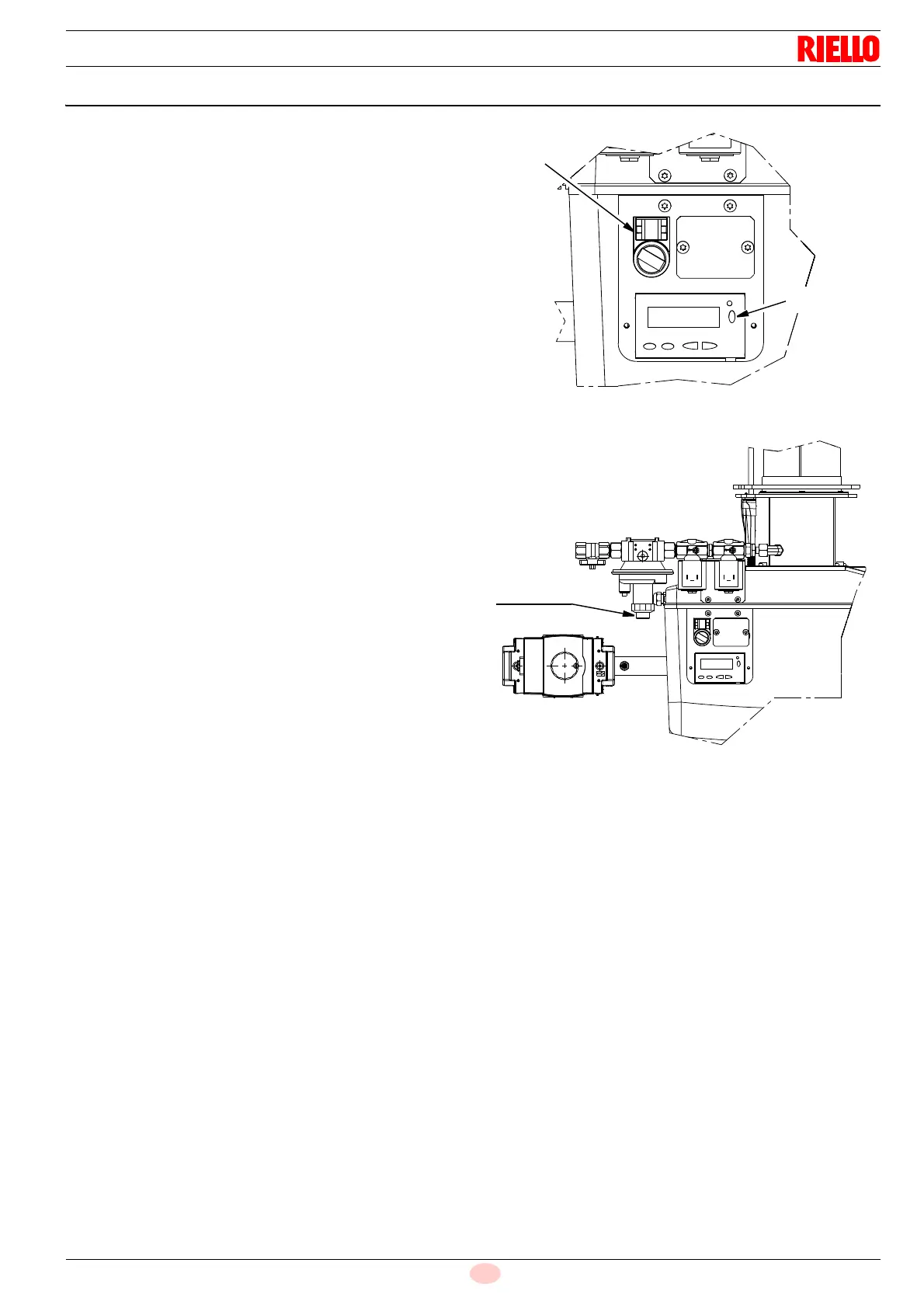
– Turn the “ON/OFF” (Fig. 160) selector to “OFF”, standby
(OFF).
– Disconnect the external modulation control (control with 3
points or analogue signal).
Start the programming mode for the technician.
Keep the buttons “A” and “F” pressed simultaneously for
< 5 seconds. “Code” is displayed.
Entering the password of the technician (SO) using the but-
tons “+”, “-” and “i/reset”. See also chapter “Entering the
password” on page 37.
The display passes from PArA a 400: SEt. Confirm with the
button “i/reset”.
run is displayed. Confirmation with the i/reset button starts
the setting mode for minimum load (P1), ignition load (P0)
and nominal load (P2).
The display shows OFF blinking.
“Turn the “ON/OFF” selector to “ON” and make sure that
there is a heat request (thermostat on ON).
LME7 starts and carries out a start-up. The corresponding
phases of the program are carried out according to the
sequence scheme and the program phases are displayed
blinking (Tab. L on page 17)
The device works up to the end of the Ph30 pre-purging
phase, it is brought to the starting load and passes to the
display of P0 (number of rpm ignition load). On the left is dis-
played P0 blinking, on the right the current rpm.
keeping button “A” pressed (the display passes to 0A and
the rpm is indicated blinking) and pressing the button “+” or
“-”, it is possible to modify the rpm number of 10 rpm within
the pre-set limits (Parameter P403.00).
set value for P0 must be equal to P1.
The base unit controls the setting values. If the setting rules
are violated, the appliance goes into lockout and the error
message Loc is displayed: 225.
Press “i/reset” to transfer the setting value into the internal
memory.
The burner proceeds with the ignition phase. If at the end of
the safety time the flame does not appear, the burner
restarts in automatic mode (it carries out a maximum of 3
attempts).
The indications of the sequence of the phases on the display
continue to blink to signal that we are still in the start-up pro-
cedure (manual operation).
If ignition is still not achieved, it may be that gas is not reach-
ing the pilot within the safety time period of 3 seconds.
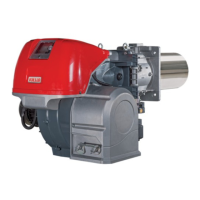
Increasing the gas pressure via the pressure regulator
(Fig. 161).
If, however, at the end of the safety time the burner starts but
then switches off, the burner goes into lockout and the dis-
play shows Loc:7 blinking (disappearance of the flame
when in operation).
Press “i/reset”, the display shows 400:Set. Exit the manual
operation mode by several times pressing “ESC” (press the
keys “+” and “-” contemporaneously).
The display shows Loc:7 fixed. Press “i/reset” to unblock
the LME7. (List of error codes Tab. W on page 56).
20128103
Fig. 160
ON/OFF
i/reset
Fig. 161
20128091
Pressure
regulator



 To Next Page