XXXXXX
XXXXXXXXXXXXXXXX
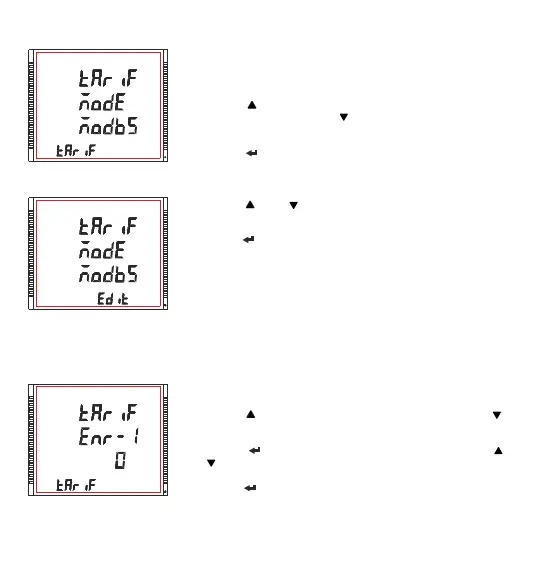
3.2.8.2 Tariff Mode Selection
Edit mode
3.2.8.3 Tariff Energies Selection
XXXXXXXXXXXXXXXX
This screen allows the user to select the available tariff modes.
1)Modbus
2)Digital Input *
Pressing the “ ” key advances to “Tariff Energies Selection” screen (see
Section 3.2.8.3) and pressing the “ ” key advances to “Number of Tariff
Selection” screen (see Section 3.2.8.1)
Pressing the “ ” key advances to Tariff Mode Selection Edit Mode.
Pressing the “ ” and “ ” keys lets the user scroll through the available
options.
Pressing the “ ” key confirms the selected option and advances to “Tariff
Mode Selection” menu screen. (see Section 3.2.8.2)
*NOTE : The Digital Input Option can only be selected and shown when the “Digital Input 1" mode (see
Section 3.2.7.2) is configured as Tariff. No input present at DI1 indicates Tariff 1 and an input present at
DI1 indicates Tariff 2.
This screen allows the user to select first of the total six tariff energies.
Pressing the “ ” key advances to “Tariff Energy - 2” and pressing “ ”
key advances to “tariff mode selection” menu. (see Section 3.2.8.2)
Pressing the “ ” key advances to the edit mode and pressing the “ ”
and “ ” keys lets the user select the energy parameter as per TABLE 2.1
Pressing the “ ” key confirms the selected value and take the user out of
the edit mode.
Note : Similarly User can select six different tariff energies.
72



 To Next Page