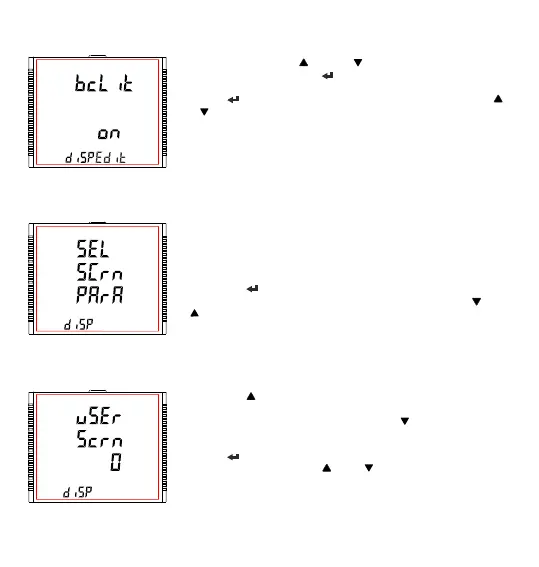
In Edit Mode, pressing “ ” and “ ” keys allows the user to scroll
between On/OFF and pressing “ ” key confirms the selection.
Pressing “ ” key again advances to editing mode whereas pressing “ ”
or “ ” keys advances to “Feature Selection” menu screen (see Section
3.2.9.1.1).
Note: (1) Default value is set to ‘On’.
(2) When backlit is switched ‘Off’, on pressing any key backlit
will turn ‘On’ for 1 min.
Backlit Edit Mode
3.2.9.1.2 User Assignable Screens
This screen allows the user to enable or disable the User Screen feature.
Using this feature, the user can select upto 10 measurement screens of
choice and scroll through only those selected screens.
Pressing the “ ” key allows the user to advance to the “Screen Number
Selection” menu (see Section 3.2.9.1.2.1) whereas pressing the “ ” and
“ ” keys advances to “Backlit” menu screen (see Section 3.2.9.1.1) and
“Contrast” menu screen (see Section 3.2.9.1.3), respectively.
3.2.9.1.2.1 Screen Number Selection
Pressing the “ ” key sets the present value for the number of screens to
be shown and advance towards the “User Screens Selection” menu
(see Section 3.2.9.1.2.2) whereas pressing the “ ” key sets the present
value and advance to “Quit Userscreens” menu (see Section 3.2.9.1.2.3).
Pressing “ ” key allow the user to set a different value for the number of
user assignable screens using “ ” and “ ” keys.
The user can set the number of screens from 1 to 10.
74



 To Next Page