2-12
ComColor GD Series Troubleshooting Guide
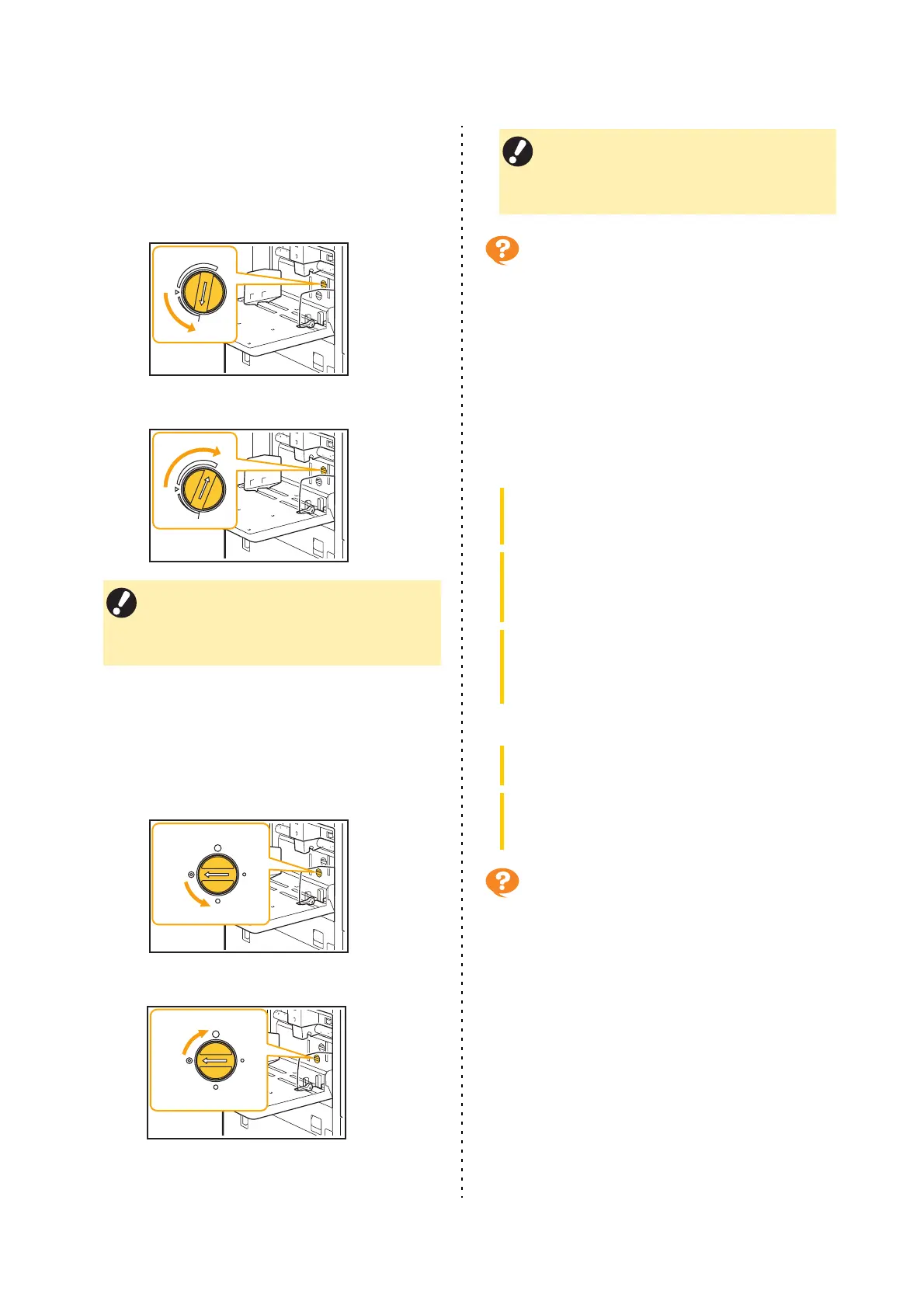
The angle of the stripper plate may not be
properly adjusted.
Turn the stripper plate angle adjustment dial to adjust
the angle of the stripper plate to suit the conditions.
When no paper is fed:
Turn the dial to the left.
When multiple sheets of paper are fed:
Turn the dial to the right.
The paper separation pressure may not be
properly adjusted.
When no paper is fed, the back of a card is
damaged, or paper that can easily generate paper
powder is used:
Turn the dial to "A little weak".
When multiple sheets of paper are fed:
Turn the dial to "Strong".
A multiple feeding error occurs
although multiple feeding was not
performed, or multiple feeding errors
occur frequently.
You may be using dark colored paper or paper
that is printed on one side.
When using paper that is printed on the back or paper
with a dark base color, the machine may incorrectly
detect this type of paper as though multiple sheets of
paper are being fed. In this case, set [Double-feed
Check] to [OFF].
For printing:
For copying:
The paper becomes dirty. / Printing is
not aligned properly.
The paper may be too dark for printing.
When printing on dark colored paper, the machine may
not be able to detect the paper size, resulting in
misaligned printing, image loss, or soiled paper edges.
It is recommended that you use paper with a light base
color.
• When adjusting the angle, be sure to remove
the paper from the standard tray and lower
the standard tray all the way to the lowest
position.
Strong
Weak
Standard
A little weak
Strong
Weak
Standard
A little weak
• When adjusting the angle, be sure to remove
the paper from the standard tray and lower
the standard tray all the way to the lowest
position.
[Print] screen select job [Change Setting] in the
sub menu [Paper Selection] [Paper Tray
Setting] set [Double-feed Check] to [OFF]
[Storage] - [Load] screen select folder select
document [Change Setting] in the sub menu for
the document [Paper Selection] [Paper Tray
Setting] set [Double-feed Check] to [OFF]
[USB] - [Load] screen select folder [Open]
select document [Change Setting] in the sub menu
[Paper Selection] [Paper Tray Setting] set
[Double-feed Check] to [OFF]
[Copy] screen [Paper Selection] [Paper Tray
Setting] set [Double-feed Check] to [OFF]
[Storage] - [Save] screen select folder [Save
Document] [Paper Selection] [Paper Tray
Setting] set [Double-feed Check] to [OFF]



 To Next Page