ComColor GD Series Troubleshooting Guide
A message indicating that one ink cartridge must be replaced is displayed. Can I continue
printing?
No, you cannot. Printing resumes after the empty ink cartridge has been replaced.
The job data will not be lost when printing is stopped because of an empty ink cartridge.
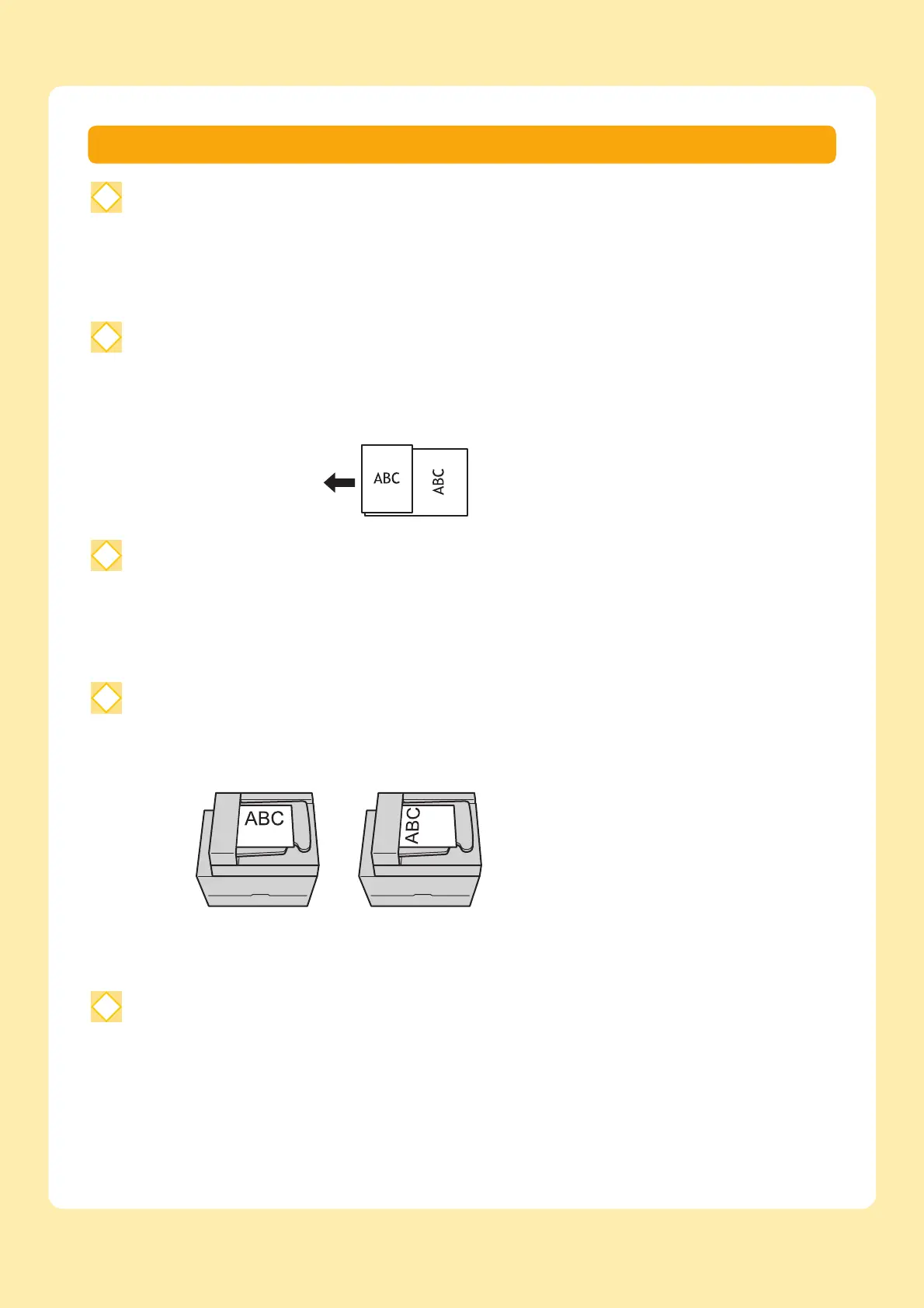
Can I load different size originals together into the ADF?
You can scan different size originals together which have one side of equivalent length. Set [Mixed Size
Original] to [ON].
How do I turn off the operation sounds?
The confirmation and error sounds can be turned on or off in the [Beep Sound] setting in the administrator
menu.
Contact your administrator.
How should the original be loaded when using [Top Side Up] and [Top Side Left] in the [Original
Orientation] setting?
The machine logged me out even though I did not perform any action.
The [Auto Logout Time] setting has been configured for [Login Setting] in the administrator menu.
[Auto Logout Time] can be set to between 10 and 3600 seconds.
Contact your administrator.
Orientation of original
when loading in ADF
[Top Side Up] [Top Side Left]
Load the original in the
same orientation as if
you were reading it.
Load the original with
the top of the page on
the left side.



 To Next Page