FLAT BED IMAGE SCANNING SECTION
REMOVAL
GR37703 - 11
2. IMAGE SCANNER UNIT
REMOVAL
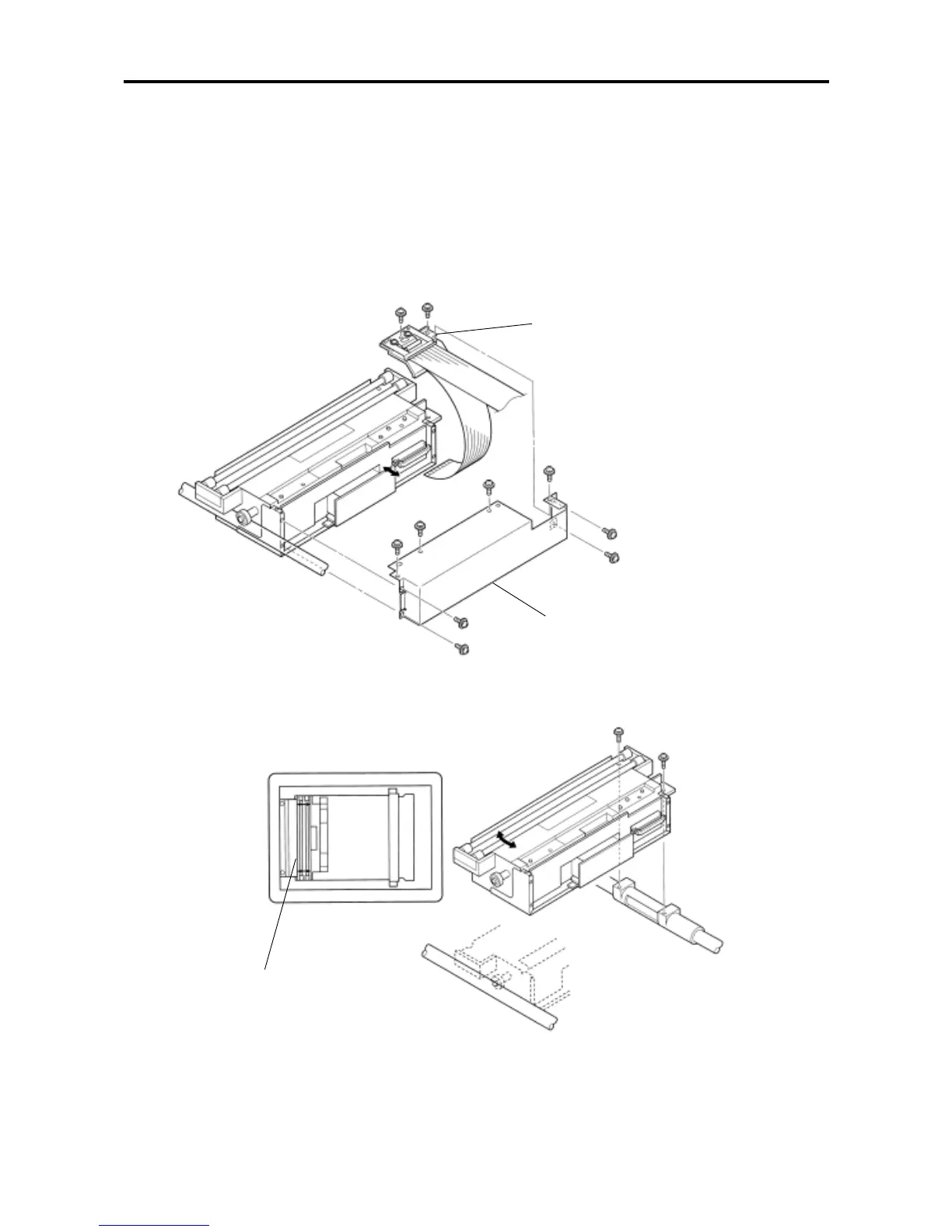
1)Turn off the power and remove the stage glass.
2)Remove mounting screws (× 8) of the image scanner cover, remove the cover.
3)Remove mounting screws (× 2) of the image scanner wire stand, raise the stand.
4)Pulling out the image scanner connector, take out the flexible wire.
5)Remove mounting screws (× 2) of the image scanner unit, raise the scanner upward for removal.
- Precautions in Assembly -
• Mount the image scanner unit in parallel with the original stopper. (See Fig.a.)
• For fitting the image flexible wire, pulling out the connector once, insert the wire to the end and, then, push the
connector into.
Image scanner wire stand
Image scanner cover
Original stopper
Fig. a










 To Next Page