MASTER MAKING SECTION
REMOVAL
GR37704 - 1
1. REMOVAL
1. THERMAL PRINT HEAD
REMOVAL
1) Turn ON the power and open the Scanner table. Then turn OFF the power. (The thermal print head is raised
automatically.)
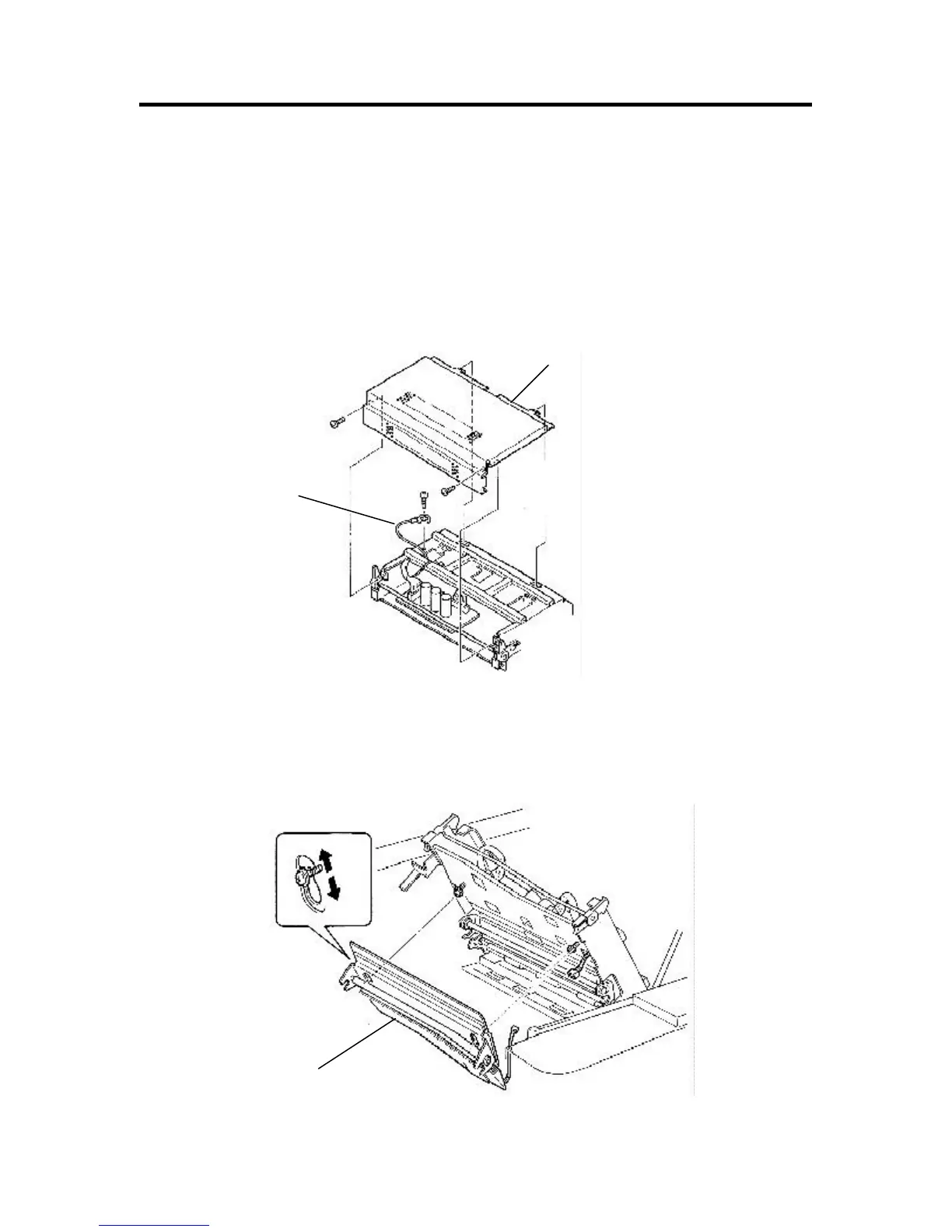
2) Remove mounting screws (× 2) of the master making unit cover, remove the cover.
3) Remove the fixing screws of thermal print head ground wire, raise the ground wire.
4) Open the master making unit, place the sheet under the thermal print head so that the screw will not fall into
Machine.
5) Loosen the fixing screws (× 2) of the copy guide plate (lower) assy, disconnect the connector from the master
end sensor light receiving section to remove the assembly.
Ground wire
Bind M3 × 6
Master making unit cover
Loosen screw
Bind M3 × 6 (× 2)
Copy guide plate (lower) assy.
Fig. a










 To Next Page