21
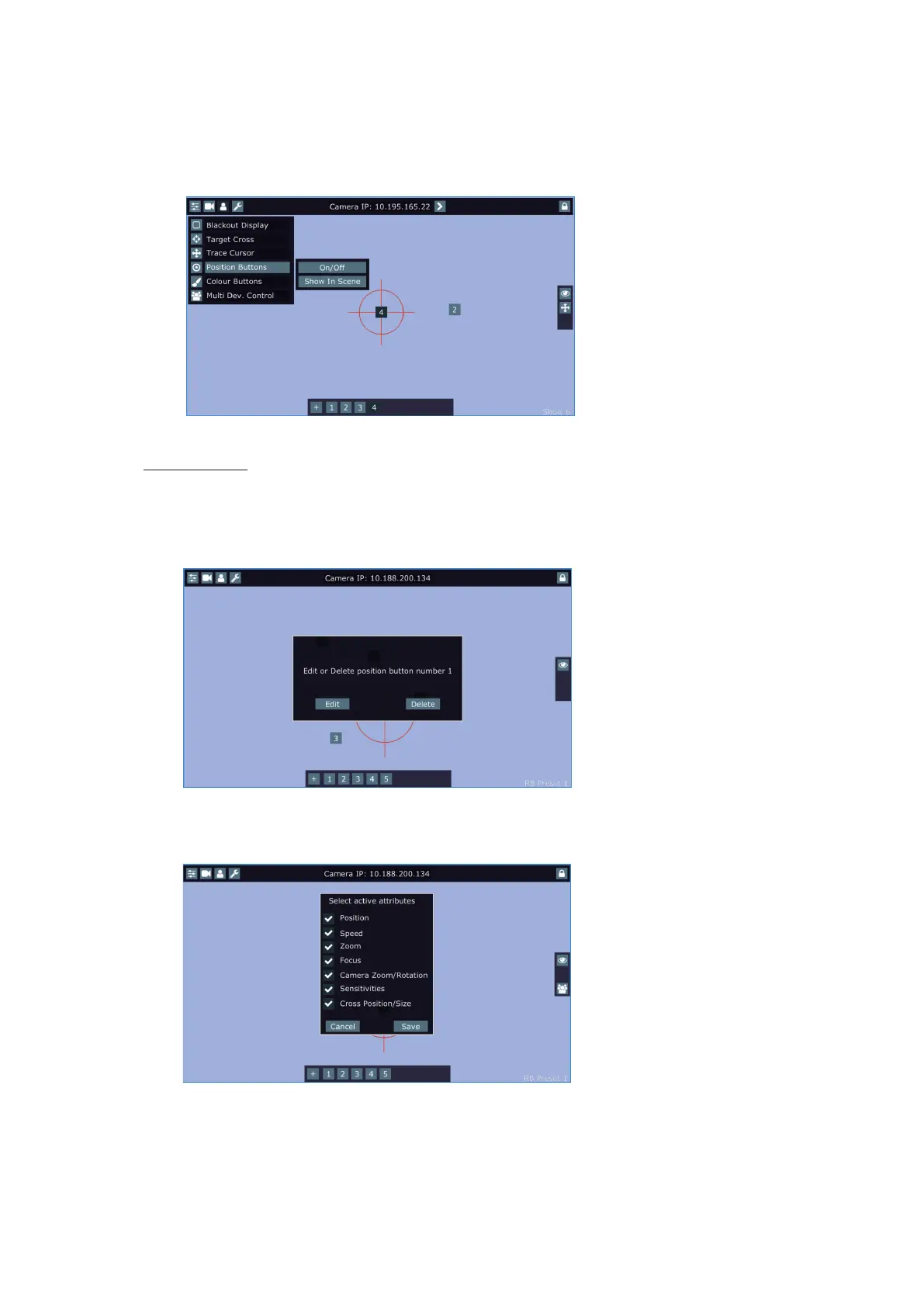
circle to desired position and press the "+" button. Button no.1 will appear at the bottom of the screen and
the button no.1 is assigned to this position of the position circle (if item " Show in scene is active, button no.1
is displayed in the position circle on the screen). You can assign up to 9 buttons to dierent positions of the
position circle on the screen.
If you touch a position button, the position circle will move to the position of this position button.
Last activated position button is highlighted.
Example (option "Show in Scene" is active):
Show in Scene - the item allows you to show positions of the position buttons on the screen.
In the position button are saved values of the following items: pan position, tilt position, pan/tilt sensitivity,
zoom sensitivity, MDC height, speed, zoom, focus, camera zoom, camera rotation, cross position, cross size.
To edit or remove the position button from the screen, touch it until the message "Edit or Delete position button
number X?" appears on the screen and select desired option.
If you select the option "Edit", the following screen with attributes will appear.
Now you can uncheck(check) attributes which you wish to be active in the position point.
Some menu attributes iclude more functions:
"Position" = pan + tilt + MDC height
"Camera Zoom/Rotation" = camera zoom + camera rotation
"Cross" = size + position
"Sensitivities" = pan sensitivity + tilt sensitivity + zoom sensitivity















 To Next Page