18
5.4 Saving and recalling the FollowSpot controller presets
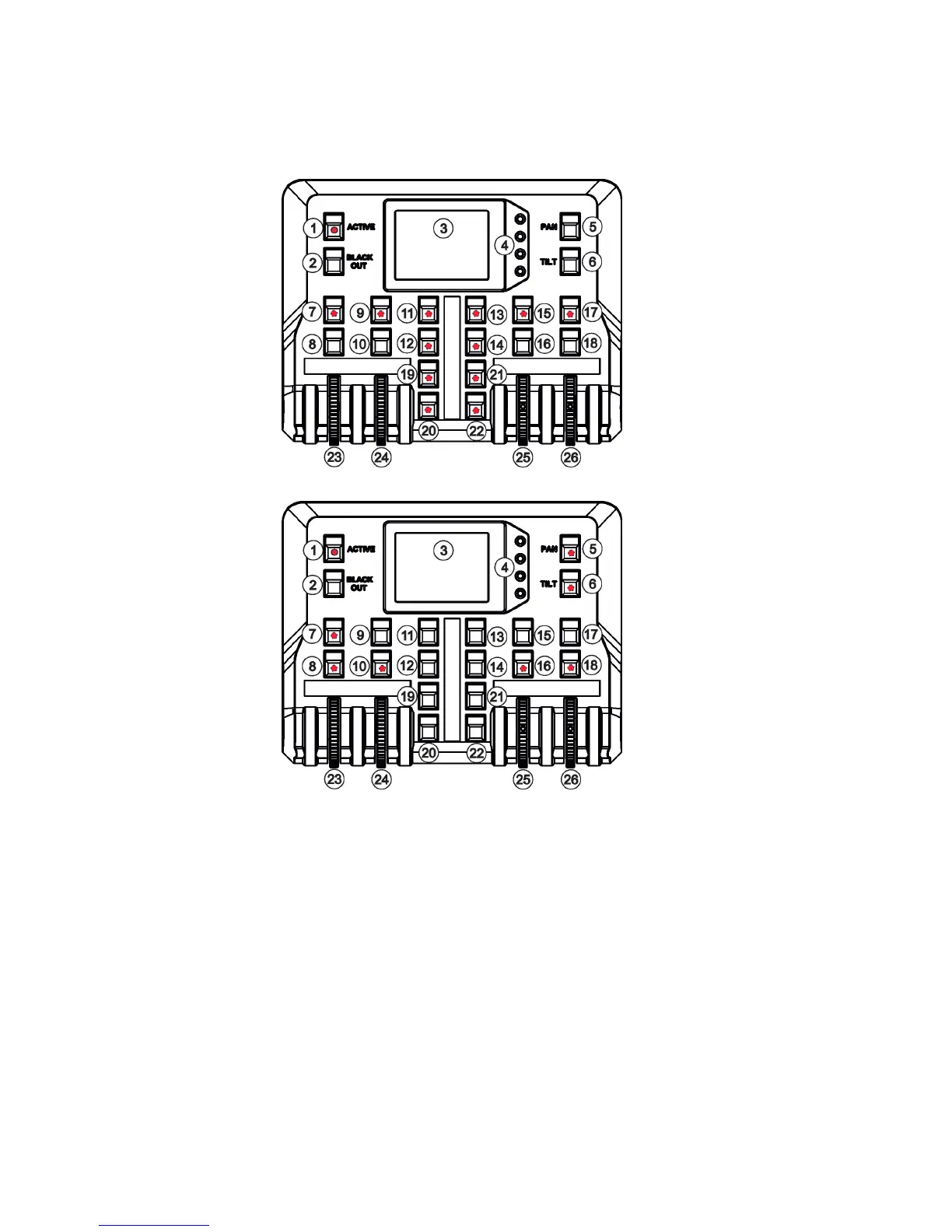
The FollowSpot Controller oers to save up to 12 presets.
To save the FollowSpot controller preset
1. Press and hold one of the preset buttons (7/9/11/12/13/14/15/17/19/20/21/22) e.g. button (7) until the jog-
wheel activating buttons (8/10/16/18) and the pan/tilt buttons (5/6) start to ash.
2. Press ashing button of eect which value you wish to add to the current preset (the button will start light
continually).
3. Press and hold selected preset button until the jog-wheels activating buttons stop to ash.
The preset button will light.
Note: Every user preset can have dierent FollowSpot Controller presets which are saved into the user preset
le. This le can be saved on a USB ash drive.
To recall the FollowSpot controller preset
Press a button with stored FollowSpot Controller preset.
To delete the FollowSpot controller preset
1. Press and hold desired preset button until the jog-wheel activating buttons (8/10/16/18) and the pan/tilt
buttons (5/6) start to ash.
2. Press and hold selected preset button until the jog-wheels activating buttons stop to ash. Do not press any
jog-wheels activating button. The preset button will stop to light.
Note: you can write notes on the white elds of the FollowSpot Controller, use a marker on an alcohol base and
a suitable cleaning liquid (on alcohol base) for removing the notes. Never use solvents!
Note: values on faders
cannot be included to
presets.


 To Next Page