10
5. Operation
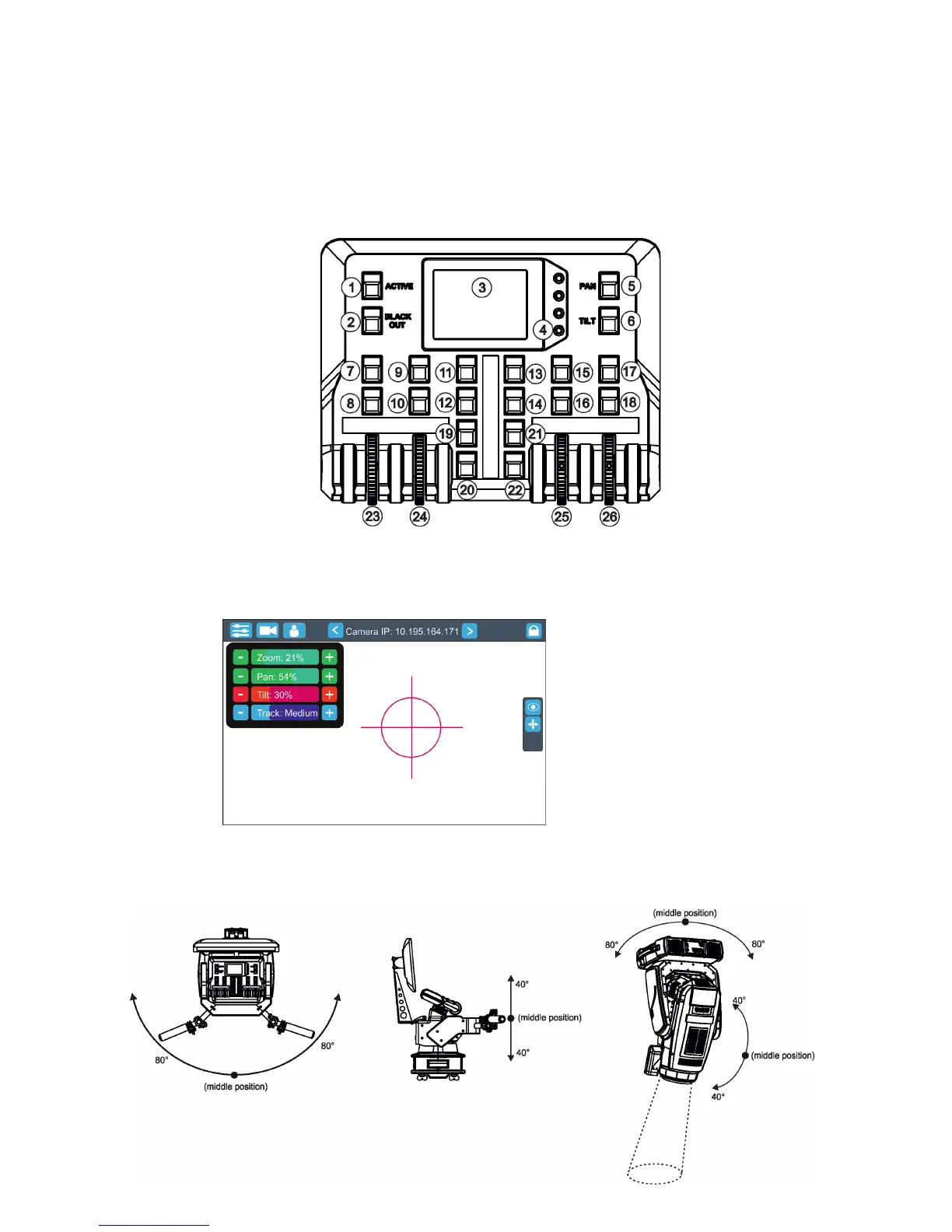
After installing the RoboSpot and connecting it with the ROBIN BMFL FollowSpot (RoboSpot MotionCamera),
connect the RoboSpot to mains by means of the enclosed power cord.
Press the button ACTIVE (1) in order to activate the FollowSpot Controller. By pressing the button PAN (5) and
TILT (6) you can activate/deactivate of the pan/tilt movement of the ROBIN BMFL FollowSpot (and all connected
BMFL xtures to the RoboSpot).
The button BLACK OUT (2) closes light output of the ROBIN BMFL FollowSpot (and also all connected BMFL
xtures to the RoboSpot).
5.1 Functions mapping
After switching the xture on,touch the Sliders button on the RoboSpot touch screen and use the pan and tilt
sliders to set desired position of the ROBIN BMFL FollowSpot´s head.
It is suitable to set the RoboSpot handlebars to the "middle" position and after that set the pan and tilt position
of the moving head by the sliders on the RoboSpot touch screen.
Sensitivity of pan/tilt movement:
High level (most accurate) - green
slider
Medium level -yellow slider
Low level- red slider
In order to switch sensitivity of pan or
tilt movement to desired level, press
and hold the PAN (5) or TILT (6) button
until the colour of fader is changed.
Sliders button


 To Next Page