6
3. Installation
The RoboSpot must be installed by a qualied worker in accordance with
all national and local electrical and construction codes and regulations.
Monitor installation
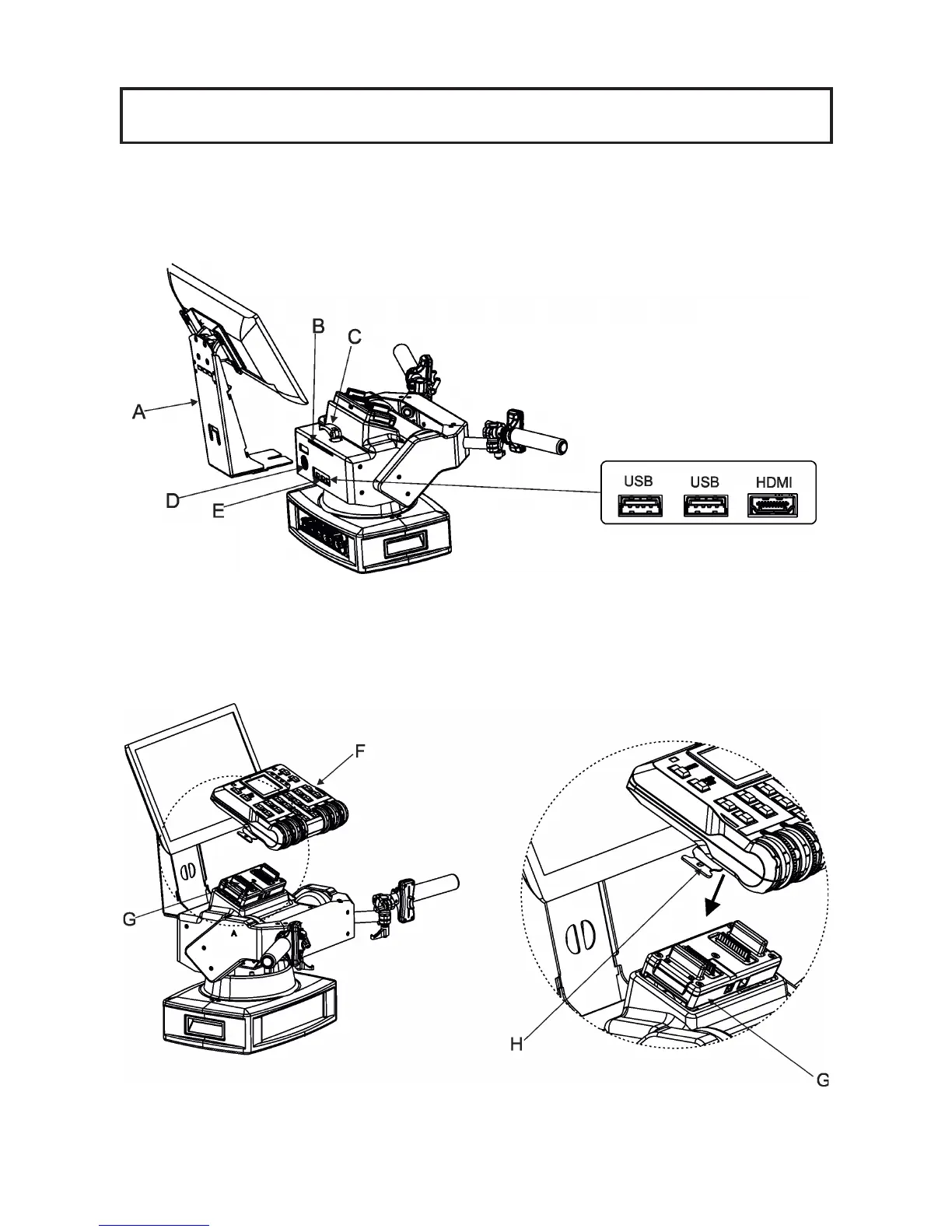
1. Insert the monitor holder (A) into the slot (B) of the RoboSpot and secure it by means of the lock (C).
The lock must be fully screwed and reclined. Check the monitor is securely fastened.
2. Connect the power cable of LCD monitor to the socket (D), HDMI cable and two USB cables to sockets (E)
in the RoboSpot.
Note: The HDMI connection has to be carried out before connecting the RoboSpot to mains.
FollowSpot Controller installation
1. Place the FollowSpot Controller (F) on the FollowSpot Controller base (G). Connectors on both parts have
to snap each other. Two locks (H) have to be pressed during placing (removing) the FollowSpot Controller (F).
2. If you need to place the RoboSpot on a tripod, you have to install an adaptor with spigot to the tripod.


 To Next Page