9
4. RoboSpot connection
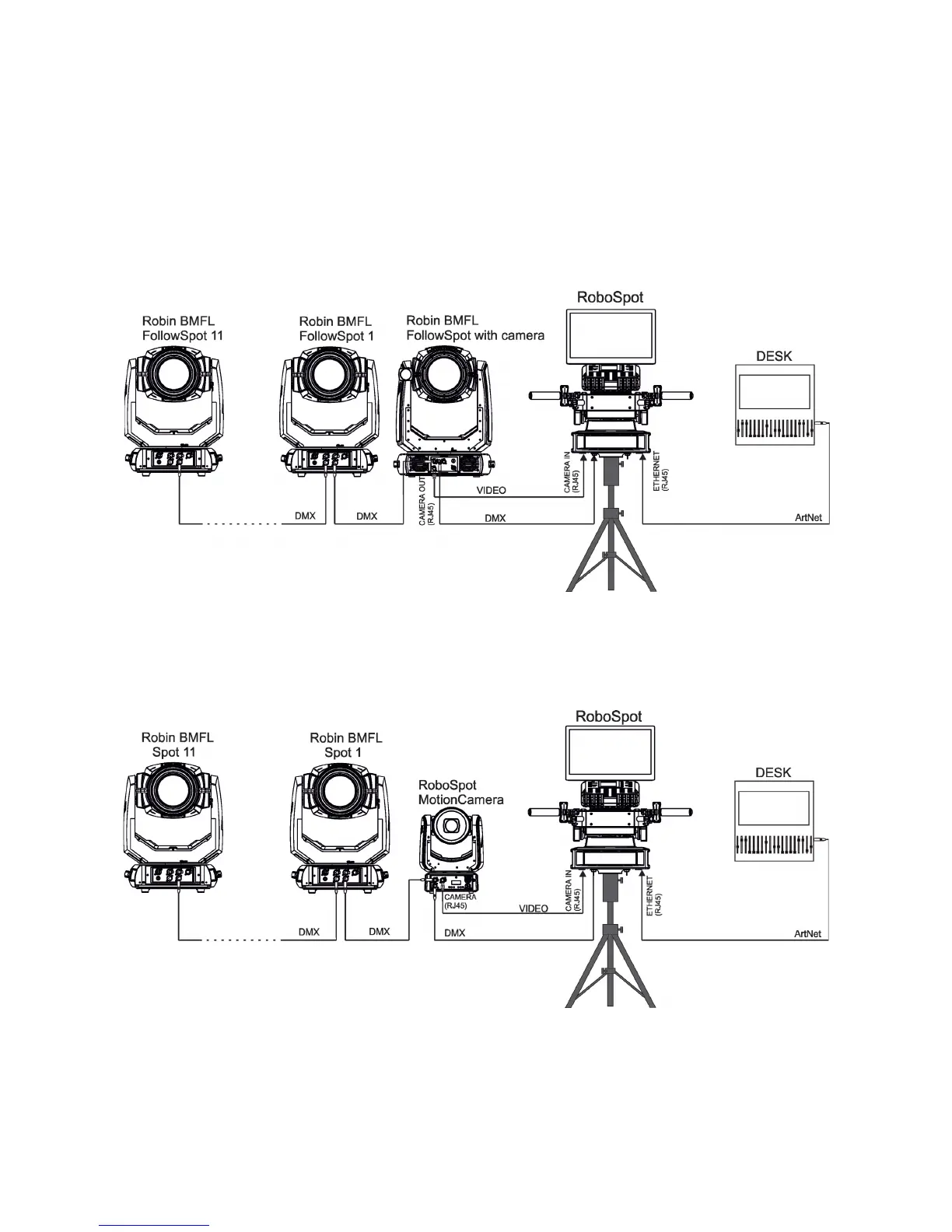
After installing the RoboSpot, connect it with the ROBIN BMFL FollowSpot with camera (or the RoboSpot Mo-
tionCamera), with another supported ROBIN xtures and a control desk.
You do not need to patch the RoboSpot, but xtures connected to the RoboSpot have to be patched.
Note: Fixtures connected to the RoboSpot and not supported by the RoboSpot will be ignored by the
RoboSpot.
Example 1. Connection with the ROBIN BMFL FollowSpot with camera
Up to 11 ROBIN BMFL FollowSpots can be connected to the ROBIN BMFL FollowSpot with camera.
Example 2. Connection with the RoboSpot MotionCamera
Up to 11 supported ROBIN xtures can be connected to the RoboSpot MotionCamera.The xtures should be
of the same type.
Note. In case of operating the RoboSpot system in interfered environment, Ethernet switches are
recommended in video line (one at the RoboSpot and one at the Robin BMFL FollowSpot or RoboSpot Mo-
tionCamera).


 To Next Page