Robotiq Hand-E C10 Gripper Instruction Manual
Installing URCap Package on e-Series
1.
Make sure that PolyScopeis up-to-date and that
the Universal Robots controller is compatible
with the gripper’s URCap package.
2.
Browse to support.robotiq.com and click Select
product > Hand-E C10 Adaptive Gripper >
Universal Robots > Software > Gripper Software.
3.
Download the UCG-X.X.X and extract its content
on the root of a blank USB stick.
4.
Insert the USBstick in the URteach pendant or
controller.
5.
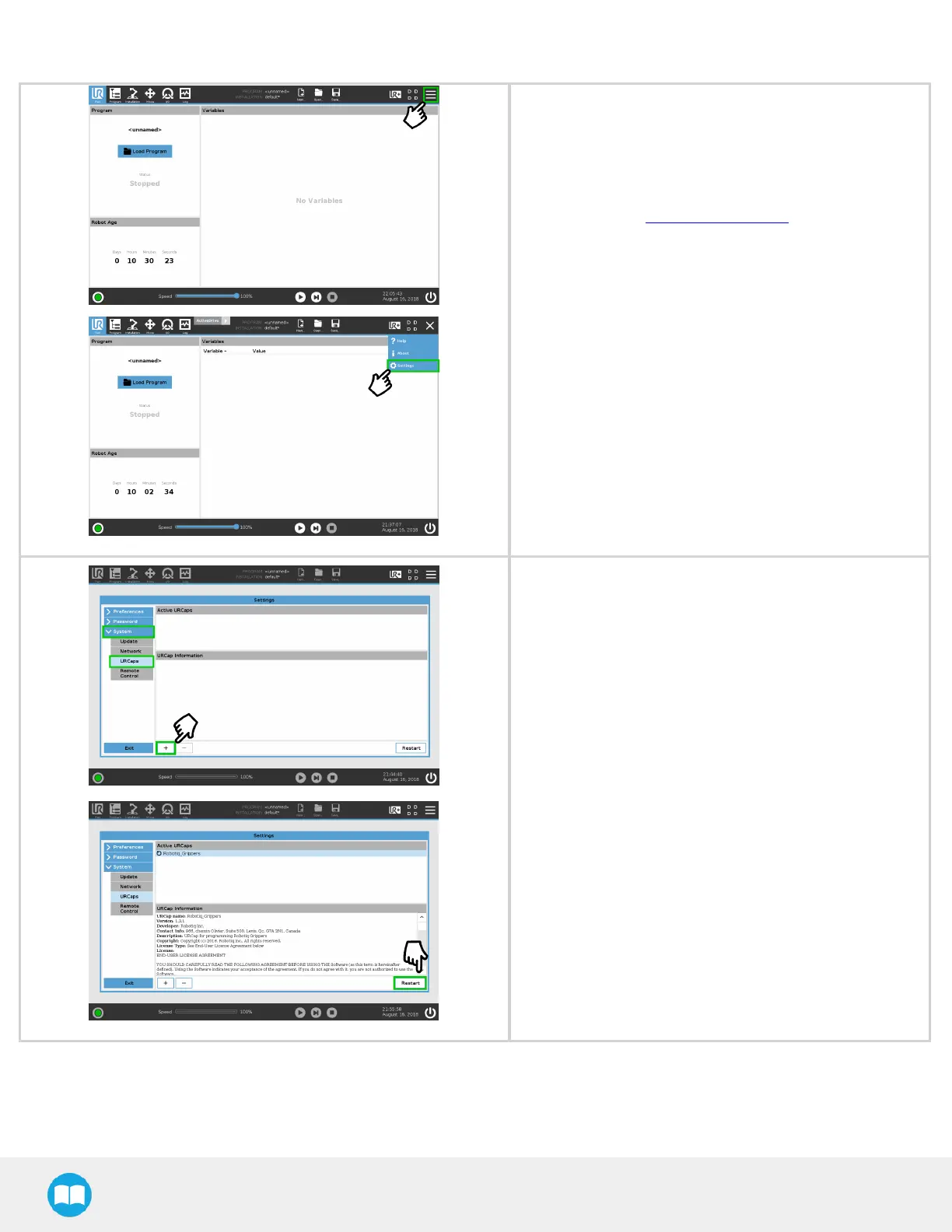
On the teach pendant, tap the triple bar icon in
the upper right corner of the screen.
6.
Tap Settings.
1. Tap the System button in the navigation pane on
the left.
2. Select URCaps in the dropdown list.
3. Press the plus (+) button to look for the .urcap file
in the available drives.
4. Once the file is selected, it displays in the Active
URCaps box, next to a rounded arrow.
5. Tap the Restart button to activate the URCap.
36



 To Next Page