Robotiq Hand-E C10 Gripper Instruction Manual
TIP
To identify your PolyScope version, go to the PolyScopehome page and tap About. A window containing
the Universal Robots software version is then displayed.
Activating a Gripper Connected to theRobot Wrist on a e-Series Robot
When connecting and activating a gripper to the robot wrist connector, set it up in PolyScope.
1. Mechanically mount the gripper on the robot. Refer to the Installing the Gripper on the Robot section
2. Go to Installation > URCaps > Gripper >Dashboard.
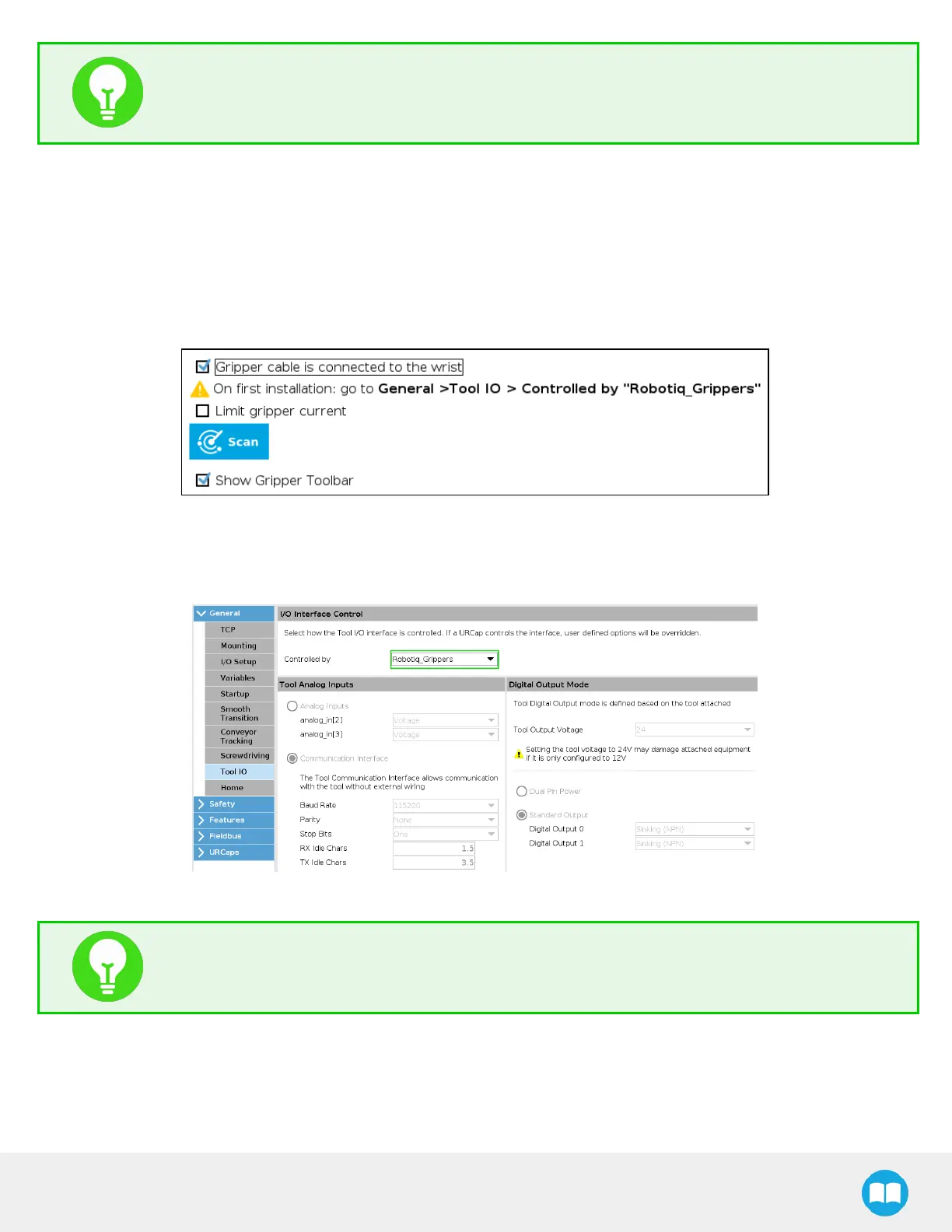
3. Check the Gripper cable is connected to the wrist box .
Fig. 3-20: Gripper Cable is Connected to the Wrist Check Box
4. Go to Installation > General >Tool I/O.
5. Go to the I/O Interface Control section and select Robotiq_Grippers in the Controlled by drop down list.
Fig. 3-21: I/O Interface Control
TIP
To reload these settings when restarting the robot, save the Installation file.
6. Go back to the gripper Dashboard, and tap Scan. An icon should confirm your gripper is connected. To activate it, tap
Activate. You can now use your gripper. Tap E-Open or E-Close to test it.
37



 To Next Page