Robotiq Hand-E C10 Gripper Instruction Manual
4.9.3. Gripper Dashboard
Overview
Single Gripper for e-Series
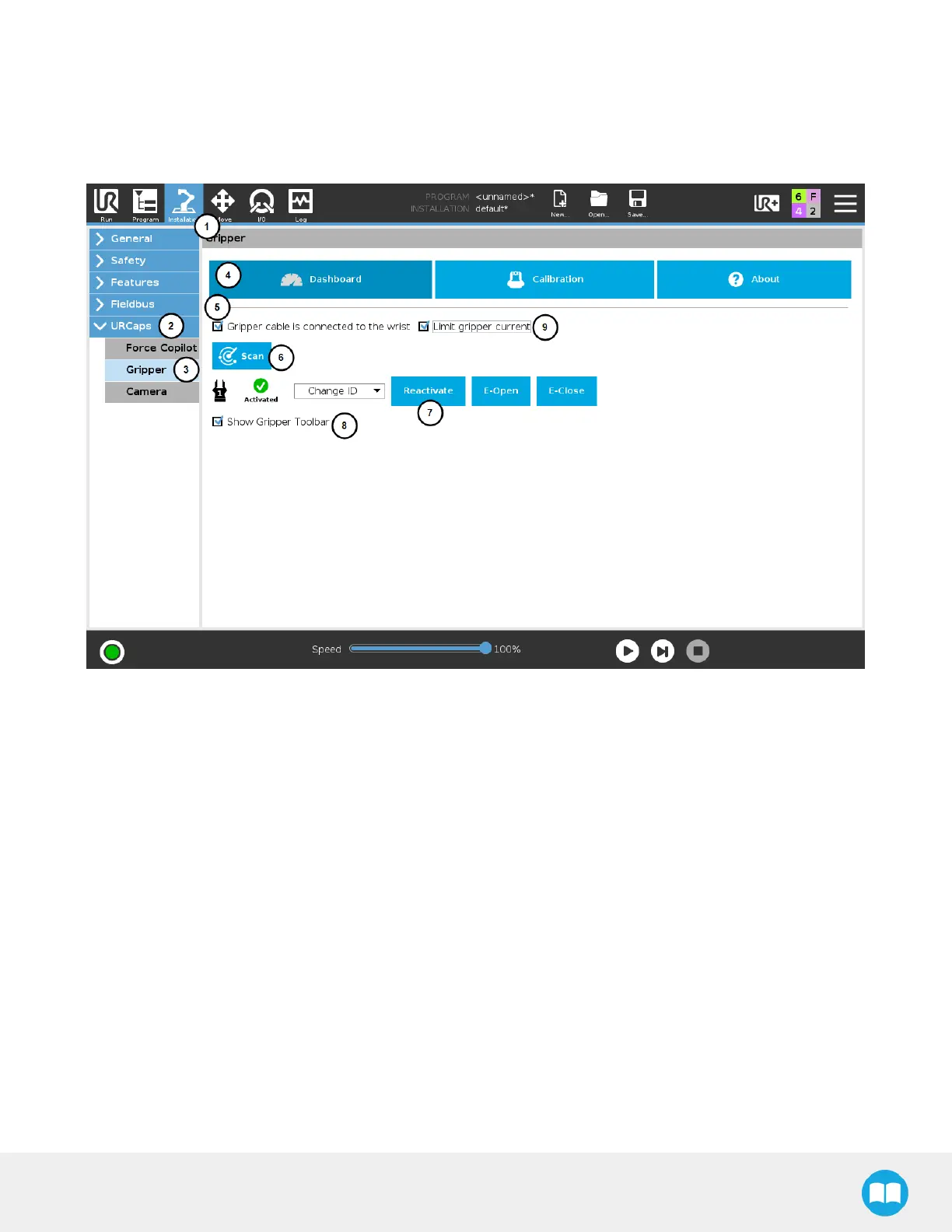
Fig. 4-8: Gripper Dashboard
1. On the teach pendant, tap the Installation button.
2. Select URCaps in the navigation pane on the left.
3. Tap the Gripper button.
4. Select the Dashboard tab.
5. If the gripper is connected to the robot wrist (and not to the robot controller or via a Robotiq Wrist Camera), tick the
"Gripper cable is connected to the wrist box.
6. If no gripper is found, tap the Scan button to detect any gripper that might be connected to the robot.
7. Tap the Activate/Reactivate button.
8. In order to display the Gripper Toolbar in the UR+ menu of the top ribbon of PolyScope, tick the Show Gripper Toolbar box.
9. In order to prevent overcurrent conditions (for instance when grasping soft objects or using multiple grippers at the same
time), tick the Limit gripper current box:
1. Limits the current at 600 mA for a single gripper.
2. Limits the current at 450 mA for each gripper connected in a multiple gripper configuration.
70



 To Next Page