Robotiq Hand-E Gripper Instruction Manual
Single Gripper (for CB-Series)
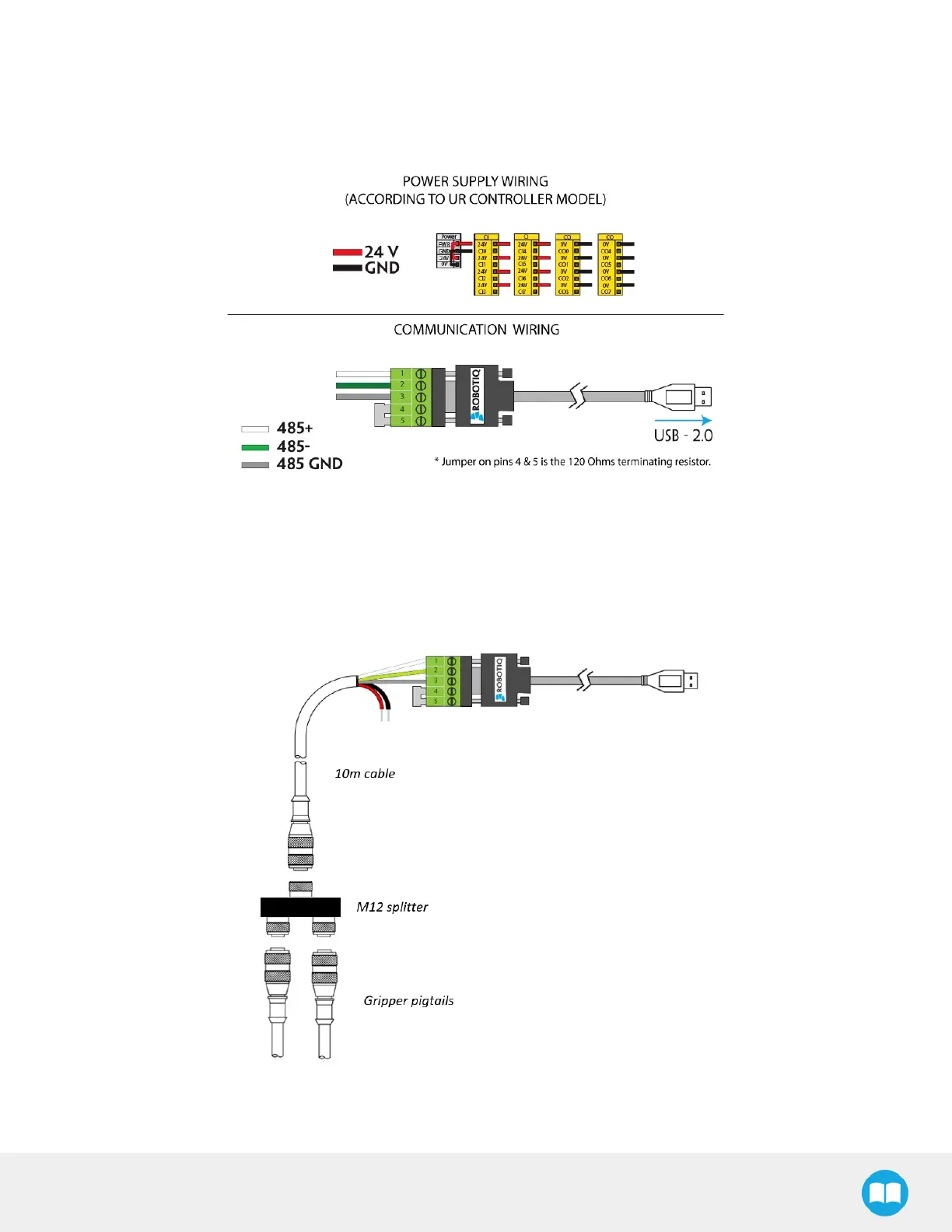
Prior to any software installation on Universal Robots, connect the white, blue and bare wires to the Robotiq RS-485 signal converter
(ACC-ADT-RS485-USB) as shown in the figure below. Also connect the red (24V) and black (0V) wires in the terminal blocks of the robot
controller.
Fig. 3-10: Hand-E Gripper wiring to Universal Robots controller.
Multiple Grippers (for CB-Series)
It is possible to connect and control up to four grippers on the same robot. Only one USB to RS485 converter (ACC- ADT-USB-RS485)
must be used. Use M12 splitters (ACC-SPLIT-M12-2:1) to connect all the grippers pigtails to one 10m cable
(CBL-COM-2065-10-HF) that connects to the RS485 to RS232 converter.
Fig. 3-11: Multiple grippers wiring.
29



 To Next Page