Robotiq Hand-E Gripper Instruction Manual
Installing URCap Package on e-Series
l Make sure that your PolyScope version is up-to-date and
that your Universal Robots controller is compatible with
the Gripper's URCap package.
l Browse to support.robotiq.com and click on Select
product > Hand-E Adaptive Gripper > Universal Robots
> Software > Gripper Software.
l Download the UCG-X.X.X and extract its content on the
root of a blank USB stick.
l Insert the USBstick in the URteach pendant or controller.
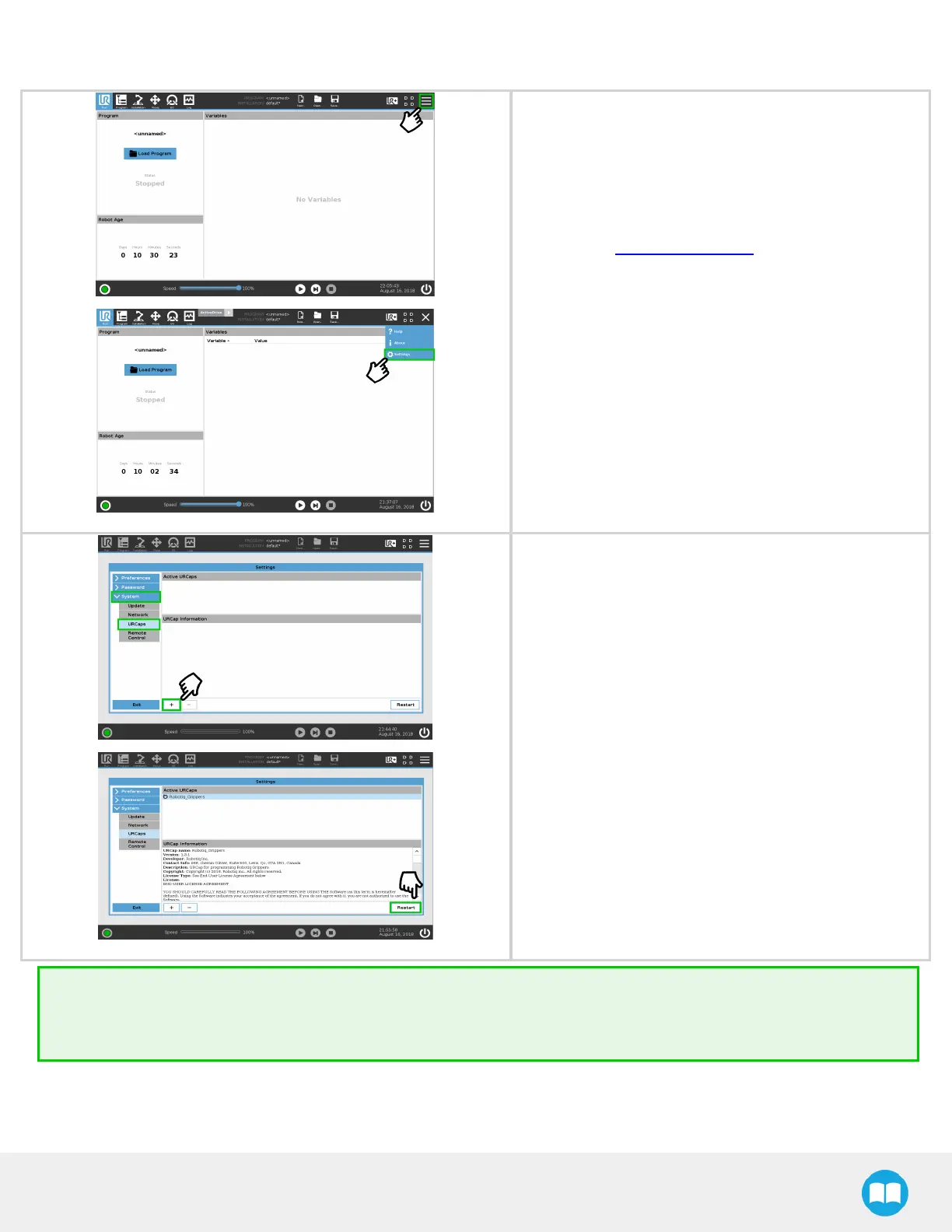
l On the teach pendant, tap the triple bar icon in the upper
right corner of the screen.
l Tap Settings.
l Tap the System button in the navigation pane on the left.
l Select URCaps in the dropdown list.
l Press the plus (+) button to look for the .urcap file in the
available drives.
l Once the file is selected, it will display in the Active
URCaps box, next to a rounded arrow.
l Tap the Restart button to activate the URCap.
Tip
To identify your PolyScope version, go to the PolyScope home page and tap About. A window containing the Universal
Robots software version is then displayed.
37



 To Next Page