Robotiq Hand-E Gripper Instruction Manual
4.9.4. Limiting your Gripper Force and Speed
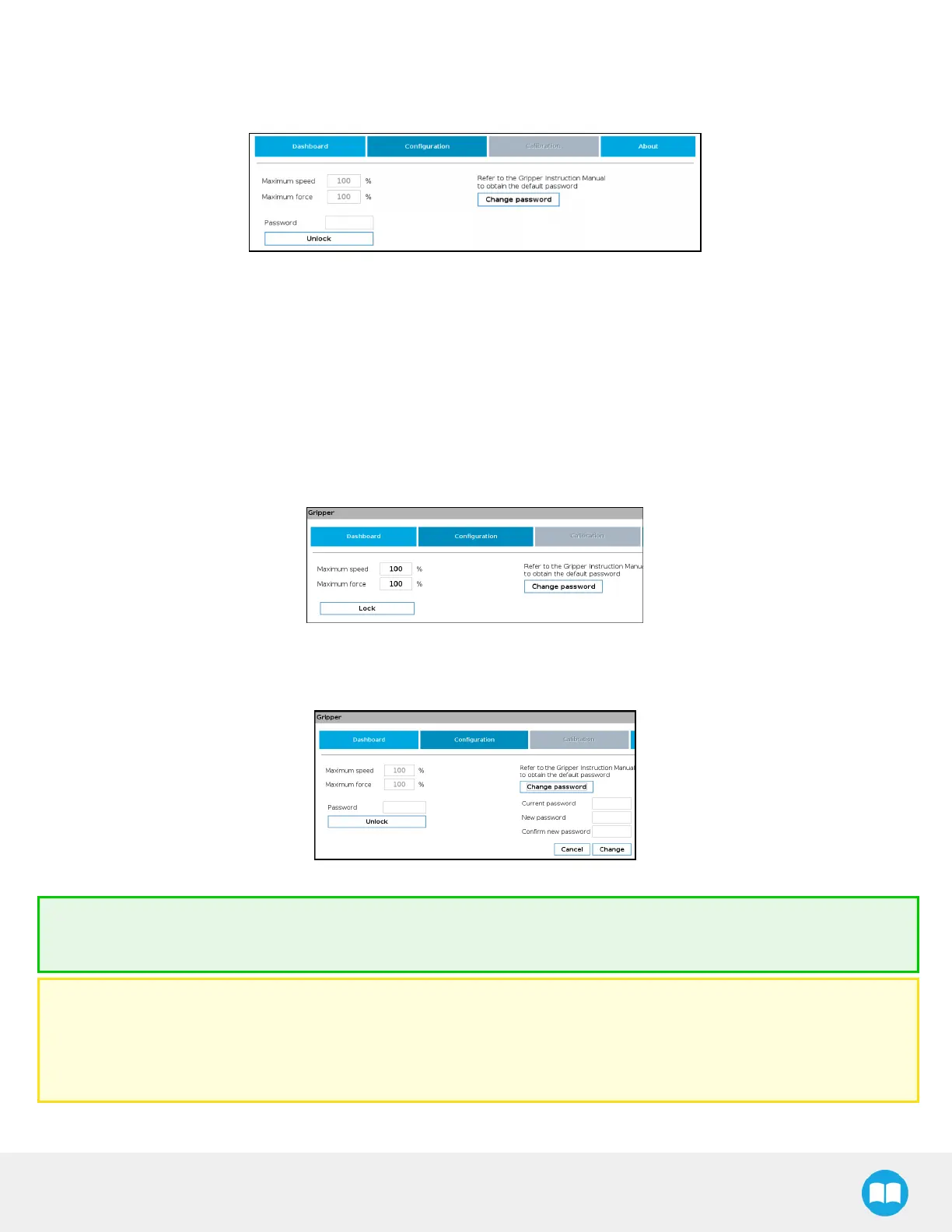
Grippers can have their force and speed limited at root-level when using the teach pendant. Follow these instructions to enable this.
Fig. 4-12: Limiting the Gripper Force and Speed
1. Depending on your robot:
l For e-Series: Go to Installation >URCaps > Gripper > Configuration.
l For CB-Series: Go to Installation > Gripper > Configuration
2. Enter your password. Default is rqsafe.
3. Tap Unlock.
4. To set a maximum opening/closing speed for your grippers (noted as a percentage of its default speed), select the box next to
the "Maximum Speed" field, and enter a value. You can also limit grip strength by setting a value under field "Maximum force".
Values are set, tap Lock. This saves values you entered.
Fig. 4-13: Lock the Maximum Force and Speed
5. To choose a new password, tap the Change password button, and follow instructions on screen. To save your new password,
tap Change.
Fig. 4-14: Modification of the current password.
Tip
Default password: rqsafe. If you lose your password, contact support team to reset it.
Caution
l This feature reduces the risk, but is not safety-certified.
l The values (%) stand as references only. The actual maximum force (in newtons) can vary depending on the application and
needs to be measured by its user by an external measuring system on each gripper for high precision.
77



 To Next Page