Robotiq Hand-E Gripper Instruction Manual
4.9.5. Visual Cues of Force and Speed Limitation
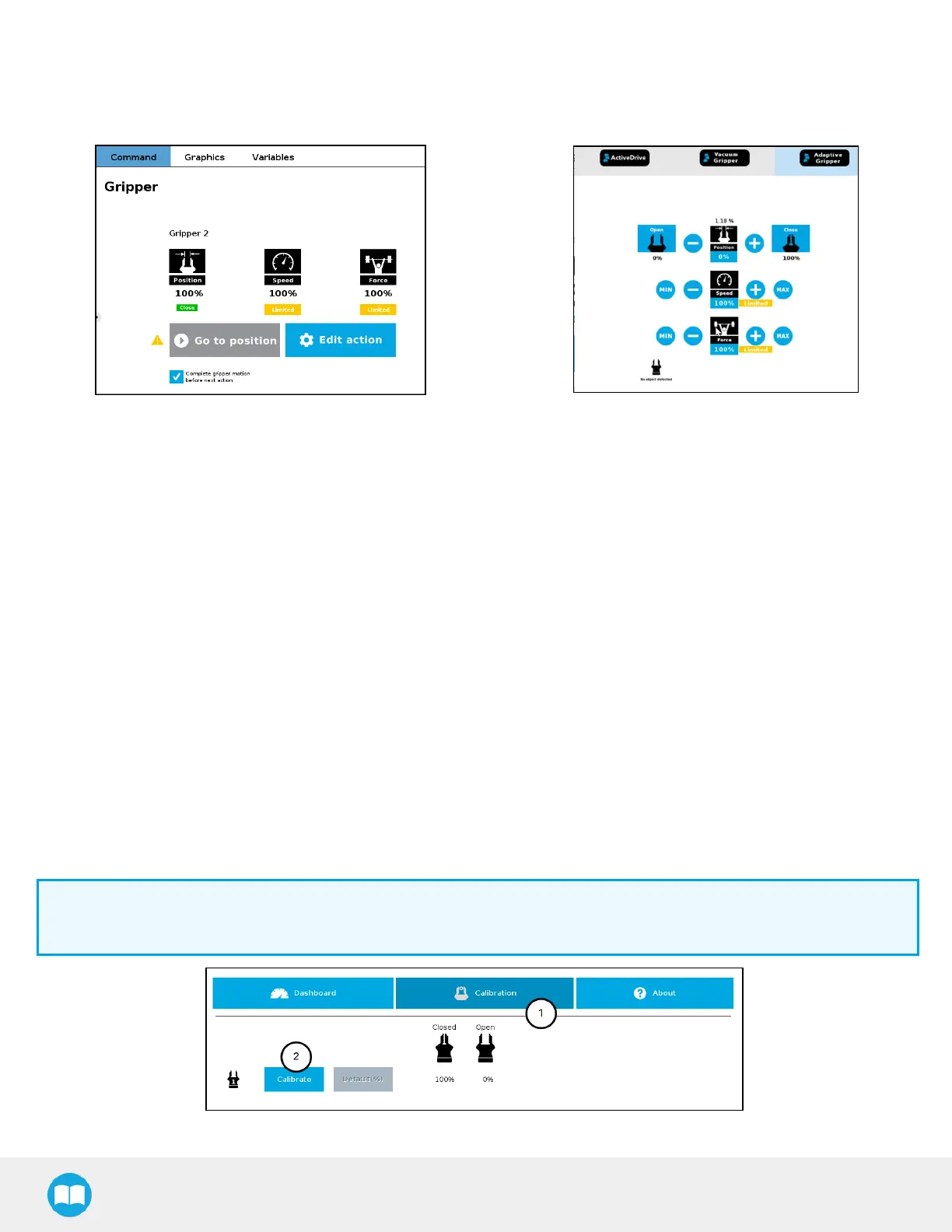
When a limitation is effective, some reminders appear in PolyScope. When adding gripper commands to a program or issuing them via
the Adaptive Gripper tab, the label "Limited" will be shown under the Speed and Force icons, if they have been limited.
Fig. 4-15: Label "Limited' appears when limitations are effective.
4.9.6. Gripper Calibration menu and wizard
Depending on the fingers/fingertips used, the operator will calibrate the gripper and measure the stroke by defining the fully open and
fully closed positions.
Make sure the gripper is activated.
For e-Series
1
On the teach pendant, tap the Installation button.
2
Select URCaps in the navigation pane on the left.
3
Tap the Gripper button.
For CB-Series
1
Go to the Installation tab
2
Select Gripper in the left pane
Info
A gripper that has not been calibrated will display open and closed values in percentage.
Fig. 4-16: Sequence Toward Calibration, Single Gripper.
78



 To Next Page