EasyManua.ls Logo

Rockwell Commander 112 - Propeller Governor Installation

Rockwell Commander 112
293 pages
Print Icon
To Next Page IconTo Next Page
To Previous Page IconTo Previous Page
Loading...
SECTION
IV
POWER PLANT
AND
PROPELLER
MAINTENANCE
MANUAL
ROCKWELL
COMMANDER
112/B/TC/TCA
MODEL
LOW
PITCH
HIGH
PITCH
112
23
0
(::0.1
0
)
28
0
- 30
0
112B
11.
6
0
(.:to.
1
0
)
30
0
112TC,
112TCA
15
0
(:!-0.1
0
)
30
0
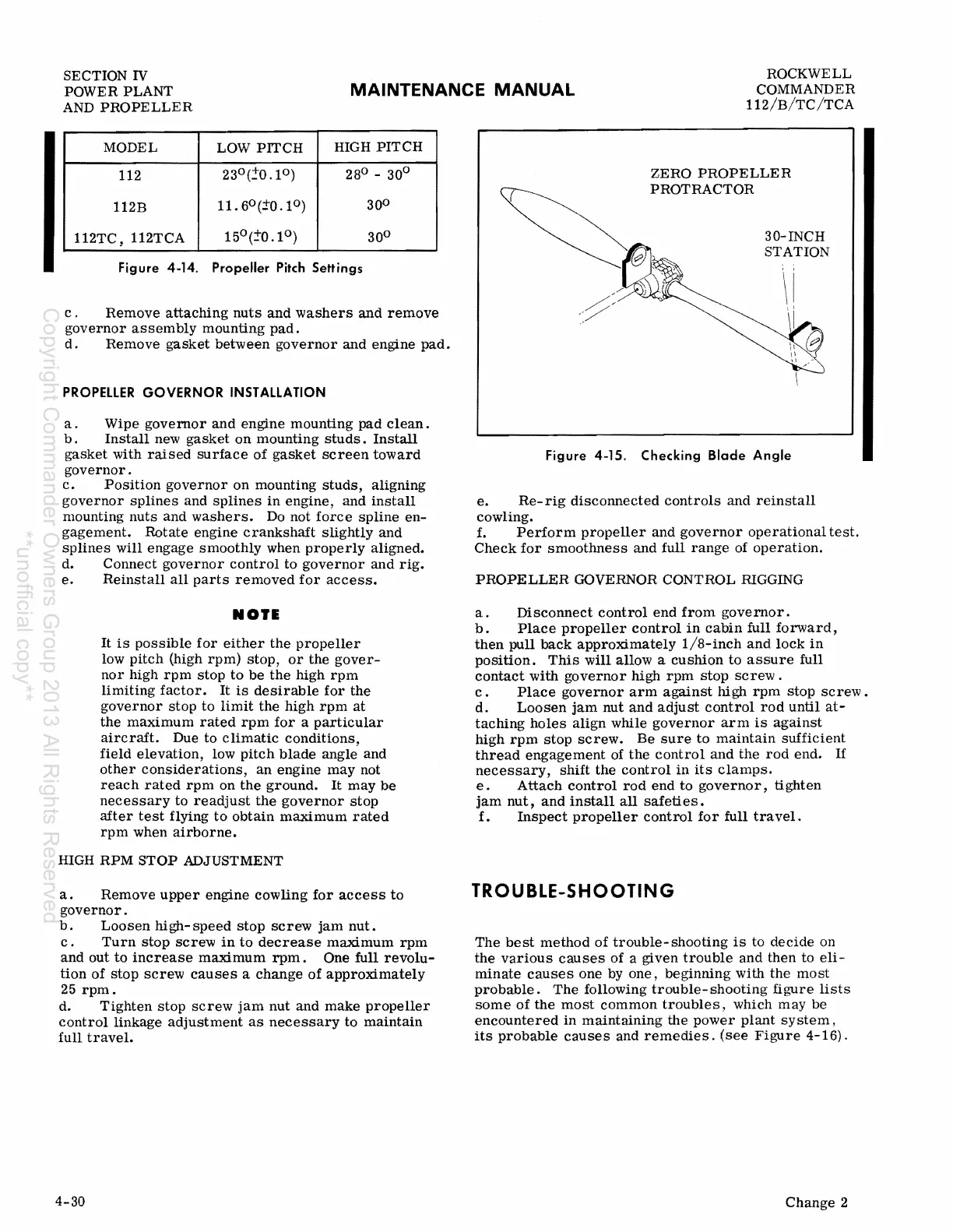
Figure 4·14. Propeller Pitch Settings
c .
Remove
attaching
nuts
and
washers
and
remove
governor
assembly
mounting
pad.
d.
Remove
gasket
between
governor
and
engine
pad.
PROPELLER
GOVERNOR
INSTALLATION
a.
Wipe
governor
and
engine
mounting
pad
clean.
b .
Install
new
gasket
on
mounting
studs.
Install
gasket
with
raised
surface
of
gasket
screen
toward
governor.
c.
Position
governor
on
mounting
studs,
aligning
governor
splines
and
splines
in
engine,
and
install
mounting
nuts
and
washers.
Do not
force
spline
en-
gagement.
Rotate
engine
crankshaft
slightly
and
splines
will
engage
smoothly
when
properly
aligned.
d. Connect
governor
control
to
governor
and
rig.
e.
Reinstall
all
parts
removed
for
access.
NOIE
It
is
possible
for
either
the
propeller
low
pitch
(high
rpm)
stop,
or
the
gover-
nor
high
rpm
stop
to
be
the
high
rpm
limiting
factor.
It
is
desirable
for
the
governor
stop
to
limit
the
high
rpm
at
the
maximum
rated
rpm
for
a
particular
aircraft.
Due to
climatic
conditions,
field
elevation,
low
pitch
blade
angle
and
other
considerations,
an
engine
may
not
reach
rated
rpm
on
the
ground.
It
may
be
necessary
to
readjust
the
governor
stop
after
test
flying
to
obtain
maximum
rated
rpm
when
airborne.
HIGH
RPM
STOP
ADJUSTMENT
a.
Remove
upper
engine
cowling
for
access
to
governor.
b.
Loosen
high-
speed
stop
screw
jam
nut.
c.
Turn
stop
screw
in
to
decrease
maximum
rpm
and
out
to
increase
maximum
rpm.
One
full
revolu-
tion
of
stop
screw
causes
a
change
of
approximately
25
rpm.
d.
Tighten
stop
screw
jam
nut
and
make
propeller
control
linkage
adjustment
as
necessary
to
maintain
full
travel.
4-30
(
ZERO
PROPELLER
PROTRACTOR
30-INCH
STATION
Figure
4·15.
Checking
Blade
Angle
e.
Re-
rig
disconnected
controls
and
reinstall
cowling.
f.
Perform
propeller
and
governor
operational
test.
Check
for
smoothness
and
full
range
of
operation.
PROPELLER
GOVERNOR CONTROL RIGGING
a.
Disconnect
control
end
from
governor.
b.
Place
propeller
control
in
cabin
full
forward,
then
pull
back
approximately
1/8-inch
and
lock
in
position.
This
will
allow a
cushion
to
assure
full
contact
with
governor
high
rpm
stop
screw.
c.
Place
governor
arm
against
high
rpm
stop
screw.
d.
Loosen
jam
nut
and
adjust
control
rod
until
at-
taching
holes
align
while
governor
arm
is
against
high
rpm
stop
screw.
Be
sure
to
maintain
sufficient
thread
engagement
of
the
control
and
the
rod
end.
If
necessary,
shift
the
control
in
its
clamps.
e.
Attach
control
rod
end
to
governor,
tighten
jam
nut,
and
install
all
safeties.
f.
Inspect
propeller
control
for
full
travel.
TROUBLE-SHOOTING
The
best
method
of
trouble-
shooting
is
to
decide
on
the
various
causes
of
a given
trouble
and
then
to
eli-
minate
causes
one by
one,
beginning
with
the
most
probable.
The
following
trouble-shooting
figure
lists
some
of
the
most
common
troubles,
which
may
be
encountered
in
maintaining
the
power
plant
system,
its
probable
causes
and
remedies.
(see
Figure
4-16).
Change
2
Copyright Commander Owners Group 2013 All Rights Reserved
**unofficial copy**

Table of Contents