Reference Manual
00809-0100-4841, Rev. AA
May 2007
Rosemount 3490 Series
2-6
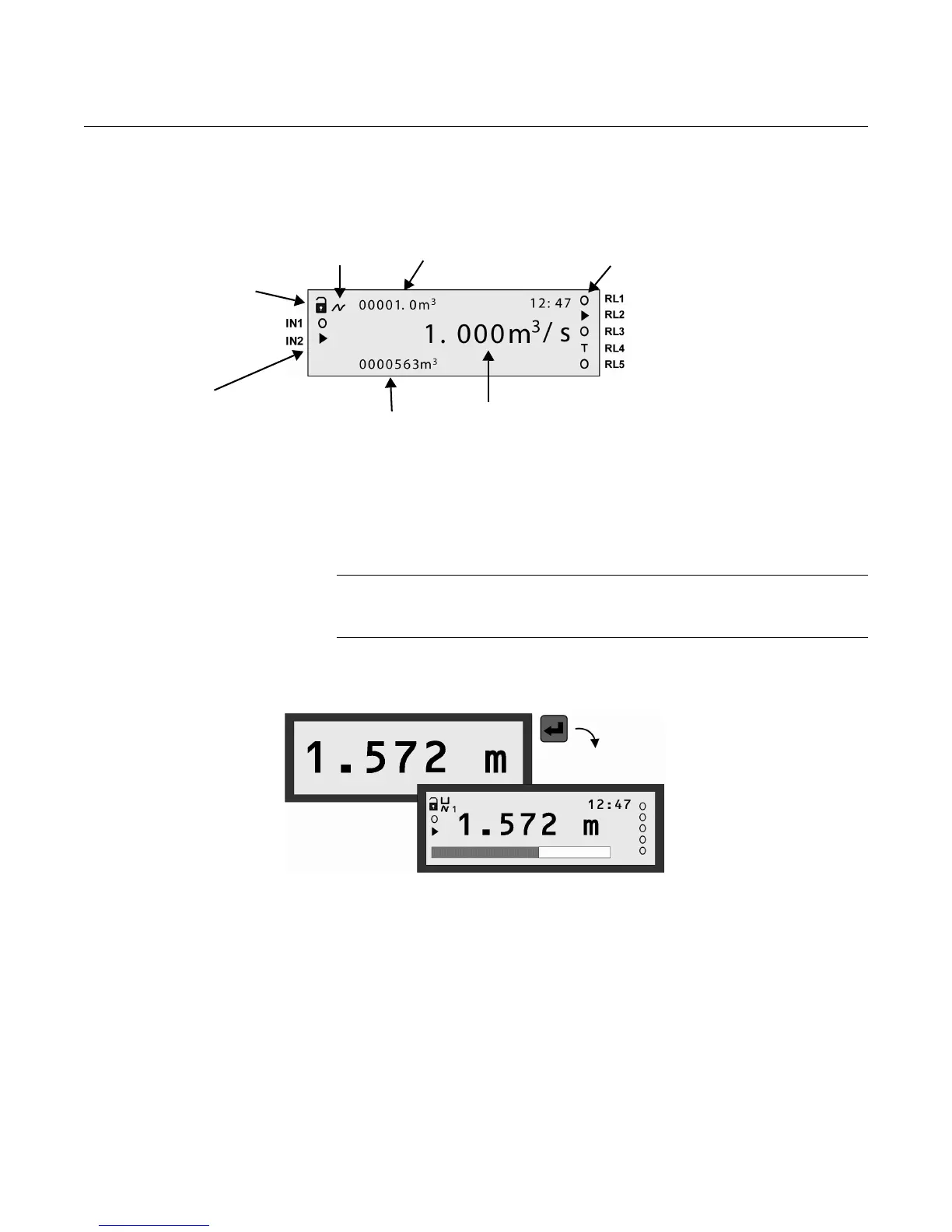
Figure 2-5.
Typical display of model 3493
After a period of keypad inactivity, the display automatically changes to the
Large PV Display. This shows only the Primary Value (PV) and Display units,
but in a larger character size to facilitate easier viewing.
To restore the Full Primary Display, press the red (ENTER) button.
NOTE:
If you do not require the Large PV Display feature, it can be switched off using
parameter P574. See also “Primary Display Options” on page 4-72
Figure 2-6. Large PV Display
Status LED The LED is positioned just below the LCD. It flashes once per second to
indicate that the Control Unit and Transmitters are operating correctly. If there
are operating system difficulties (e.g., overheating) or a transmitter fault, the
LED is constantly on.
HART Transmitter
communicating
(Absent if idle)
Measured PV
(Primary Value)
Totaliser 1
Off-line/on-line status.
(Locked padlock = on-line)
Relay (RL) status.
o = de-energized,
= energized
T = Totaliser
Totaliser 2 (Daily total)
Digital input status
o = de-energized,
= energized
Full Primary Display
Large PV Display



 To Next Page