Reference Manual
00809-0100-4841, Rev. AA
May 2007
Rosemount 3490 Series
D-2
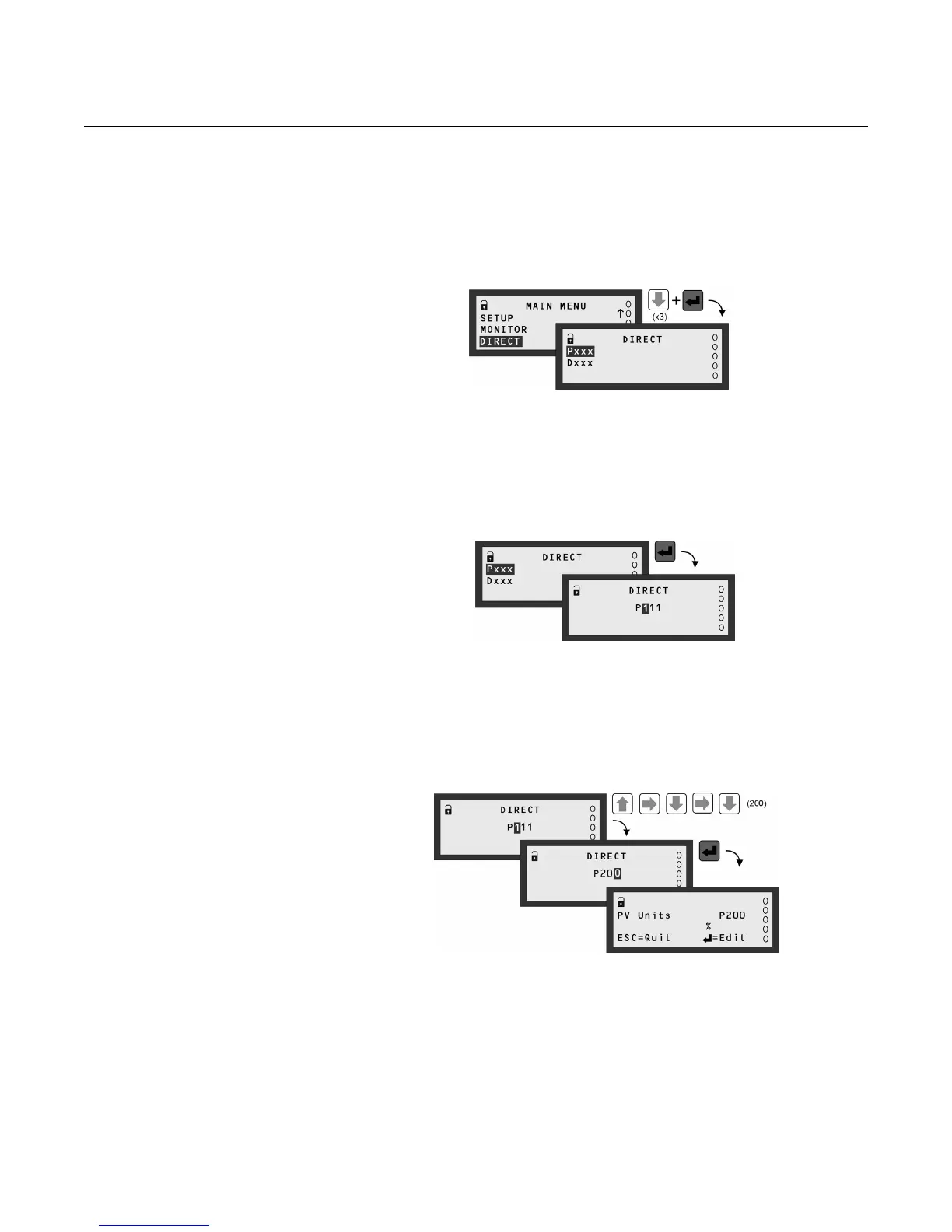
DIRECT MENU SCREEN The DIRECT menu screen is selected from the MAIN MENU (Figure D-1).
It features a method for fast access to parameter screens. This is an ideal
facility for those who want to check parameter settings without traversing the
menu system. All that is required is the entry of the 3-digit identification (ID)
number for a parameter, as found in Appendix C: Menus and Parameters.
Figure D-2. Navigating to the
DIRECT menu
Both 'P' and 'D' prefixed parameters can be accessed, but through separate
selection screens. At the DIRECT menu screen, a selection must first be
made which is based on the parameter prefix - see Figure D-3.
Figure D-3. DIRECT menu -
Pxxx or Dxxx Selection
Once a selection is made, the unique 3-digit identification number of the
parameter is edited using the arrow buttons. Pressing the red (ENTER) button
will then bring up the parameter screen, unless it is unavailable.
Figure D-4. DIRECT menu -
Pxxx Editing (Parameter Exists)
When a parameter is unavailable, the nearest numbered parameter is
displayed instead. However, pressing the ESC button takes you back to the
previous screen, allowing you to re-edit the number and try for another
parameter screen. This is also convenient for when checking on more than
one parameter.



 To Next Page