Reference Manual
00809-0100-4841, Rev. AA
May 2007
Rosemount 3490 Series
4-6
11. Within the menus, there are also parameter screens for programming -
setting-up for an application, adjusting default settings, etc. - and screens
for displaying read-only information.
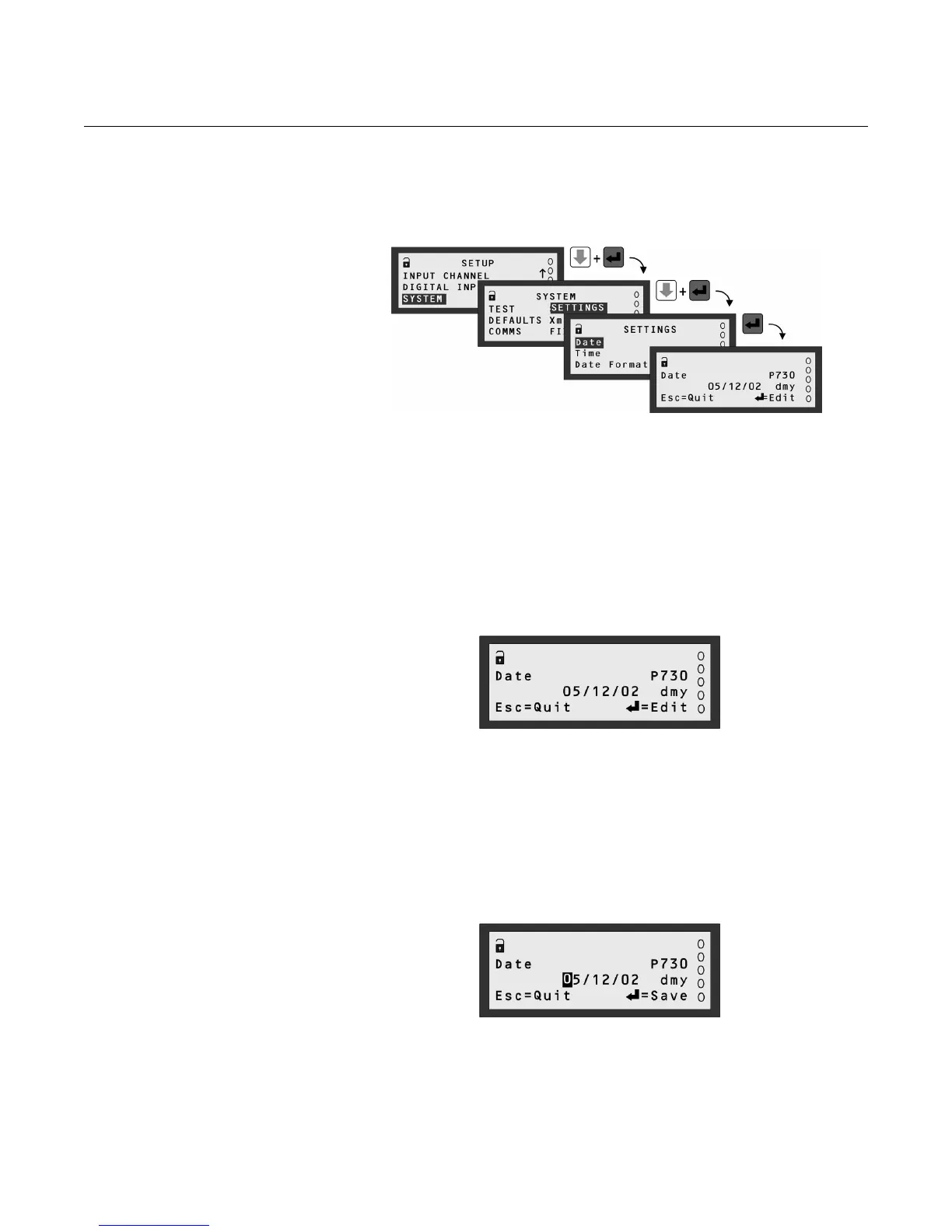
Figure 4-7.
Example of a parameter screen
About parameter screens To understand how to edit a parameter, such as the calendar date, follow the
instructions in this section, otherwise feel free to continue to “Programming“
on page 4-9.
1. Navigate to the "Date" parameter screen (see Figure 4-7).
2. Upon entering a parameter screen, it is always in View Mode (Figure 4-8).
3. Guidance for what to do now is on the display line 4. In View Mode, the
ESC button returns you to the menu.
Figure 4-8.
Parameter Screen (View Mode)
4. To enter Edit Mode, press the red (ENTER) button as guided on display
line 4.
The “0” is highlighted to show this digit can now be edited (Figure 4-9).
Also, note that on display line 4, "Edit" has changed to be "Save".
You can press the ESC button at any time to quit editing and return to
View Mode. This will also restore the original setting.
Figure 4-9.
Parameter Screen (Edit Mode)
5. Press the RIGHT-ARROW button once to highlight the “5”.
If you go too far to the right, use the LEFT-ARROW button to move the
highlight back to the “5”.



 To Next Page