Reference Manual
00809-0100-4841, Rev. AA
May 2007
4-5
Rosemount 3490 Series
Operating modes "On-line" and "off-line" affect outputs on the 3490 Series
Control Unit (see section “Modes of operation“ on page 4-11).
If the 3490 Series Control Unit is configured and outputs are
connected up to equipment e.g. a pump, use caution!
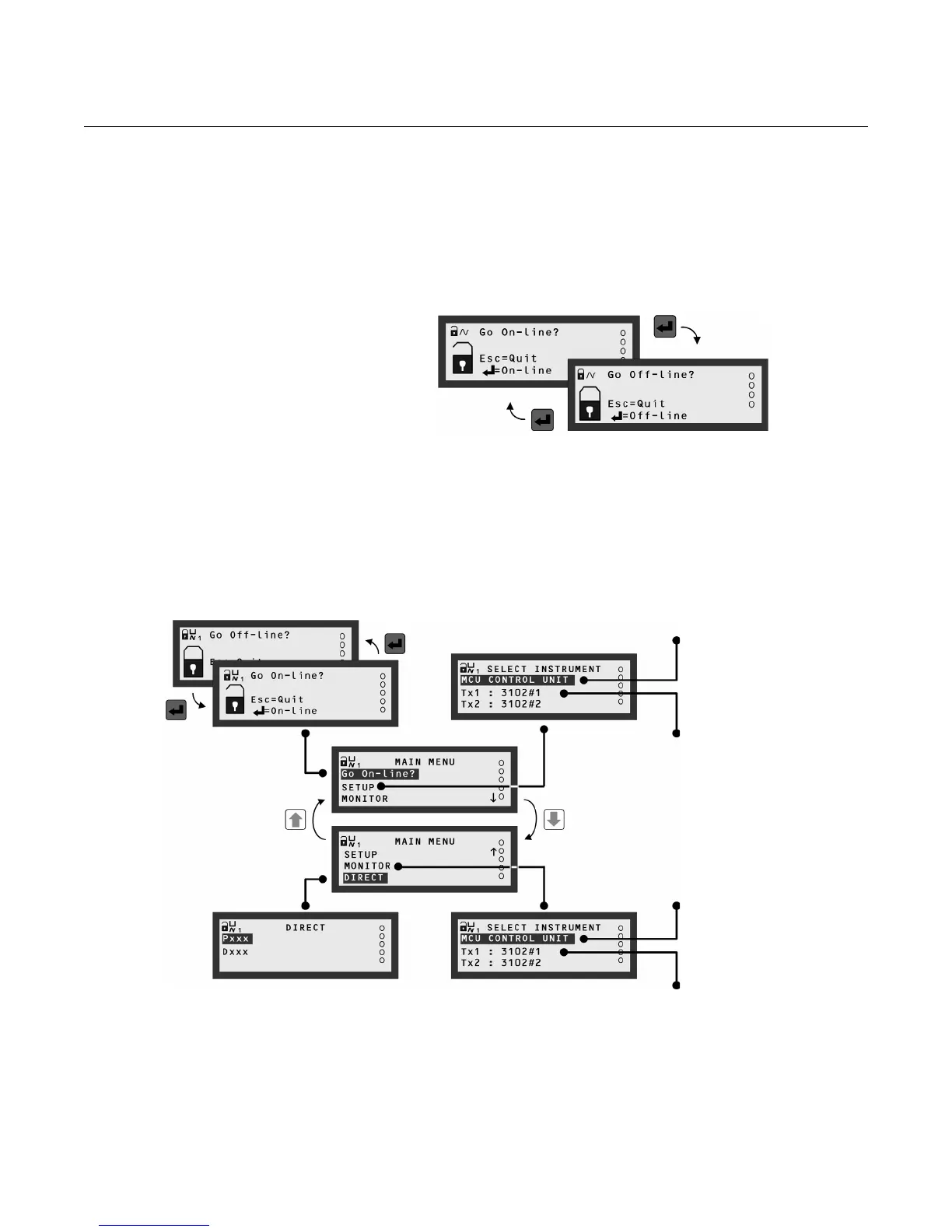
9. With the screen displaying "Go On-line?" on the top line, press the
ESC button once to exit to this menu.
Figure 4-5. Toggling operating
modes “On-line” and “Off-line”
10. The MAIN MENU sits above a series of sub-menus, which lead to further
levels of sub-menus that lead to parameter screens (see Figure 4-6).
Figure 4-6.
MAIN MENU Overview
Pressing the red (ENTER) button toggles the operating mode
of the 3490 Series Control Unit. An open padlock indicates
that the unit is off-line and parameter values can be changed.
Selecting this will bring up the "Set-up" menu for
programming the 3490 Series Control Unit.
For a menu map, see Appendix C.
Selecting this will bring up the "Set-up" menu for
optional HART transmitter (Tx1) programming.
(Similarly for Tx2 on model 3492.)
The transmitter Bottom Reference can be
changed here.
For a menu map, see Appendix C.
Selecting this will allow you to monitor live readings
and diagnostic information for the 3490 Series
Control Unit. For a menu map, see Appendix C.
Selecting this will allow you to monitor live readings
and diagnostic information from the HART
transmitter, Tx1. (Similarly for Tx2 on model 3492.)
For a menu map, see Appendix C.
Direct access menu for advanced users
to select parameter screens.
For a guide to this, see Appendix D.



 To Next Page