Reference Manual
00809-0100-4841, Rev. AA
May 2007
4-35
Rosemount 3490 Series
Starting, stopping and resetting the logger
To start logging, simply change the logging interval (P590) from 0 to the
interval required. Logging is now activated.
To stop logging, simply change the logging interval (P590) back to 0. Note,
when the logging interval is re-set, all logged data will be cleared from the
logging memory.
Changing the logging interval from 0 to a logging interval in minutes will clear
all data logged (i.e. clear the 7000 event-memory plus the 60 midnight totals).
Changing the log interval from a non-zero interval (e.g. 15 minutes) to a new
non-zero interval (e.g. 5 minutes) will clear the 7000 event-memory).
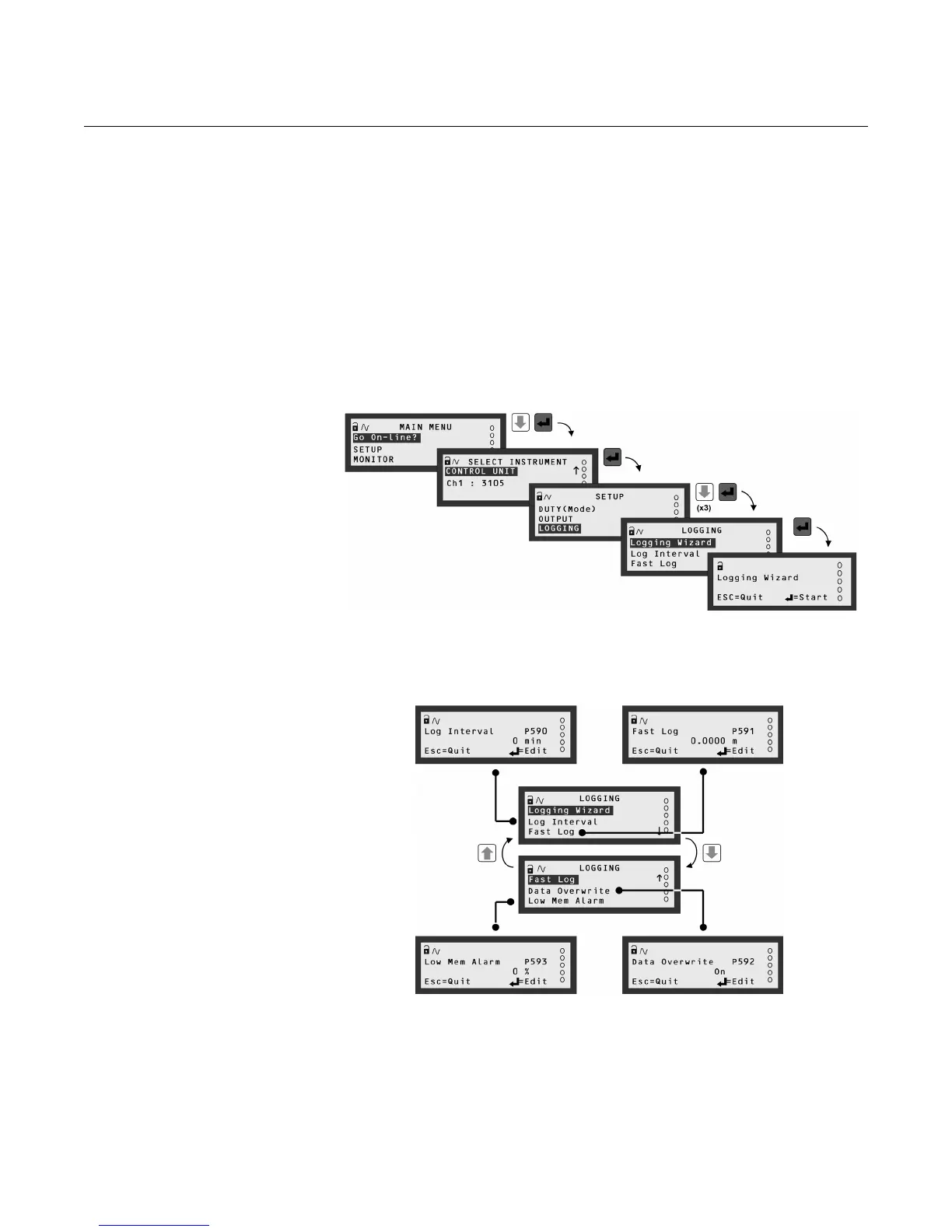
Figure 4-24. Navigating to the
LOGGING Menu
Figure 4-25. Menu Map for
LOGGING screens
The SELECT INSTRUMENT menu does not appear unless a HART transmitter is connected



 To Next Page