Reference Manual
00809-0100-4841, Rev. AA
May 2007
4-37
Rosemount 3490 Series
Logging Wizard - Logging of flow measurements
The Logging Wizard is the easiest way to configure a data logging application
after the main duty (e.g. flow) is set-up.
Consider data logging of the MCU PV value (D800) every 15 minutes, where
the PV value is a flow measurement in cubic metres per second. When the
flow measurement is at 1 cubic metre per second or more, the Fast Log Mode
is required to activate. When the memory is at 90% of capacity, a relay is
activated instead of overwriting old data.
1. Navigate the menu system to get to the "Logging Wizard" screen, as
guided in Figure 4-24 on page 4-36.
2. Start the "Logging " Wizard by pressing the red (ENTER) button once.
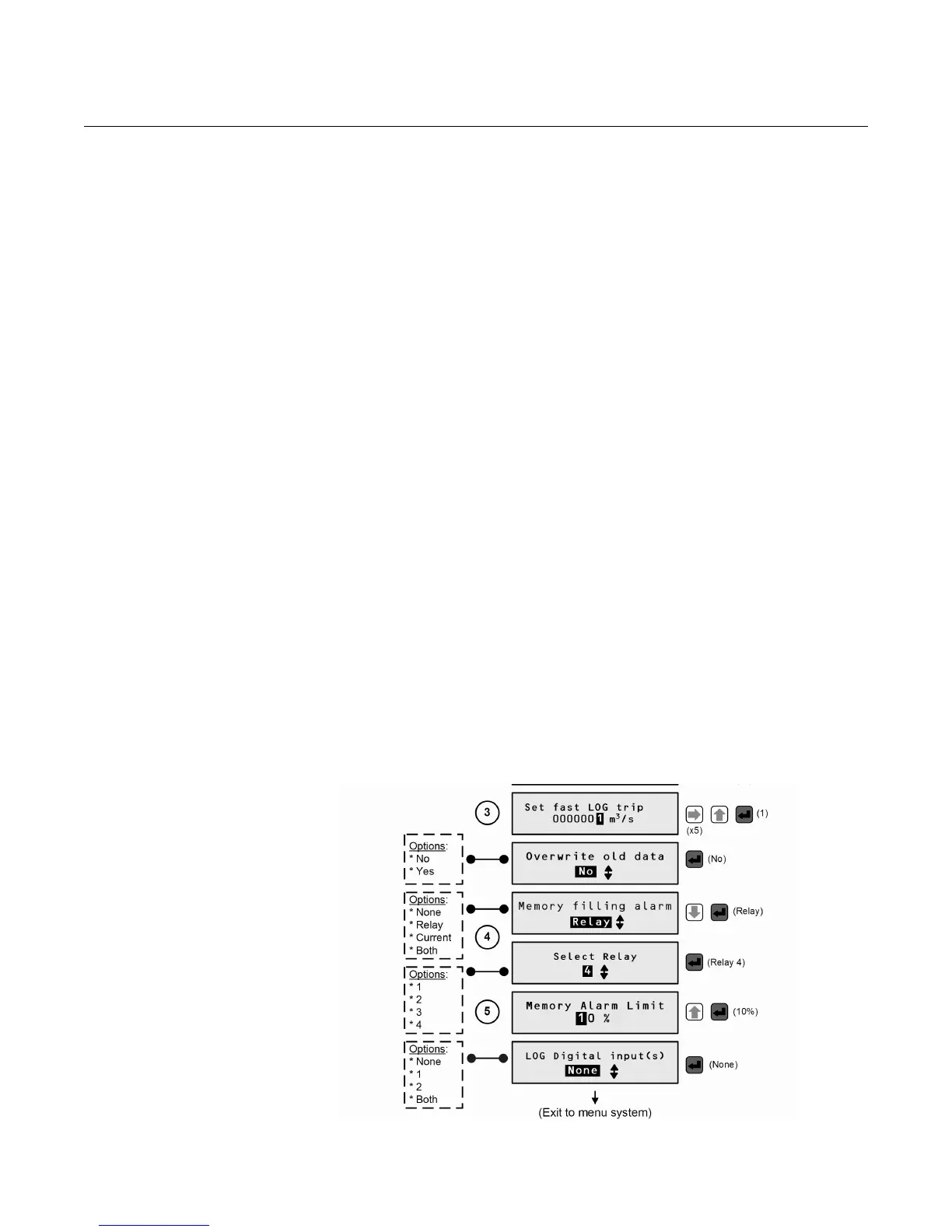
3. Work through the "Duty" Wizard prompts (Figure 4-27) until completion;
this occurs when the menu system re-appears. Keypad hints, for the
illustrated Wizard sequence on the next page, are provided alongside the
prompts. If applicable, adapt the example to suit your application.
4. Circled numbers in the illustrated Wizard sequence relate to these notes:
(1) Press the red (ENTER) button once
(2) Set the logging interval to once every 15 minutes (see P590)
(3) Set Fast Log Mode to activate at 1 m
3
/s or more (see P591). Units are
dependent on PV units (P200).
(4) Relay 4 is to activate when there is a low memory condition (see
Section “P593: Low Memory Alarm“ on page 4-35)
(5) Low memory condition when memory is at 90% of capacity.
5. Return to the main menu by holding the ESC button for a few seconds,
releasing it when the main menu appears. Next, go on-line by selecting
the "Go on-line" menu option and then pressing the red (ENTER) button
once. Finally, press the ESC button repeatedly until the primary display
appears. You will now see "LOG" flashing to indicate logging is underway.
Figure 4-27. Logging Wizard -
Logging of flow measurements



 To Next Page