23
2.7 ALEXA VOICE ASSISTANT
The smartwatch supports the Amazon Alexa voice
assistant function. To use Alexa on the smartwatch,
you will need to log into your Amazon account in the
Ryze Connect App. You can check the weather, set
timers and alarms and control your smart home devices
by speaking to the Alexa voice assistant on your
smartwatch.
NOTE
The Alexa built-in function will not keep listening to you in the
background. The microphone in the smartwatch will only be
activated when you press and call up Alexa. The microphone
will turn o after Alexa has responded to you or when you turn
o the Alexa screen.
2.7.1 ALEXA SETUP
1) Download and install the Amazon Alexa app in your
smartphone. If you do not have an Amazon account,
you need to apply for a new account.
2) Pair your Ryze Trek smartwatch with the Ryze
Connect App. The Ryze Connect App should be
running in the background on your smartphone for
Alexa to work. If necessary, set the permission for
the App to allow it to run in the background on your
smartphone.
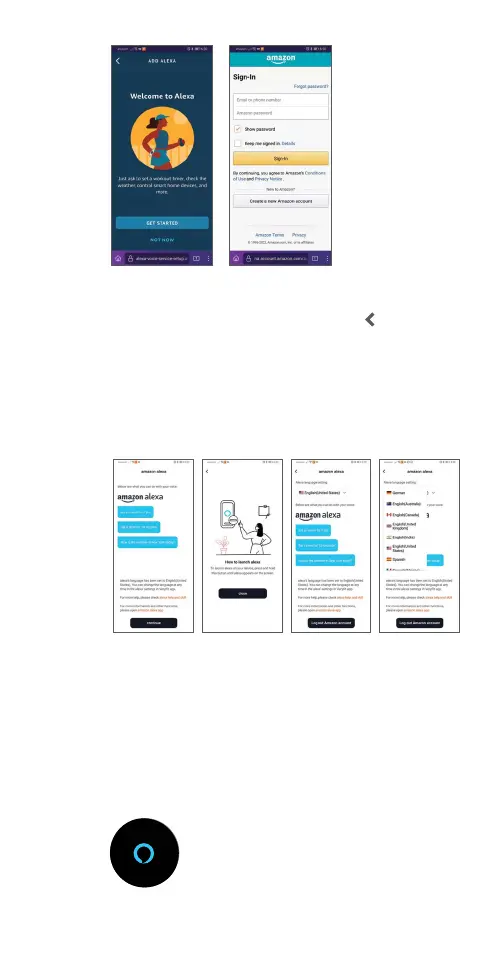
3) Open the Ryze Connect App and go to the Device
menu. Tap Alexa. Tap Login with Amazon.
4) On the redirected page, tap Get Started. Follow the
on-screen instructions and enter your account
details to login your Amazon Alexa account. Tap
Sign-In.
5) Open the pop-up link to continue. Tap Continue.
Tap Close. Choose English (United States) for Alexa
language setting when prompted. Tap
at the
upper left to return to the Ryze Connect App.
6) Set and share your location and time zone with
Alexa to allow proper local weather check and alarm
setting with Alexa.
7) In the Ryze Connect App, go to the Device tab.
Verify that the status next to Alexa shows Logged In.
2.7.2 ACCESSING ALEXA ON THE WATCH
Keep your smartwatch close and paired with your
smartphone. Ensure that your smartphone has
Bluetooth enabled and is connected to the internet.
The smartwatch should also be within the Bluetooth
range to enable Alexa to be used.
1) Press and hold the smartwatch button until the
screen displays the Alexa icon.
Sorry, I can not
understand what you
mean.
Please try again.
Time out!



 To Next Page