EasyManua.ls Logo

Ryze trek - Page 26

Ryze trek
56 pages
Print Icon
To Next Page IconTo Next Page
To Previous Page IconTo Previous Page
Loading...
24
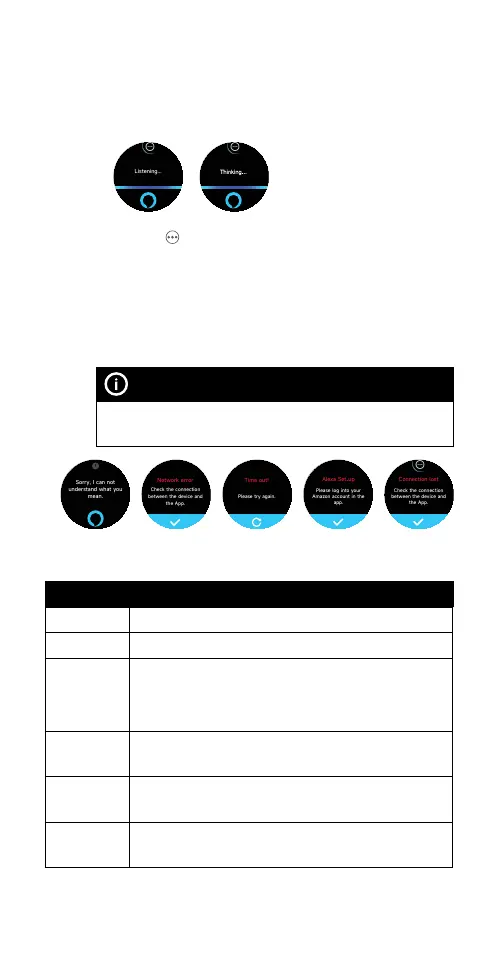
2) Speak (enunciate) your voice command to the
smartwatch microphone when the screen displays
Listening…. When the screen displays Thinking…, it
indicates the system is analysing and processing your
request.
3) Tap the
icon to reveal the set alarm, timer and
reminder. The result of the request will be displayed
on the screen, or the associated App will be
launched. A prompt will be displayed on the screen
if you have not logged in to your Alexa account
in the Ryze Connect App or if the connection is
compromised.
NOTE
Simply saying Alexa to the smartwatch will not activate the
Alexa function. You must first activate Alexa via the app.
2.7.3 ALEXA BUILT-IN COMMANDS
FUNCTIONS VOICE COMMAND EXAMPLES
Alarm Set an alarm for 6.00am
Reminder Remind me to go for a jog at 6.00pm
Timer Set a timer for 5 minutes.
NOTE Alarms and timers set via Alexa are mutually
independent from alarms and timers set via the Ryze
Connect App or the smartwatch alarm application.
Weather What is the weather in Sydney?
What is the temperature?
Shopping
List
Add sugar to my shopping list.
What is in my shopping list?
Funny Tell me a joke.
Tell me a limerick.
Listening...
Please log into your
Amazon account in the
app.
Alexa Set up
Check the connection
between the device and
the App.
Connection lost
Sorry, I can not
understand what you
mean.
Check the connection
between the device and
the App.
Network error
Please try again.
Time out!
Listening...
Please log into your
Amazon account in the
app.
Alexa Set up
Check the connection
between the device and
the App.
Connection lost
Sorry, I can not
understand what you
mean.
Check the connection
between the device and
the App.
Network error
Please try again.
Time out!
Listening...
Please log into your
Amazon account in the
app.
Alexa Set up
Check the connection
between the device and
the App.
Connection lost
Sorry, I can not
understand what you
mean.
Check the connection
between the device and
the App.
Network error
Please try again.
Time out!
Listening...
Please log into your
Amazon account in the
app.
Alexa Set up
Check the connection
between the device and
the App.
Connection lost
Sorry, I can not
understand what you
mean.
Check the connection
between the device and
the App.
Network error
Please try again.
Time out!
Listening...
Please log into your
Amazon account in the
app.
Alexa Set up
Check the connection
between the device and
the App.
Connection lost
Sorry, I can not
understand what you
mean.
Check the connection
between the device and
the App.
Network error
Please try again.
Time out!
Listening...
Please log into your
Amazon account in the
app.
Alexa Set up
Check the connection
between the device and
the App.
Connection lost
Sorry, I can not
understand what you
mean.
Check the connection
between the device and
the App.
Network error
Please try again.
Time out!
Listening...
Please log into your
Amazon account in the
app.
Alexa Set up
Check the connection
between the device and
the App.
Connection lost
Sorry, I can not
understand what you
mean.
Check the connection
between the device and
the App.
Network error
Please try again.
Time out!

Table of Contents