6.4 Configure > Network
Network and TCP/IP settings for the R60 are found by selecting the Configure base
category and then selecting the Network sub-category.
Default IP parameters are found in Ref [1].
The R60 can also be set up to filter received AIS messages (VDMs) before output on
the network, both using an area filter for positon report, and the AIS message type.
These settings affect all network TCP port except port 8230.
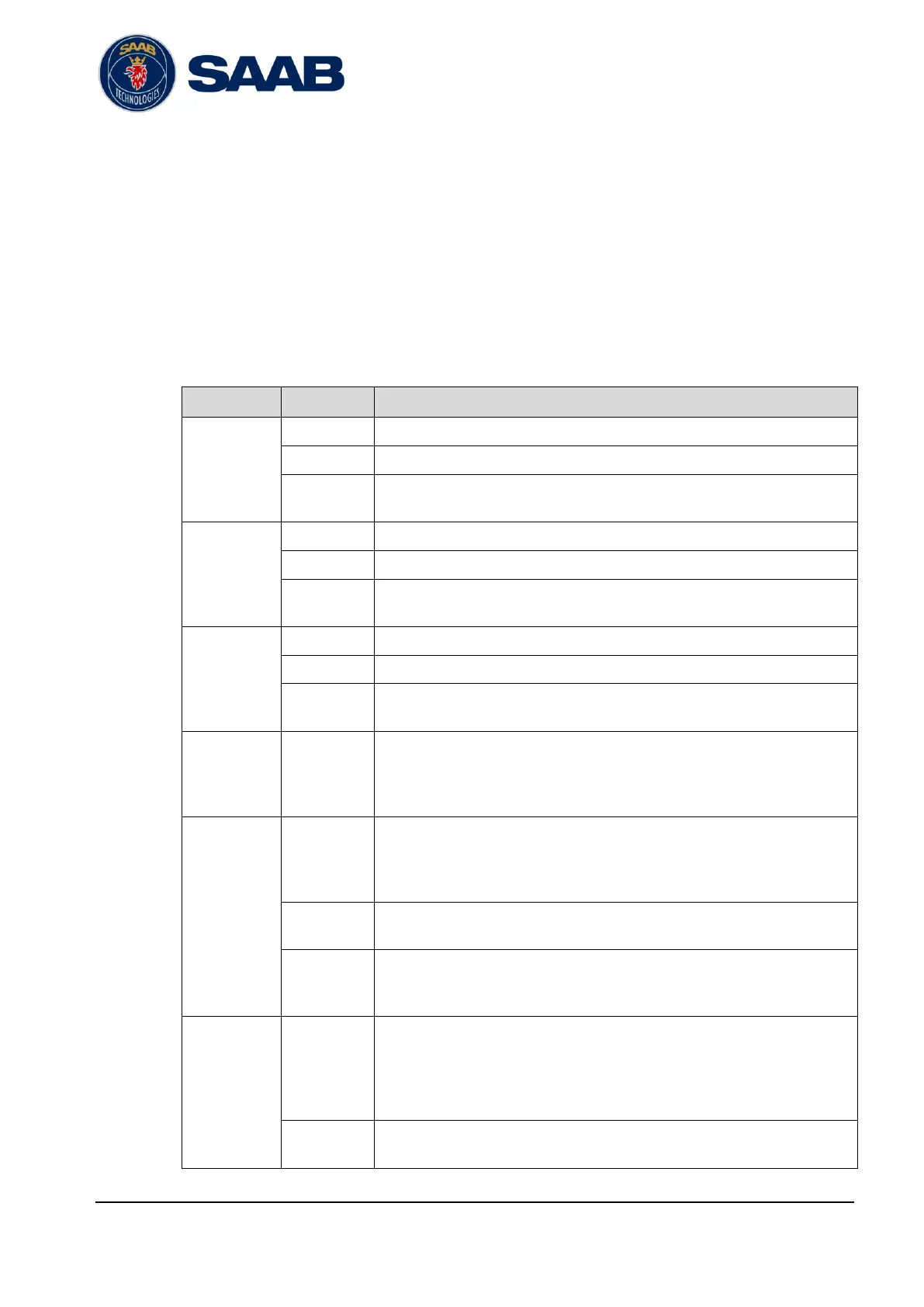
The parameters are described in the following table:
IP address of the R60 ETH1 network connection.
R60 Netmask setting for the ETH1 IP network connection.
R60 default gateway setting for the ETH1 IP network connection.
IP address of the ETH2 network connection.
R60 Netmask setting for the ETH2 IP network connection.
R60 default gateway setting for the ETH2 IP network connection.
IP address of the R60 ETH3 network connection.
R60 Netmask setting for the ETH3 IP network connection.
R60 default gateway setting for the ETH3 IP network connection.
Enable or disable TCP network connections for each port.
Enables/Disables the internal web server in the R60.
Warning: Do not disable this parameter from the web interface unless
there are other tools or interfaces available to access the R60. Disabling
the web server will disable the web interface!
Enables/Disables SNMP monitor access to the R60. For more information
about SNMP monitoring, see section 9.
Enables/Disables the NTP server in the R60.
NTP allows synchronization of clocks between systems. Just configure
your clocks to use the R60 IP address as time server.
Network
VDM Output
Filter
Enable/disable use of position reports area filter. If enabled only AIS
position reports that are within the defined area (see latitude/longitude
settings below) will be output to network clients, all other position report
will be blocked. Position reports with unknown position will always be
output to the network, unless blocked by the AIS Message Types filter.
The latitude of position reports must be between the Latitude N and
Latitude S settings to be output to network clients.


 To Next Page