INTEGRA-X User Manual WEB GUI
SAF Tehnika JSC 75
Modify mode
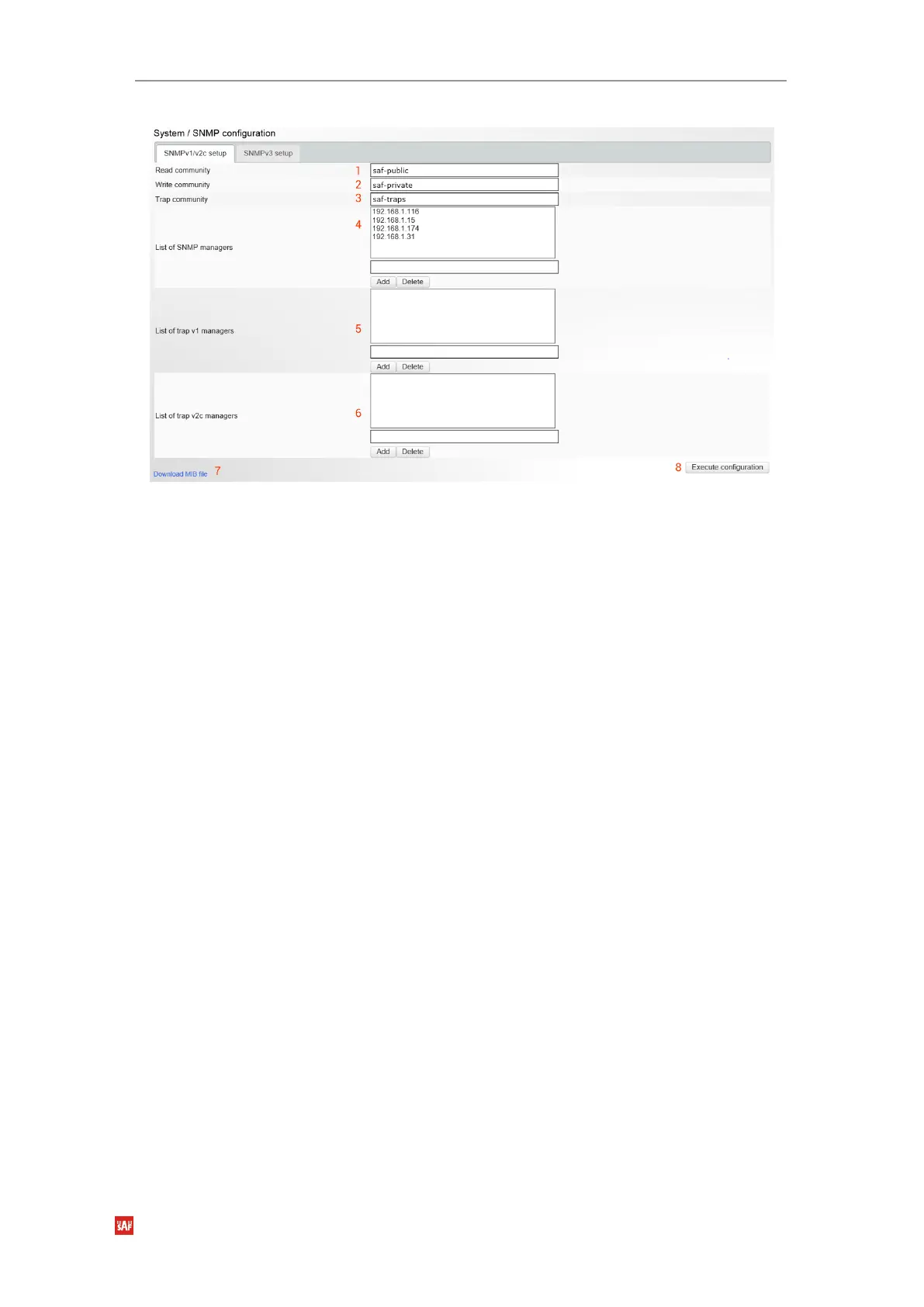
Figure 3-79 SNMPv1/v2c page modification page
1)
Read community
– Indicates currently specified read community for SNMPv1/v2c (status
mode); allows specifying read community for SNMPv1/v2c of the agent to enable
parameters to be read (modify mode). Default read community name is “saf-public”.
2)
Write community
– Indicates currently specified write community for SNMPv1/v2c (status
mode); allows specifying write community for SNMPv1/v2c of the agent to enable
parameters to be written (modify mode). Default write community name is “saf-private”.
3)
Trap community
– Indicates currently specified trap community for SNMPv1/v2c (status
mode); allows specifying trap community for SNMPv1/v2c for trap authentication in
monitoring applications (modify mode). Default trap community name is “saf-traps”.
4)
List of SNMP managers
– Shows list of configured SNMPv1/v2c host IP addresses (status
mode); allows adding/deleting SNMPv1/v2c host IP addresses (modify mode). Specified IP
addresses have access to read and modify configuration parameters using the appropriate
read and write community names.
5)
List of trap v1 managers
– Shows a list of configured SNMPv1 trap IP addresses (status
mode); allows adding/deleting SNMPv1 trap IP addresses (modify mode). The Integra-X
management controller sends SNMPv1 traps to the Trap Manager with the IP address
specified here;
6)
List of trap v2c managers
– Shows a list of configured SNMPv2c trap IP addresses (status
mode); allows adding/deleting SNMPv2c trap IP addresses (modify mode). The Integra-X
management controller sends SNMPv2c traps to the Trap Manager with the IP address
specified here.
7)
Download MIB file
– Click to download Integra-X MIB files.
8)
By pressing
„Execute configuration”,
changes made to the corresponding section apply only
to the local side Integra-X.
SNMPv3 setup
SNMPv3 primarily is improved with security settings. It does not rely on SNMP community
names as it is in versions 1 and v2c.



 To Next Page