F@ST 2704R Reference Manual - 253526032-A
Sagemcom Broadband SAS document. Reproduction and disclosure prohibited
Page 6-79
6-
dvanced parameters
6.4.10
DNS
Object: This menu lets you select DNS Server Interface from available WAN interfaces or enter static DNS
server IP addresses for the system.
This section contains the following subtitles:
• DNS Server (see subsection 6.4.10.1)
• Dynamic DNS (see subsection 6.4.10.2)
6.4.10.1 DNS Server
Object: This menu enables the automatic resolution of domain names by polling remote servers.
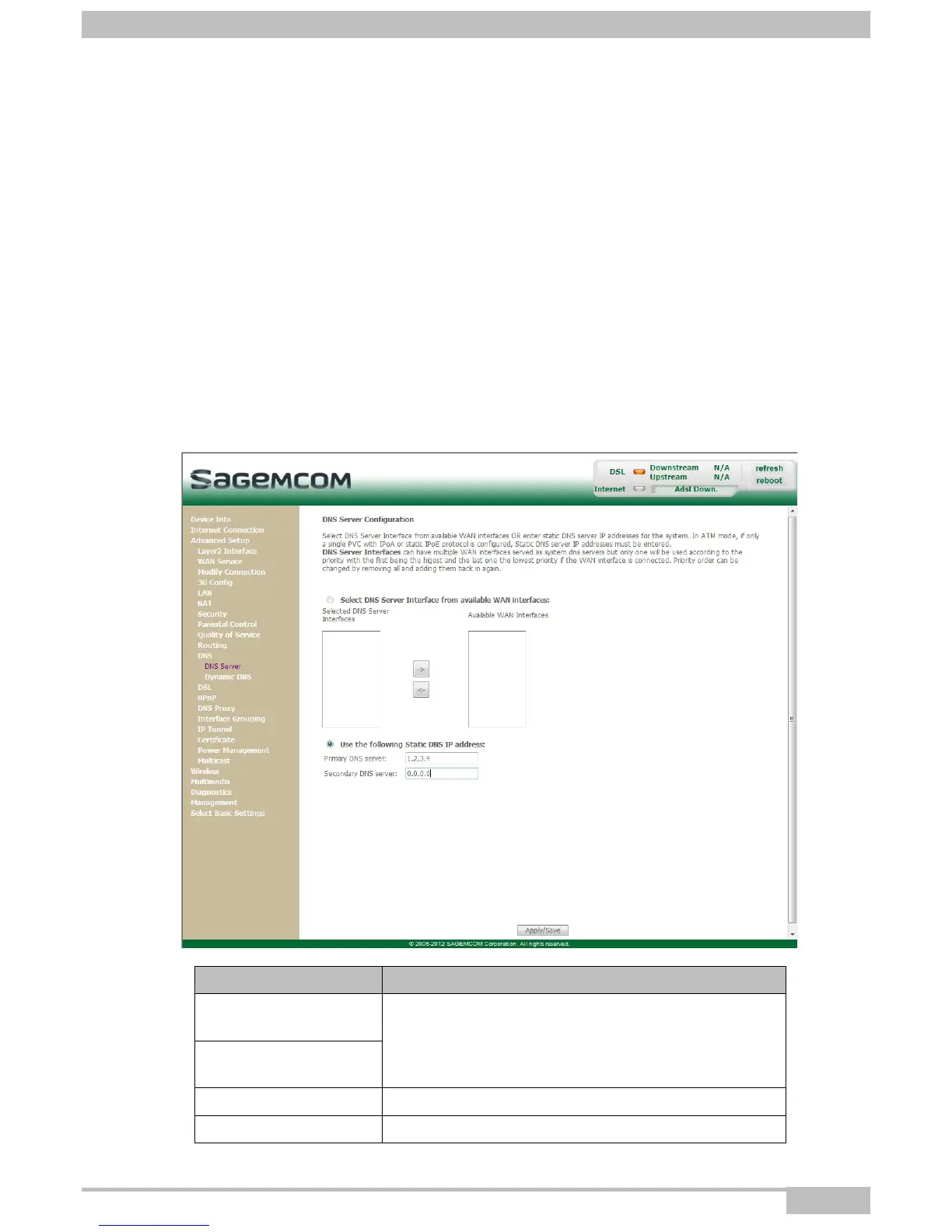
• In the Advanced Setup menu, select DNS then select DNS Server.
The following screen opens:
Field
Action
Selected DNS Server
Interfaces
Available WAN
Interfaces
For more details, a summary table is presented below
for each column.
Primary DNS server Enter the primary DNS server
Secondary DNS server Enter the primary DNS server



 To Next Page