24
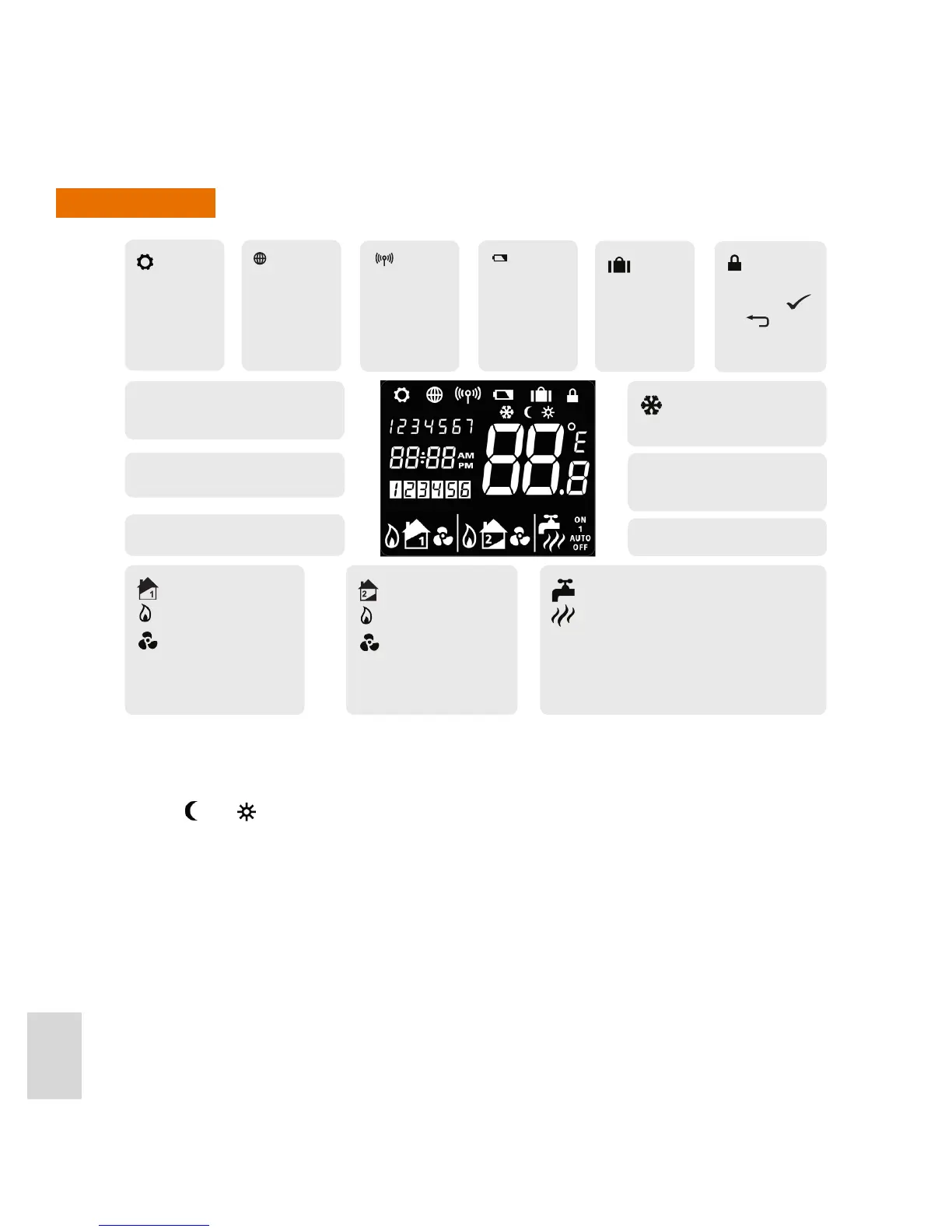
Display
Notes:
• Indicators change during programming, becoming displays of selectable options or setpoint indicators.
• The
and icons are not used on this model.
Indicates
unit is in Setting
Mode.
Indicates
internet
connection is
active.
Low battery
warning symbol.
If ashing, very
low battery.
Zone 1 Heating indicator
Heating on indicator
Cooling on indicator
Zone 2 Heating indicator
Heating on indicator
Cooling on indicator
Hot Water indicator
Hot Water on indicator - qualied below:
ON Continuously on
1 On once a day from program 1 ON to program 3 OFF
AUTO Running in auto
OFF Continuously o
Indicates
wireless
communication
is active,
transmitting or
receiving.
Indicates
that the Holiday
override is
active.
Indicates that
the keypad is
locked. Press
and together
to unlock.
Indicates Frost Protection is
active, heating is on.
Temperature indicator, current
ambient temperature displayed
Days of the week, current day only
displayed
Clock, with 12/24 hour clock indication.
Program number, active program displayed
Operation indicator



 To Next Page