30 EB 5824-2 EN
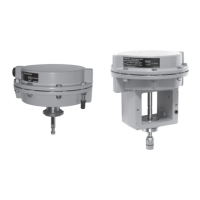
Handwheel
7 Handwheel
The handwheel is used to move the actuator
stemmanually(approx.4turnsfor1mm)
when the supply voltage is disconnected.
Direction of action and actuator travel can
be read off the travel indicator scale
(Fig.11).
Direction Actuator stem
Extends
Retracts
Travel
indication scale
Handwheel
(Type5824only)
Fig.11:Handwheel
The positioning of the valve is affected when
the handwheel is operated while the process
is running. As a result, zero point and the
position feedback do not match the calibrat-
ed values. Zero calibration, initialization or
a transit time measurement must be per-
formed again.
7.1 Manual override of
Type5825Actuator
Risk of electric shock from exposed live
parts.
Do not touch live parts on operating the
manual override.
1. Unscrewfrontcoverandplacea4mm
Allen key on the red actuating shaft.
Risk of damage to the actuator by turning it
too far.
Only retract the actuator stem as far as the
nal travel value.
2. TurntheAllenkey:
Î Turn it counterclockwise only for a ver-
sion with fail-safe action "actuator stem
extends".
Î Turn it clockwise only for a version with
fail-safe action "actuator stem retracts".
3. TurntheAllenkeyonlyasfarasthenal
travel value, which is at the point where
the torque-dependent limit switch is acti-
vated (switching off the motor).
Once the magnet has been released, the
spring mechanism pushes the actuator
stem back to the fail-safe position.
4. Remove Allen key and carefully refasten
the front cover.
Note
DANGER
!
NOTICE
!



 To Next Page
 Loading...