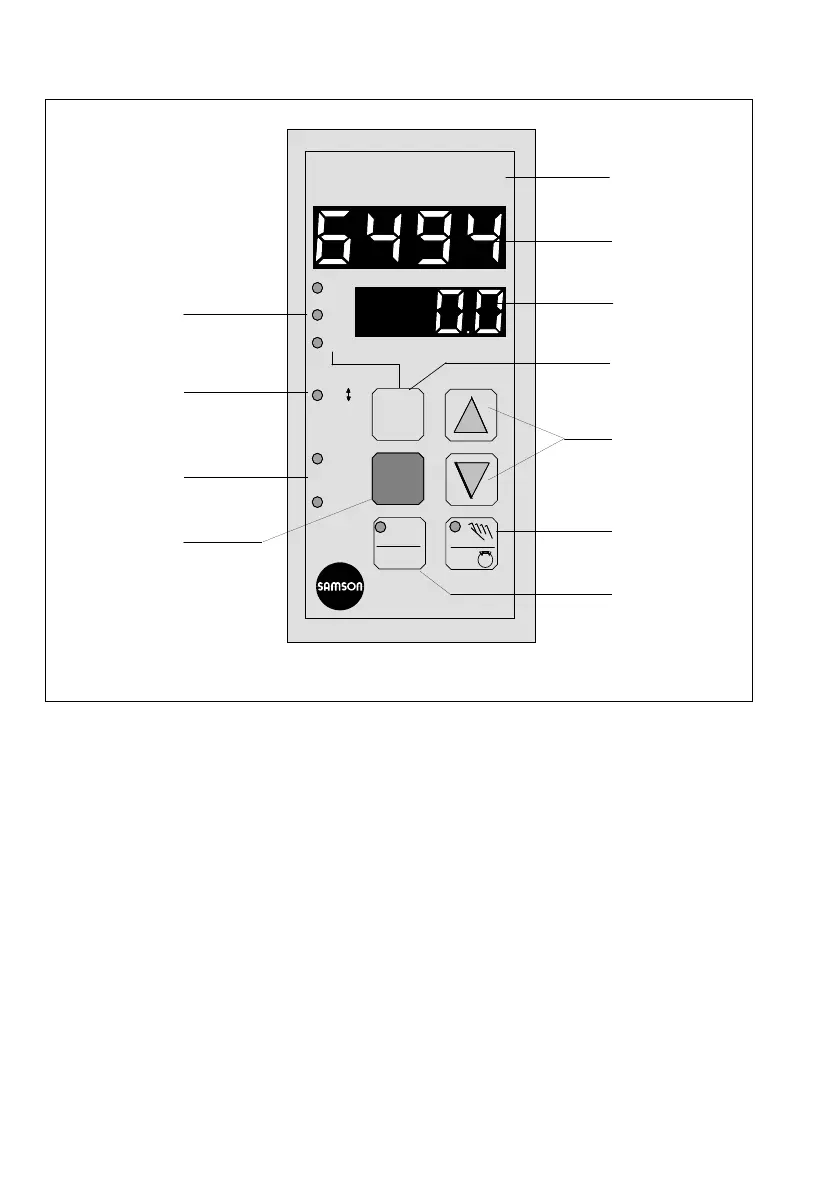
4. Operation
4.1 Control panel, displays and operating elements
1 Controlled variable display
(top display)
Controlled variable x, sometimes referred to as the Process Variable PV, is displayed in the
operating level. The value of the selected entry option is can be viewed in the parameteriza-
tion and configuration level.
2 Setpoint (SP) display
The current setpoint is displayed in the operating level. The display mode can be modified
in the following sequence by actuating the operating key (7): setpoint W1, control deviation
(error) XD, output variable Y, setpoint W2.
Configuration blocks and parameters values are presented in both the configuration and
parameterization levels, resp.
3 Control deviation
Whenever xd is greater than 0.9 % or less than –0.9 %, the red LED (light-emitting diode) il-
luminates.
4 Display of switching outputs Y1 and Y2
Two red LEDs display indicate the circuit state of the three-step/on-off controller output, or
the limit alarms.
Fig. 6 ⋅ Front view
W1
XD
XD
Y
W2
Y1
Y2
°C
W2
11
1
2
7
5
6
9
8
4
3
10
10



 To Next Page