85
Using MDC
3
3 Using MDC
z Changes will only be applied to the displays that are powered on. If no display is selected, the
factory default values will be displayed.
z Magicinfo only functions on products that have the MagicInfo function.
z TV mode is only available on products that have the TV function.
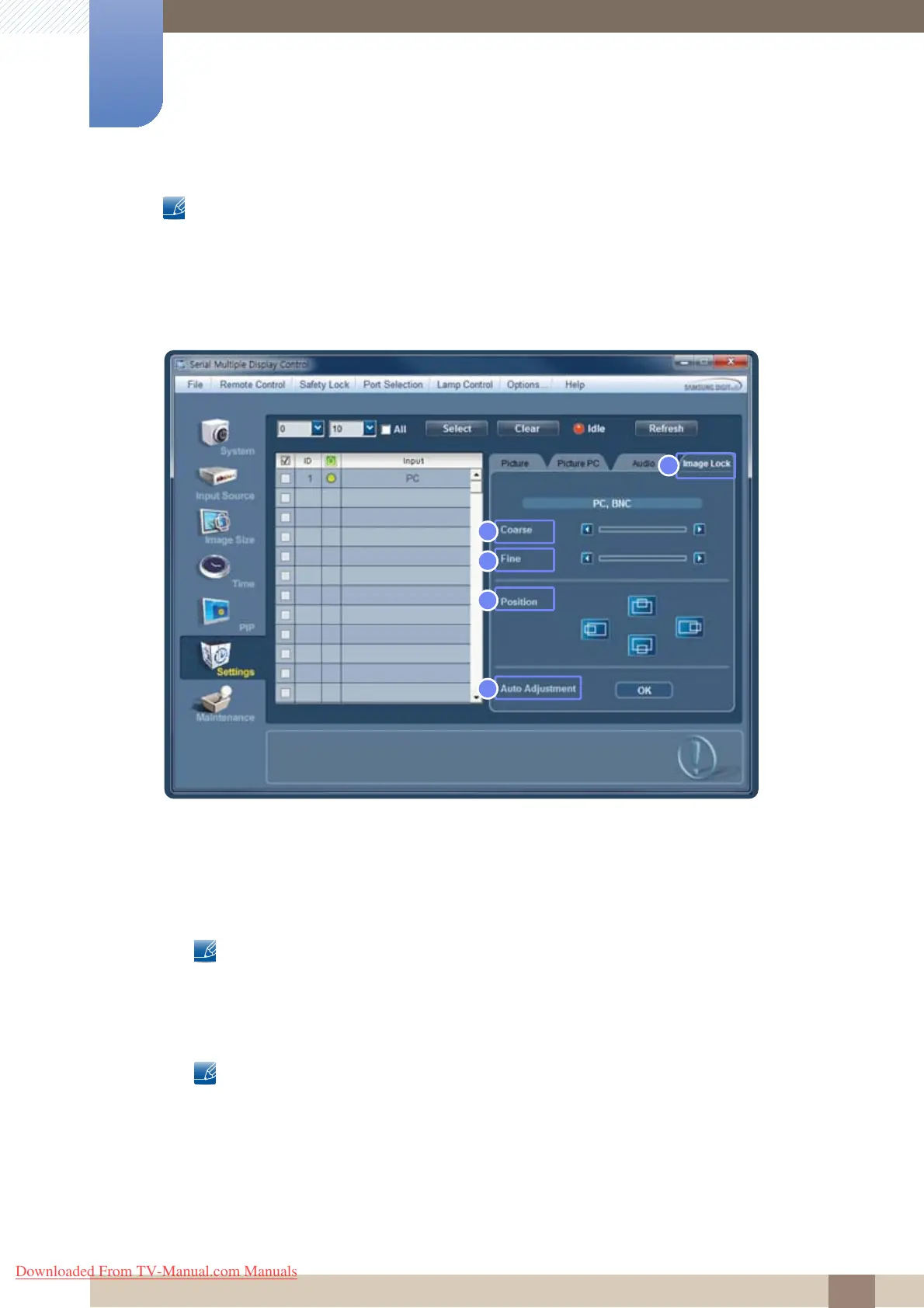
Image Lock
1 Image Lock
Only enabled for the PC input sources.
2 Coarse
Vertical noise (stripes) on the screen will be removed.
The screen may be moved after changing the frequency (Coarse). If this is the case, move the
screen to the center using the horizontal position adjustment menu.
3 Fine
Horizontal noise (stripes) on the screen will be removed.
If the noise is not completely removed after adjusting the Fine value, adjust Coarse and try Fine
adjustment again.
4 Position
Move the screen for the selected display horizontally or vertically.
5 Auto Adjustment
Automatically configure the Coarse, Fine, and Position settings for the product.
5
2
1
3
4
Downloaded From TV-Manual.com Manuals







 To Next Page