EasyManua.ls Logo

Samsung 450 - To Select the Source; To Edit the Input Source Name

Samsung 450
95 pages
Print Icon
To Next Page IconTo Next Page
To Previous Page IconTo Previous Page
Loading...
,
To
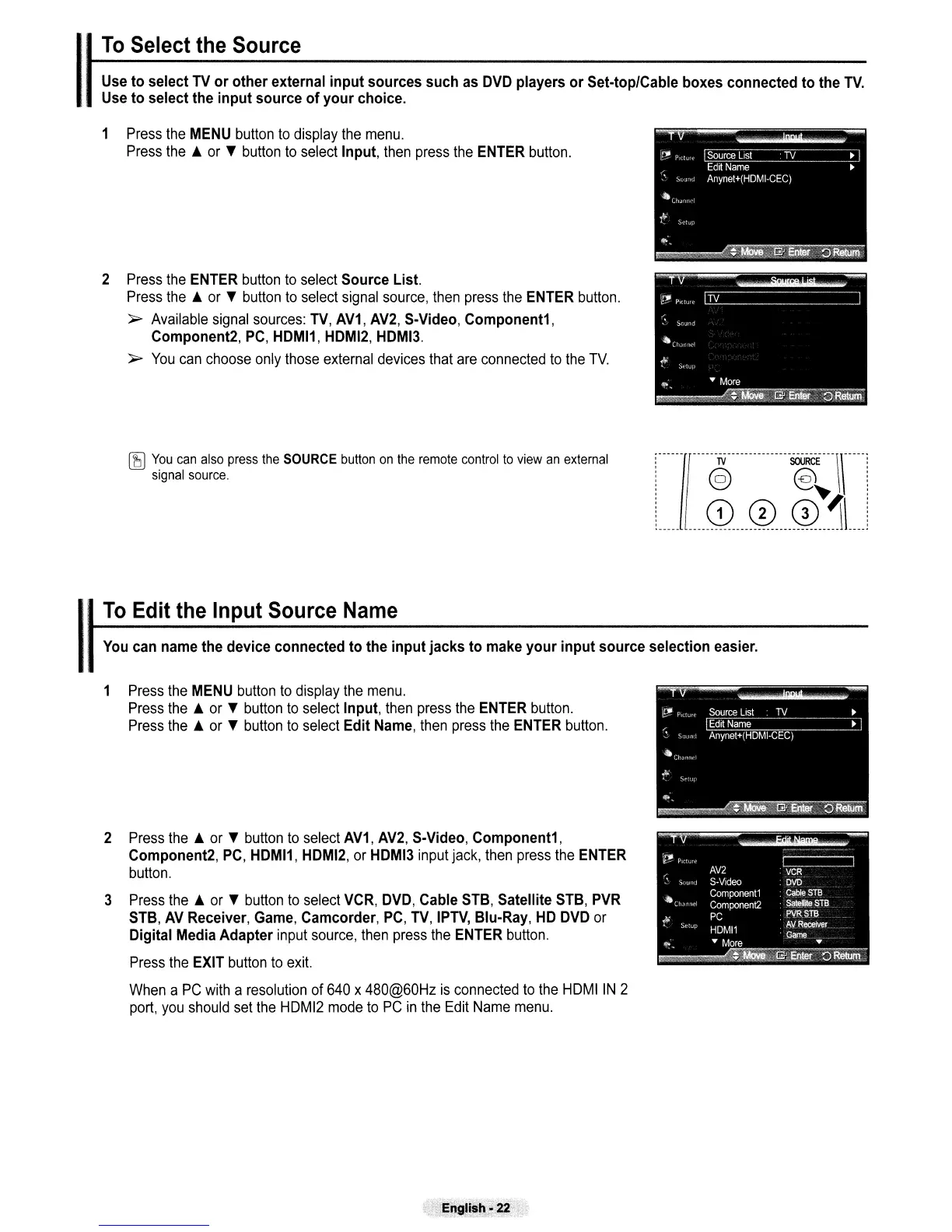
Select the Source
Use
to select
TV
or other external input sources such
as
DVD
players or Set·top/Cable boxes connected to the
TV.
Use
to select the input source of your choice.
1
Press
the
MENU
button
to
display
the
menu.
Press
the.
or
'f
button
to
select
Input,
then
press
the
ENTER
button.
2
Press
the
ENTER
button
to
select
Source List.
Press
the.
or
'f
button
to
select
signal
source,
then
press
the
ENTER
button.
~
Available
signal
sources:
TV,
AV1, AV2,
S·Video, Component1,
Component2,
PC,
HDMI1, HDMI2, HDMI3.
~
You
can
choose
only
those
external
devices
that
are
connected
to
the
TV.
~
You
can
also
press
the
SOURCE
button
on
the
remote
control
to
view
an
external
signal
source.
••••
I
••
~
•••
~
••••
~~~
••••
You
can
name
the device connected to the input jacks to
make
your input source selection
easier.
,
To
Edit the Input Source
Name
1
Press
the
MENU
button
to
display
the
menu.
Press
the.
or
'f
button
to
select
Input,
then
press
the
ENTER
button.
Press
the.
or
'f
button
to
select
Edit
Name,
then
press
the
ENTER
button.
2
Press
the.
or
'f
button
to
select
AV1,
AV2,
S-Video,
Component1,
Component2,
PC,
HDMI1,
HDMI2,
or
HDMI3
input
jack,
then
press
the
ENTER
button.
3
Press
the
A
or
'f
button
to
select
VCR,
DVD,
Cable
STB,
Satellite
STB,
PVR
STB,
AV
Receiver,
Game,
Camcorder,
PC,
TV,
IPTV,
Blu-Ray,
HD
DVD
or
Digital
Media
Adapter
input
source,
then
press
the
ENTER
button.
Press
the
EXIT
button
to
exit.
When
a
PC
with
a
resolution
of
640
x
480@60Hz
is
connected
to
the
HDMIIN 2
port,
you
should
set
the
HDMI2
mode
to
PC
in
the
Edit
Name
menu.

Table of Contents

Other manuals for Samsung 450

Related product manuals