EasyManua.ls Logo

Samsung 450 - Function Description; Selecting a Menu Language; Viewing Closed Captions (On-Screen Text Messages) - Digital

Samsung 450
95 pages
Print Icon
To Next Page IconTo Next Page
To Previous Page IconTo Previous Page
Loading...
I
Function
Description
II
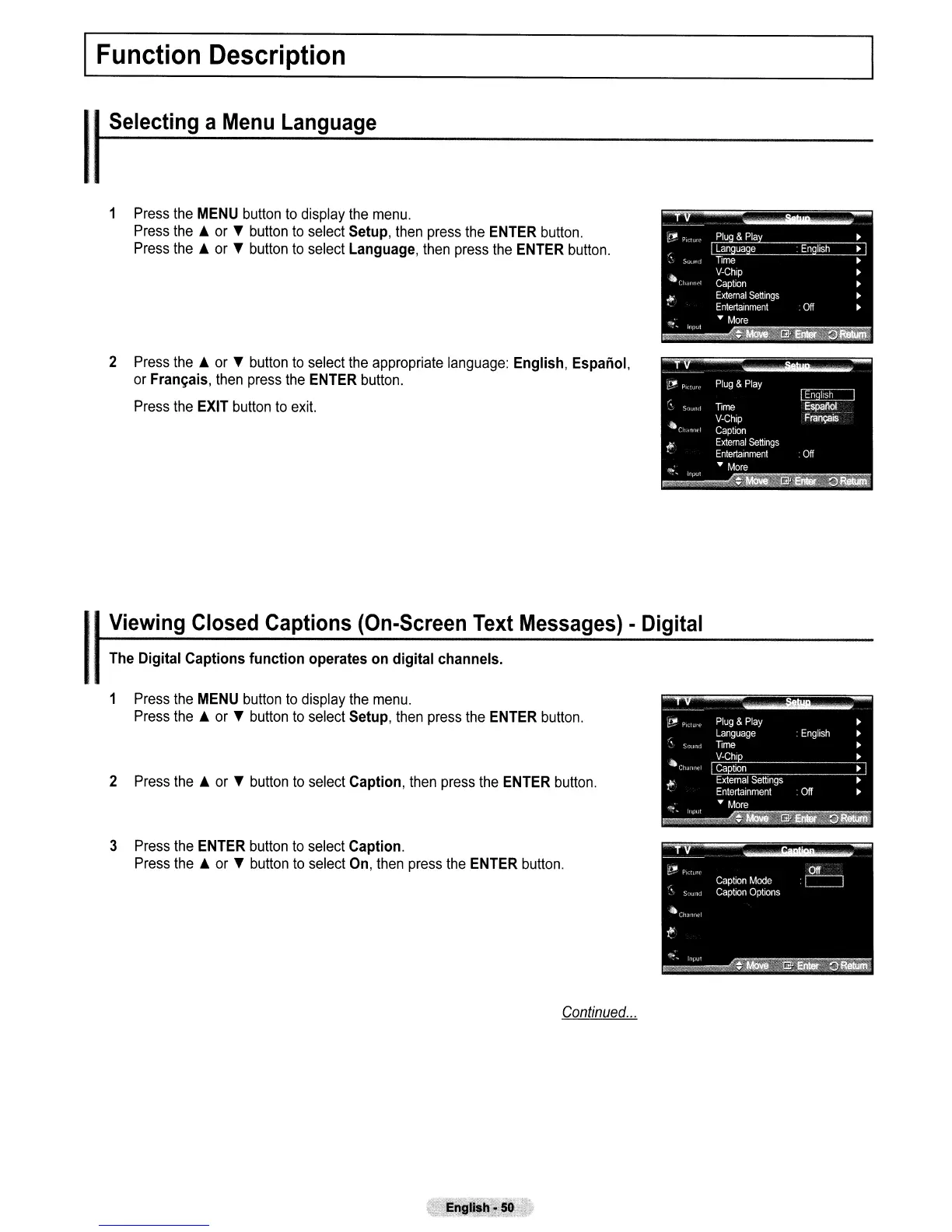
Selecting
a
Menu
Language
1 Press
the
MENU
button
to
display the
menu.
Press
the.
or T button
to
select
Setup,
then press
the
ENTER
button.
Press
the.
or T button
to
select
Language,
then press the
ENTER
button.
2 Press
the.
or T button
to
select the appropriate language:
English,
Espanol,
or
Fran~ais,
then
press the
ENTER
button.
Press
the
EXIT
button
to
exit.
1 Press the
MENU
button
to
display
the
menu.
Press
the.
or T button
to
select
Setup,
then
press the
ENTER
button.
2 Press
the.
or T button
to
select
Caption,
then
press
the
ENTER
button.
3
Press
the
ENTER
button
to
select
Caption.
Press
the.
or T button
to
select
On,
then
press
the
ENTER
button.
Continued
...

Table of Contents