I
Time
Setting
I
·
Setting the Time
• Setting the
clock
is necessary in
order
to
use the various
timer
features
of
the
TV.
Also, you can check the time
while watching the
TV.
(Just
press the INFO button.)
Option 1: Setting the
Clock
Manually
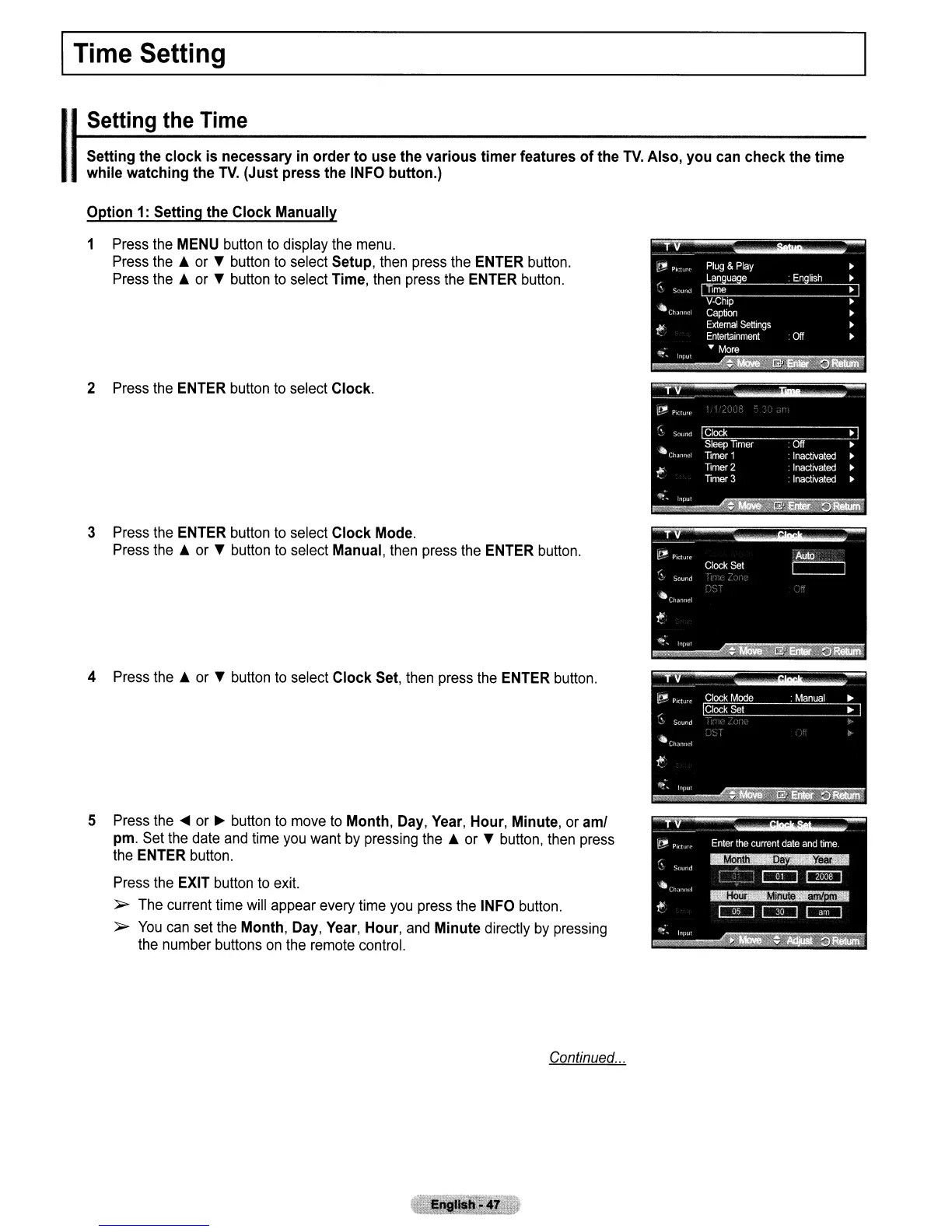
1 Press the MENU button
to
display the menu.
Press the A or
'f
button
to
select Setup, then press the ENTER button.
Press the A or
'f
button
to
select Time, then press the ENTER button.
2 Press the ENTER button
to
select Clock.
3 Press the ENTER button
to
select Clock Mode.
Press the A or
'f
button to select Manual, then press the ENTER button.
4 Press the A or
'f
button
to
select Clock Set, then press the ENTER button.
5 Press the
....
or
~
button
to
move
to
Month, Day, Year, Hour, Minute, or
amI
pm. Set the date
and
time you want
by
pressing the A or
'f
button, then press
the ENTER button.
Press the EXIT button
to
exit.
»-
The current time will appear every time you press the INFO button.
»-
You
can set the Month, Day, Year, Hour, and Minute directly by pressing
the number buttons
on
the remote control.
Continued
...



 To Next Page