Option
2:
Setting the Clock Automatically
The Clock can be set automatically
if
you
are receiving a digital signal.
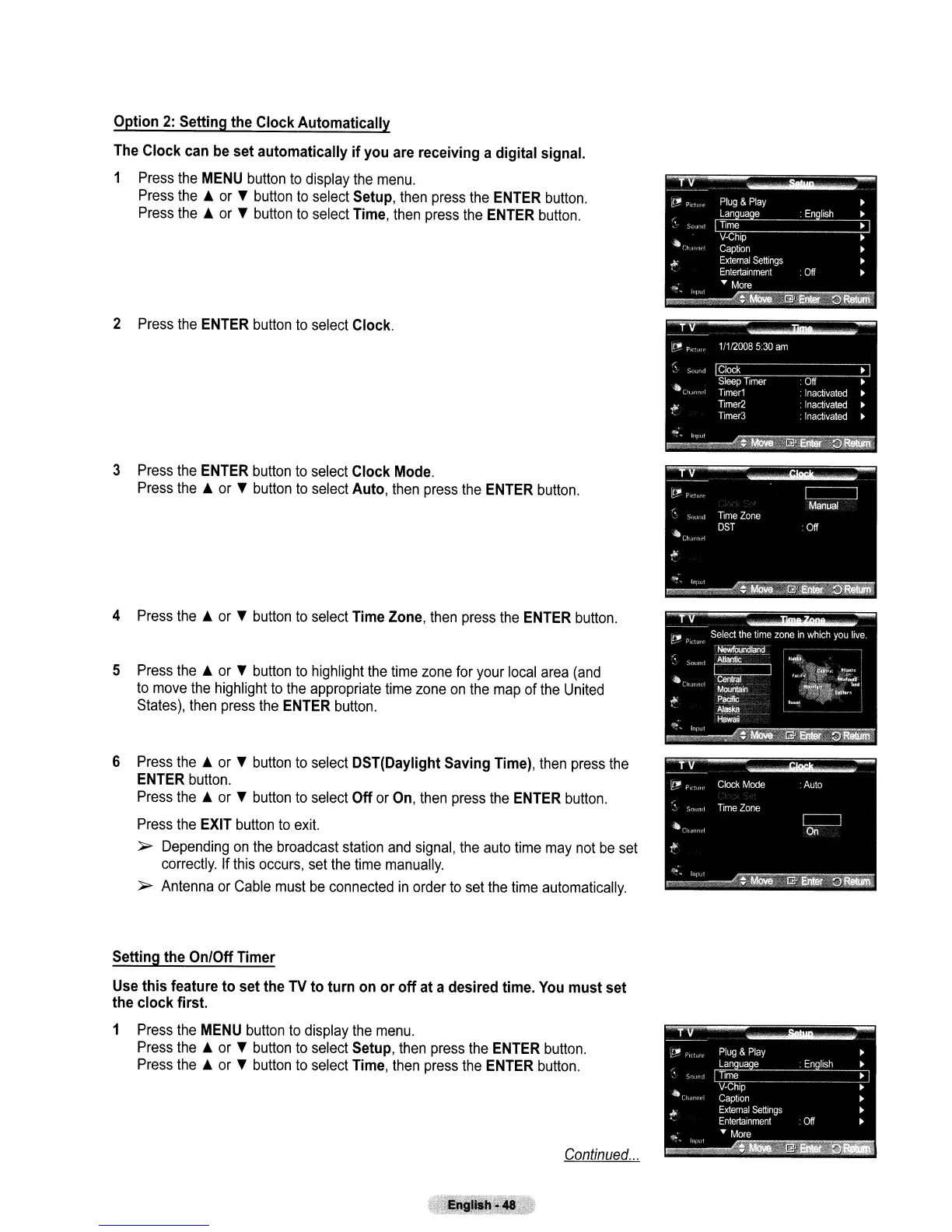
1 Press the MENU button to display the menu.
Press
the.
or T button to select Setup, then press the ENTER button.
Press
the.
or T button to select Time, then press the ENTER button.
2 Press the ENTER button
to
select Clock.
3 Press the ENTER button to select Clock Mode.
Press the • or T button
to
select Auto, then press the ENTER button.
4 Press
the.
or T button
to
select Time Zone, then press the ENTER button.
5 Press
the.
or T button to highlight the time zone for your local area (and
to
move the highlight
to
the appropriate time zone
on
the
map of the United
States), then press the ENTER button.
6 Press
the.
or T button to select DST(Daylight Saving Time), then press the
ENTER button.
Press
the.
or T button to select
Off
or On, then press the ENTER button.
Press the EXIT button
to
exit.
~
Depending
on
the broadcast station
and
signal, the auto time may not
be
set
correctly. If this occurs, set the time manually.
~
Antenna or Cable must
be
connected
in
order to set the time automatically.
Setting the On/Off Timer
Use
this
feature
to
set the TV
to
turn on
or
off
at a desired time. You
must
set
the
clock
first.
1 Press the MENU button to display the menu.
Press the • or T button
to
select Setup, then press the ENTER button.
Press
the.
or T button
to
select Time, then press the ENTER button.
Continued
...



 To Next Page