EasyManua.ls Logo

Samsung 450 - How to Assemble the Stand-Base (Depending on the Model); Specifications

Samsung 450
95 pages
Print Icon
To Next Page IconTo Next Page
To Previous Page IconTo Previous Page
Loading...
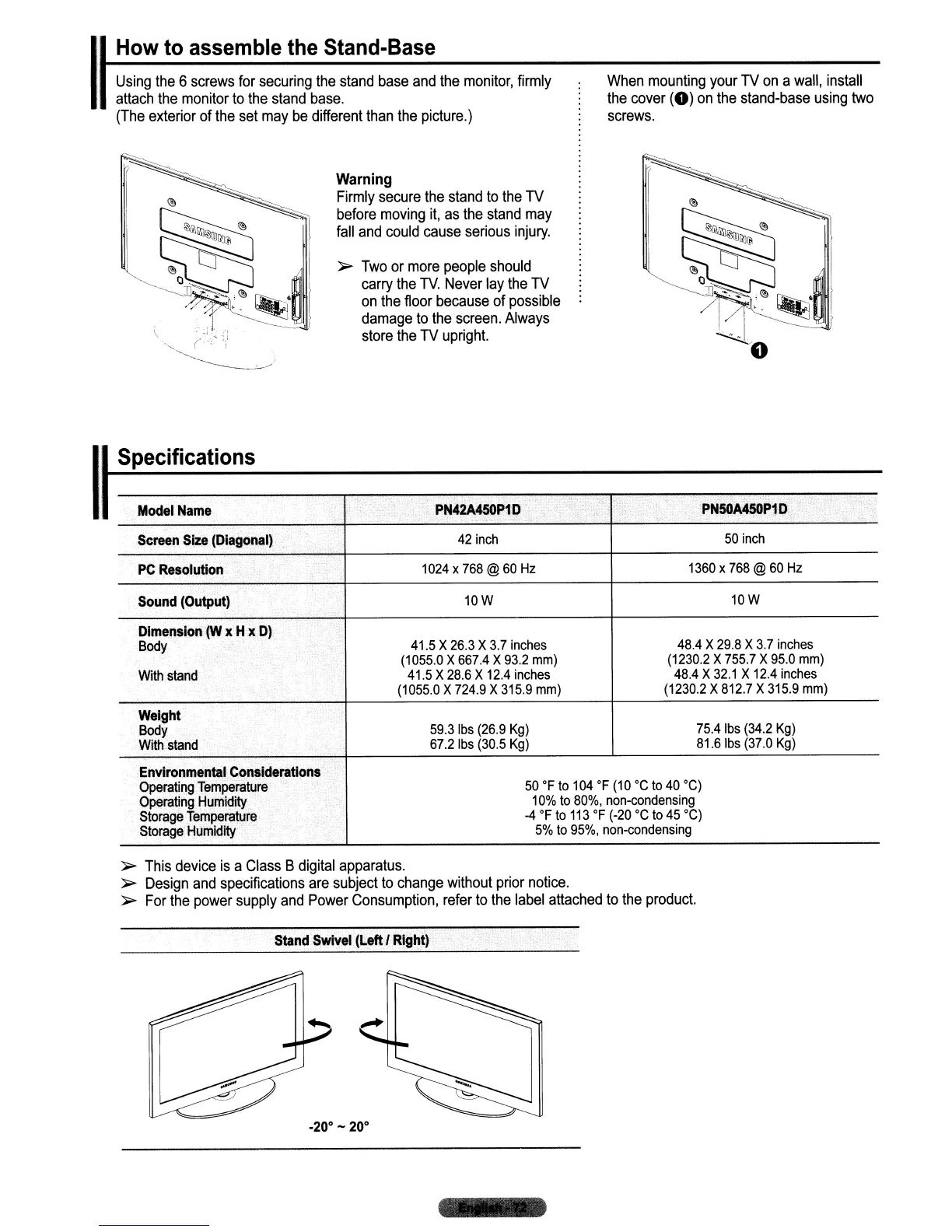
When
mounting
your
TV
on
a
wall,
install
the
cover
(0)
on
the
stand-base
using
two
screws.
,
Using
the
6
screws
for
securing
the
stand
base
and
the
monitor,
firmly
attach
the
monitor
to
the
stand
base.
(The
exterior
of
the
set
may
be
different
than
the
picture.)
IHow
to
assemble the Stand-Base
Warning
Firmly
secure
the
stand
to
the
TV
before
moving
it,
as
the
stand
may
fall
and
could
cause
serious
injury.
~
Two
or
more
people
should
carry
the
TV.
Never
lay
the
TV
on
the
floor
because
of
possible
damage
to
the
screen.
Always
store
the
TV
upright.
Model
Name
PN42A450P1
D
,
PNSOA450P1
D
Screen
Size
(Diagonal)
42
inch
50
inch
PC
Resolution
1024
x
768
@
60
Hz
1360
x
768
@
60
Hz
Sound
(Output)
10W
10W
Dimension
(W
x Hx
D)
Body
41.5
X
26.3
X
3.7
inches
48.4
X
29.8
X
3.7
inches
(1055.0
X
667.4
X
93.2
mm)
(1230.2
X
755.7
X
95.0
mm)
With
stand
41.5
X
28.6
X
12.4
inches
48.4
X
32.1
X
12.4
inches
(1055.0
X
724.9
X
315.9
mm)
(1230.2
X
812.7
X
315.9
mm)
Weight
Body
59.3
Ibs
(26.9
Kg)
75.4
Ibs
(34.2
Kg)
With
stand
67.21bs
(30.5
Kg)
81.61bs
(37.0
Kg)
Environmental
Considerations
Operating
Temperature
50
of
to
104
OF
(10°C
to
40°C)
Operating
Humidity
10%
to
80%,
non-condensing
Storage
Temperature
-4
of
to
113
of (-20°C
to
45°C)
Storage
Humidity
5%
to
95%,
non-condensing
ISpecifications
~
This
device
is
a
Class
B
digital
apparatus.
~
Design
and
specifications
are
subject
to
change
without
prior
notice.
~
For
the
power
supply
and
Power
Consumption,
refer
to
the
label
attached
to
the
product.
Stand
Swivel
(LeftJ
Right)
.20·
- 20·

Table of Contents

Other manuals for Samsung 450

Related product manuals